The Rise of Low-Code and No-Code Development Platforms

Is it possible to build an app with no coding? It would have seemed impossible if I had asked ten years ago, but not today. With the dynamic app development environment, the need for low-code and no-code platforms has peaked. 
According to Statista, the global low-code platform market value is estimated to hit a whopping revenue of USD 32 billion in 2024! The market is expected to grow at a CAGR of 27.3% between 2024 and 2030.
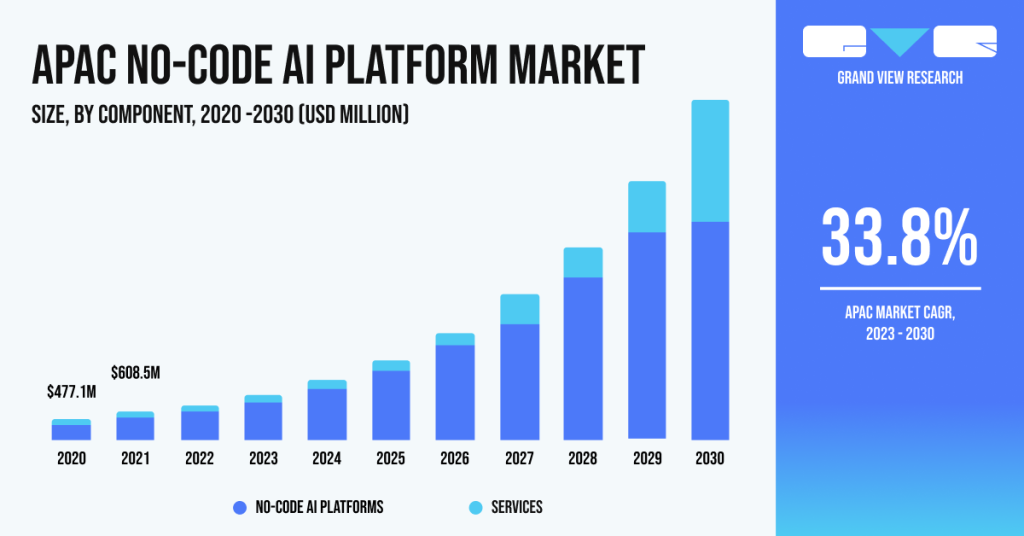
market is expected to grow at a CAGR of 27.3% between 2024 and 2030.

The low-code development technology has proved to be revolutionary for pro developers and no-code development has transformed the non-technical industry. Thanks to such platforms, even non-tech people can leverage Graphical User Interfaces (GUIs) to build an app of their own. 

In that regard, 66% of top-tech companies are using at least four low-code platforms in 2024 (Gartner report). It also predicts that by 2026, more than 80% of low-code platform users will belong to the non-IT developer segment.

This blog explains what Low-Code No-Code platforms are, real-life examples of such platforms, the benefits of these platforms, how to make an app with low-code no-code platforms, and if you should still hire developers. 

Without further ado, let’s get started.

What is Meant by a Low-Code No-Code Platform?

Platforms and technologies that let users construct applications without writing a lot of code are referred to as low code and no code (LCNC) platforms. As the name implies, no code platforms eliminate the requirement for coding, allowing users to create applications using pre-built components and visual interfaces. For instance, one can make a full-fledged website with drag-and-drop functionality.

However, low-code platforms offer a different approach by giving users access to a visual development environment where they may write applications with little to no coding—often by using pre-made functions.

Adopting low-code no-code platforms will further help enterprises reduce their operational costs. As Jason Wong, Distinguished VP Analyst at Gartner, says:

The high cost of tech talent and a growing hybrid or borderless workforce will contribute to low-code technology adoption. Empowered by the intuitive, flexible and increasingly powerful features of low-code development tools, business technologists and citizen technologist personas are developing lightweight solutions to meet business unit needs for enhanced productivity, efficiency, and agility — often as fusion teams

Examples of Low-Code No-Code Platforms

Let’s look at some of the most popular examples of low-code no-code platforms.

1. Low-Code Platform

One of the best examples of a low-code platform is FlutterFlow. You can create native mobile applications through this low-code builder via the browser. Developers and other IT professionals can save time by building an app ten times faster through a drag-and-drop interface.
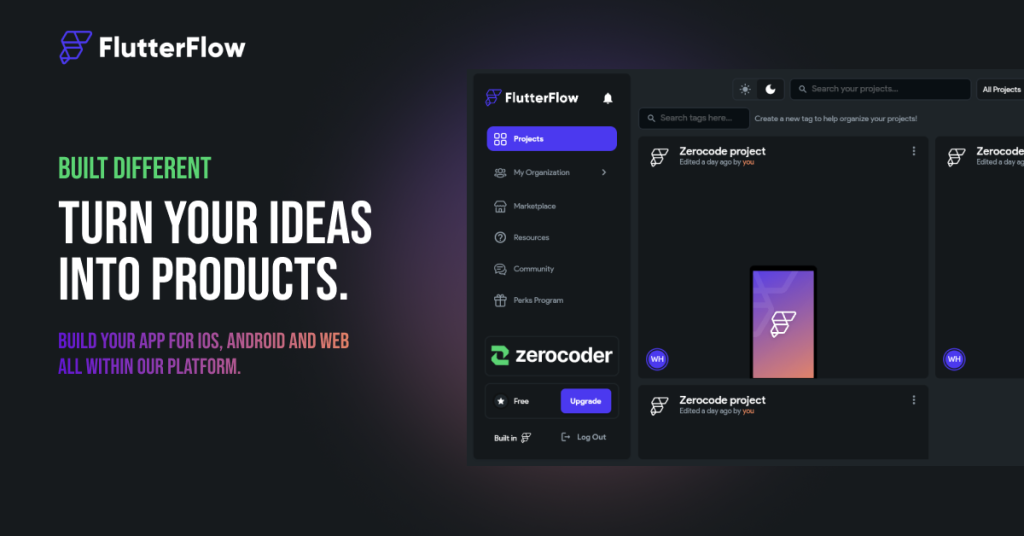
Fluterflow

Note: FlutterFlow is highly compatible with Google Chrome. If you face any issues, it is best to switch your browser to it.

2. No-Code Platform

One of the budding examples of a no-code platform is Thunkable. It offers more than 50 design components and easy-to-use animations for your app. The app claims that you can build an intuitive user experience through pre-built components, such as buttons, maps, input fields, video players, etc.

Thunkable

You can also connect your app with third-party applications, direct deployment capabilities for the App Store/Google Play store, and collaborate with your team efficiently on Thunkable.

What are the Advantages of No Code and Low Code Platforms?

The introduction of low-code and no-code platforms has led to a radical change. Without requiring in-depth coding knowledge, these creative methods let people with different levels of technical proficiency actively engage in the development and implementation of apps.

Low-code platforms offer a mixture of visual creation and customized coding solutions to perform complex functionalities, while no-code platforms enable users to design software solutions through user-friendly graphical interfaces and pre-built components. 

Some of the significant benefits of low-code no-code platforms are mentioned as follows:

1. Easy-to-Use

One of the best upsides of a no-code or low-code platform is that it bridges the gap between technical and non-technical professionals. The interface of a no-code app builder is user-friendly, and even a non-technical user can utilize it to create an app. 

This has given a major push to innovation among individuals. People do not hesitate to collaborate with developers anymore. Low-code platforms have helped developers build a fresh perspective on solving complex coding problems.

2. Faster Time-to-Market

Low-code and no-code platforms have sped up the app development process. If someone wanted to build an app a decade ago, it would have taken months to work on the idea. Also, you’d need a team of Quality Assurance engineers, UI/UX designers, and IT developers.

The LCNC platforms have cut down the need for an array of professionals to develop an app. The founder of the company can himself make use of such platforms for app or website development. Forrester mentioned in one of its reports that low-code no-code platforms made development 20 times faster than a traditional development process.

3. High Agility

The low-code platforms offer you high agility. This means you can save time developing, testing and debugging the applications. Another significant asset of a low-code no-code platform is that it offers pre-built modules that help tech/non-tech individuals to build an app in the visual environment quickly.

The LCNC platforms are mostly hosted on the cloud, which gives me high-level agility and flexibility. You don’t have to worry about losing your project.

4. Lower Costs

Enterprises often have to go through the exhausting task of hiring high-cost developers. The low-code platforms can reduce the engineering workforce and eventually lower the costs to the company. They can also save the capital and invest it into other useful resources for the enterprise.

Also, there are many economical options to choose the low-code no-code platforms. You can choose from a massive pool of low-code or no-code apps.

5. Enhanced Automation

The low-code, no-code platforms give you the freedom to iterate tedious tasks of debugging or feeding in data for building an application. With the incorporation of Artificial Intelligence (AI) and Machine Learning (ML), you can enhance the website development process.
For example, Pega is a low-code platform that allows users to build powerful apps with minimal coding. On top of that, it also integrates AI for predictive analysis, data mining and event processing.

6. Auto-Updates and Maintenance

Most of the traditional codebases require human intervention to keep them updated and perform regular maintenance cycles. Low-code and no-code platforms reduce manual work and keep track of updates of their own. This helps individuals focus on the development part.

7. Simple Data Integration

Data integration becomes simpler and more flexible when processes are established for the gathering, sharing, processing, and storing of information. Users can locate, comprehend, and utilize data inside a process with the help of LCNC tools. You will be able to make more confident and informed decisions by doing this, as well as identifying the ownership, validity, source, and quality of data across processes. 

8. Cross-Platform Mobility

One of the major benefits of using low-code platforms is that they offer cross-platform mobility, which is quite an advantage for developers. Enterprises and business organizations can easily access various third-party APIs and modules via low-code platforms.

What are the Components of a Low-Code No-Code Platform?
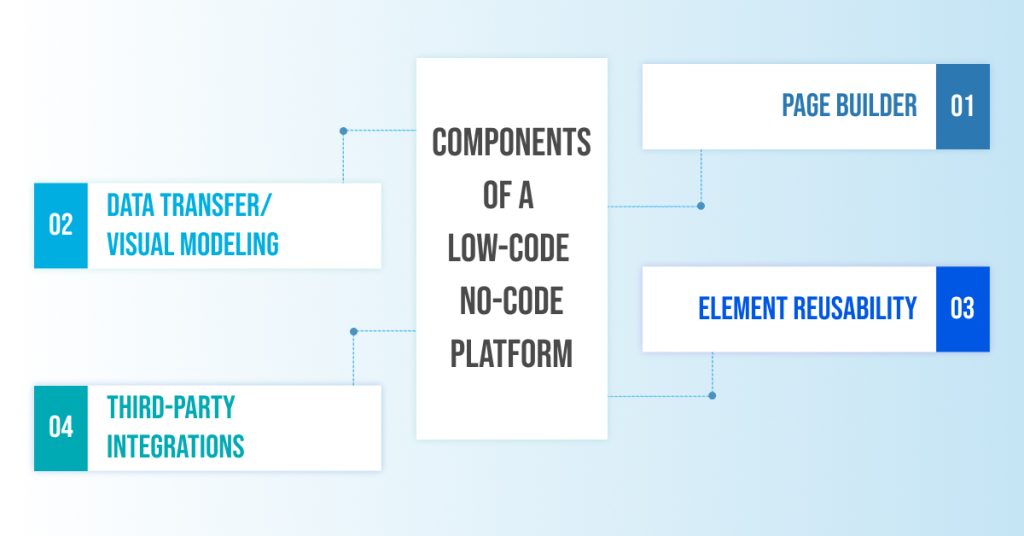
Components of a Low-Code No-Code Platform

Before learning how to build an app from scratch, you must be familiar with the key components of a typical no-code low-code platform. These are mentioned as follows:

  • Page Builder

The first step is to harness the drag-and-drop functionality to build single or multiple web pages. From adding forms to tables, you have all the freedom to add the elements of your choice. Developers can also utilize different frameworks if needed.

  • Data Transfer/Visual Modeling

One of the most common features of low-code no-code platforms is to feed data from Excel sheets for the low-code no-code platform to analyze it. The platform then builds an interface based on the data. Some low-code platforms also offer visual modeling to manage data.

  • Element Reusability

The LCNC platforms save time and enhance innovation by allowing you to reuse elements for your new website pages. You can reuse tiny parts of an old application for your new one. These platforms also offer a dedicated community to share these elements.

  • Third-Party Integrations

Low-code no-code platforms allow you to integrate your website with different web services, such as Salesforce, Slack, Twitter, etc. You can also utilize third-party APIs to enhance your app functionality further.

Get Started with App and Website Development through our Skilled Developers

Deftsoft is a one-stop solution for app and website development services. Our developers have vast experience in various industries, such as healthcare, real estate, logistics, e-commerce, etc. If you want to kickstart a dynamic project, Deftsoft is the apt app development company to cater to your needs.

Our developers create user-intuitive, easy-to-use websites and apps in collaboration with UI/UX designers and testers. Experience sophisticated development services through the premier website development company.

FAQs:

What is a low-code platform?

As the name suggests, a low-code platform allows developers and other tech-savvy professionals to create a website or app through minimal coding. You can use the low-code environment and utilize in-built frameworks to save time in the development process. FlutterFlow is a great example of a low-code platform.

What is a no-code platform?

A no-code platform refers to a platform that uses zero code for web and app development. These platforms can be used by non-technical individuals along with developers. You can use drag-and-drop functionality and other easy-to-use features to build your final app/website. Thunkable is an example of a no-code platform.

Can you build an app without coding?

Yes, you can build an app without coding through the use of no-code platforms, such as Thunkable. These platforms offer pre-built templates to help you make an app. You can choose from a variety of forms, elements, etc., and connect with a large community of no-code users.

What are the benefits of no-code and low-code platforms?

Some significant benefits of low-code no-code platforms include faster time-to-market, high agility and flexibility, enhanced automation, auto-updates and maintenance, lower costs, simple data integration, and cross-platform mobility.
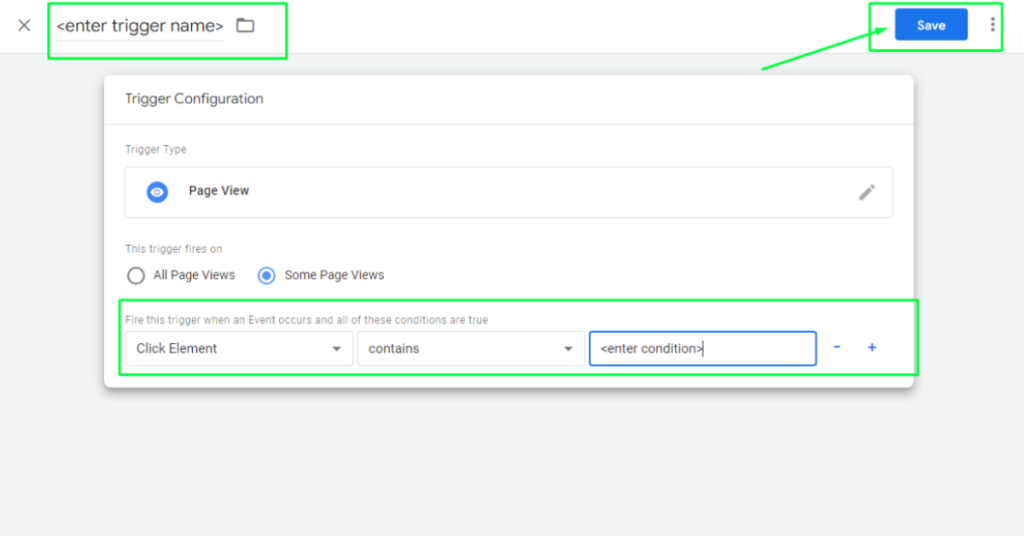
What is the difference between a low-code and no-code platform?

A no-code platform suits non-technical businesses and entrepreneurs who want to build an app to address minimal business problems—for example, building an e-commerce store for a clothing brand. On the other hand, a low-code platform is suitable for building websites and apps that cater to a massive business application, for example, building a cloud computing website.
Skyrocket Your Sales with Shopify Amazon Integration

Are you ready to take the next step to expand your Shopify store? It’s time to perform Shopify Amazon integration! According to the latest 2024 statistics by Semrush, Amazon experienced 4.49 billion visits in January!

Imagine the page authority and the amount of traction your e-commerce business can gain via Amazon. This guide demonstrates precisely how you can perform Shopify integration with Amazon. 

Before discussing the steps involved in Amazon Shopify integration, you must know what Shopify is, if you should just stick to Shopify, what the requirements are to integrate Shopify with Amazon, and finally, the steps involved in Shopify Amazon integration.

Without further ado, let’s begin learning how to connect Shopify to Amazon!

What is Shopify?

Shopify is a platform that helps businesses build their e-commerce stores. Business organizations can create, manage, design, and scale their products through Shopify. It offers user-friendly functionalities, such as an online storefront, themed stores, shopping reports and analytics, intuitive and fast checkout, etc.

On top of that, Shopify is a solid software that offers uniform experiences across various devices, such as smartphones, iPads, computers, web, etc. Currently, 4.80 million live online stores use Shopify to sell their products. It is indeed a market leader in the e-commerce sector.

With such enhanced capabilities, you can create a sales powerhouse by performing Shopify Amazon integration for your brand. However, let’s first know if its better to sell on Shopify alone.

Is Selling on Shopify Better than Amazon?

With billions of traffic, Amazon is a vast marketplace that can give you tons of exposure as an e-commerce business. But if you run a small- or mid-sized business, filling in Amazon’s seller fees and surviving in the fierce competition can be impeding. 

To eliminate this competition, a lot of business owners create their online stores using Shopify. Therefore, it is always a good idea to start small with Shopify. But once you hit good revenue, listing your products on the Amazon marketplace is best to scale up the business revenue.

There are ample reasons to list your products on both Shopify and Amazon. The reasons are as follows:

1. Massive E-Commerce Retailer

Amazon is one of the world’s largest e-commerce retailers, with a monthly traffic of billions. Your products are exposed to many potential buyers by listing them on Amazon.

2. Solid Customer Base

Amazon is home to a solid customer base that frequently visits the website. Listing your product on Amazon by integrating it with Shopify can multiply your sales exponentially.

3. Faster User Buying Cycles

According to the recent Amazon statistics, 28% of Amazon purchases are made in 3 minutes or less than that. Customers make 50% of their purchases in less than 15 minutes.

4. Abode to Independent Sellers

Independent sellers contribute to over 60% of sales on Amazon. Most of them are either small or medium-sized businesses. For the record, this is what Kelly, the CEO of Merfs Condiments has to say:

The best year we ever had with my cousin reselling our products, we made maybe $40,000. Then we launched our store with Amazon in the second week of November of 2021. In 2022, we did $96,000 in sales. That’s phenomenal! Now my question is, what do I got to do to do half a million with Amazon this year?” – Kelly, CEO, Merfs Condiments

(Source: Amazon)

Concluding thoughts: It is best to run your e-commerce store by performing Shopify and Amazon integration. You can link Shopify to Amazon to do so.

What are the Requirements to Integrate Shopify with Amazon?

It’s time to look at the requirements for Shopify and Amazon integration. The requirements are given as follows:

  • Active Shopify Account

You must have an active Shopify account. This is the basis for overseeing all aspects of your online store management, such as order processing, inventory control, and product listings.

  • Amazon Seller Account

Establish and keep up an operational Amazon Seller Account. To manage orders and list products on Amazon, you need this account.

  • Third-Party Integration App

Pick a reliable third-party integration app from the Shopify App Store to enable smooth connectivity between your Shopify store and Amazon. Apps such as “Amazon Sales Channel” and “Shopify Marketplace Connect” are popular choices.

Note: Shopify discontinued the Amazon Sales Channel on September 27, 2021.

  • Product Listing Setup

Make sure both platforms have accurate product listings. This entails coordinating product information between Shopify and Amazon, including names, descriptions, photos, prices, and variations.

  • Inventory Management

Establish a real-time inventory synchronization system to avoid stockouts and overselling. Amazon should instantly update its inventory levels when Shopify makes changes, and vice versa.

  • Shipping Configuration

Assign shipping costs, delivery options, and fulfillment strategies in a way that complies with Amazon’s specifications. Make sure that the shipping guidelines for both platforms are the same.

  • Product Data Compliance

Consider Amazon’s policies regarding product information, such as product identifiers, UPC/EAN codes, and classification. Adhering to Amazon’s guidelines is essential to prevent account suspensions or listing rejections.

  • Account Integration Configuration

Configure the integration app settings to create a secure link between your Shopify and Amazon accounts. Usually, this involves providing API keys or approving data exchange rights.

How to Link Shopify to Amazon?

Follow the steps mentioned below to connect Shopify to Amazon successfully:

1. Sign Up for the Amazon Seller Account

Open Amazon and create a professional seller account. Make sure you select the targeted region for sales so that the currency on Amazon aligns with your Shopify store. On the sign-up page, fill in your details, such as email and password. If you don’t have an Amazon account, you can create one.

Rest, other essential details that you need to keep at your disposal include:

  • A professional business name
  • Contact number
  • Business address
  • Credit card details
  • Legitimate bank account information
  • Taxpayer Identification Number (TIN) or EIN

2. Get Your E-Commerce Product Category Approved on Amazon

You then need to get your products approved on Amazon. Ensure your category is listed with Amazon and matches other required metrics, such as performance reviews, fees, etc.  The following are the key categories that require approval:

  • Automotive & Safety Accessories
  • Baby Products
  • Food & Grocery Products
  • Protected Brands
  • Toys
  • Health, Hygiene, & Medicine
  • Kitchen Products
  • Pet Products
  • Postage stamps
  • Collectible Coins
  • Music & DVD
  • Services
  • Sports Collectibles
  • Fine Art
  • Jewellery
  • Join Amazon Subscription Boxes
  • Made in Italy
  • Streaming Media Players
  • Video, DVD, & Blu-ray
  • Watches
  • Other Categories

3. Download Amazon by Shopify Marketplace Connect Shopify App

Since the Amazon Sales Channel is obsolete, one of the best ways for Amazon and Shopify integration is by leveraging Codisto(now called Shopify Marketplace Connect). It is one of the easiest ways to sell on Amazon directly from Shopify.

This tool allows you to manage, connect, and fulfill orders from Shopify directly. It connects and syncs your complete Shopify catalog with top-notch online marketplaces like Amazon, Walmart, and eBay.

Note: Shopify Marketplace Connect is a free app until you start gaining 50 orders per month.

Follow the steps mentioned below to integrate Amazon with Shopify via Shopify Marketplace Connect:

  • Download and fully install the Shopify Marketplace Connect.
  • Open Marketplace Connect and click on the Connect Marketplace option in the window’s top-right corner.
  • You’ll find a list of all the top marketplaces. Simply click on Connect Amazon. Amazon will be integrated automatically.
  • The next step is to link the products from Shopify to Amazon. To allow linking, click on Learn More present in the Amazon checkbox.
  • An Overview tab opens up. Click on the Link listings option under the Existing listings – Amazon.
  • Scroll down to the bottom right to the link listings section. You can click on either of the options as per your requirements and confirm match.

Note: You need to put a checklist for products when you integrate the listings. For example, you can choose barcodes and SKUs.

  • However, if you cannot find a product match, you can manually enter your Shopify SKU and then confirm match. You can then review close matches and click on the Link listings option present on the right side of the Please note section.

4. Manage Your Shopify Payment Gateway

You can choose Shopify Payments or a third-party app to accept credit card payments. You can set up Shopify payment through the following steps:

  • Fill in the details of the payment method.
  • Put in your bank details to receive the order payments.
  • Ensure that you read all the terms and conditions correctly.

What are the Benefits of Shopify Marketplace Connect?

The benefits of the Shopify Marketplace Connect are mentioned as follows:

  • Real-Time Tracking

You can track your product stock in real-time. You don’t have to change your stock to marketplaces manually. It will be updated automatically.

  • Audit Transport

If you receive any audit on Amazon marketplace, it gets transported to Shopify directly. This makes the fulfillment process easier.

  • Organized Interface

Your order history is well-organized with the Shopify Marketplace Connect. You can also add a rule to set different prices for your various marketplaces. Any prices updated in Shopify will be updated automatically on other marketplaces.

Wrapping Up

Taking your e-commerce business to the next level once you plunge into the market is crucial. You can only do it by exposing your brand to a bigger marketplace, and Amazon is one of the best of them all. 

This blog discusses the simplest, hassle-free steps to carry out Shopify Amazon integration. Using Shopify Marketplace Connect is the latest method to perform Shopify and Amazon integration. However, if you still struggle to perform integration, you can hire our Shopify experts to do the job!

FAQs:

Can we integrate Shopify with Amazon?

Yes, Shopify can be integrated with significant marketplaces like Amazon, eBay, and Walmart. You can do so by using the Shopify Marketplace Connect app. It also allows you to automatically update your products’ SKUs, stock and price with the integrated marketplace.

Does Amazon connect to Shopify?

Amazon cannot connect directly with Shopify. This is why you need to use the Shopify Marketplace Connect app. It is a Shopify-based app that allows you to perform Shopify and Amazon integration.

Can I sell Amazon products on my Shopify store?

Yes, you can do so by opening the listings in the Shopify Marketplace Connect app. You can link your Shopify products to the matching Amazon listings and then sell them on the Shopify store.

How do I add Amazon Pay to Shopify?

Go to Shopify admin > Settings > Payments. Click on Manage in the Shopify Payments section. Then open the Wallet section and add Amazon Pay. You need to activate the Amazon Pay through the Amazon Seller Central. Ensure that you transfer the API keys.

Can I dropship from Amazon to Shopify?

Yes, you can take advantage of Amazon’s dropshipping. You can add Amazon’s top-selling products to your Shopify store using solid Shopify apps like Zonify.

A Hassle-Free Guide to Integrate Magento 2 with AEM

 Building an easy-to-use eCommerce platform is good, but offering a personalized experience is great! You’re missing out on the mightiest capabilities of Magento (now called Adobe Commerce) if you’ve not yet integrated with AEM. 

Magento has over 677,539 users for enhancing their e-commerce website experience. It was, however, in August 2018 when Magento was acquired by Adobe. Now, it is called Adobe eCommerce. While a large number of individuals harness Magento for a killer Search Engine Optimization (SEO) strategy, novel catalogue-management tools and managing content for their online store, AEM can significantly improve the efficiency of the tool.

This blog is a simple, easy-to-use guide for AEM and Magento integration. Firstly, you’ll learn what Magento and AEM are, the steps to AEM Magento integration and the benefits of the integration.

Let’s begin!

What is Meant by Magento?

Simply put, Magento is a popular e-commerce platform used by numerous professionals as a robust solution for their online B2B, B2C and D2C businesses. Businesses are flocking to this tool like a moth to a flame. After all, it offers tools to attract potential prospects, sell more products and make more money. Adobe Commerce users vouch for its feature-rich omnichannel experience!

Magento

Apart from this, it is a Content Management System (CMS) that offers editing, organizing, deleting, modifying, maintaining and publishing content directly from a central interface. Individuals can manage workflow in a collaborative environment through Magento (Adobe Commerce).

Adobe Commerce is a modern, flexible platform that allows us to present our complex product offering to customers in a friendly, approachable, and easy-to-understand way. It’s aligned with our brand and what customers expect from a modern online shopping experience.”

Steelcase, a B2B office furniture company

Magento is considered as one of the top 10 e-commerce platforms.

Magento-is-considered-as-one-of-the-top-10-e-commerce-platforms.-1024x536

There are over 5,000 downloads of Magento each day, thanks to its vivid features, which are as follows:

  • Open-source software (community edition)
  • Simple and flexible back-end
  • Easy media and content management
  • Completely headless (de-coupled architecture)
  • Product publishing and organizing categories
  • Search Engine-friendly structure
  • User Management System

What is Meant by Adobe Experience Manager (AEM)?

Adobe Experience Manager (AEM) is a content management system (CMS) and digital asset management (DAM) software that offers sophisticated capabilities. It is Adobe’s proprietary software for managing, publishing, delivering and optimizing digital assets. These digital assets include documents, forms, audio, videos, images, and website content. 

From social media to mobile apps, you can ensure efficient and uniform content delivery across various channels. AEM offers personalization and optimization of user experience across multiple channels and social media. This directly enhances prospect engagement and, ultimately, business revenue.

What Sets AEM Apart from Other CMSs?

AEM offers content personalization across varied channels.

The numbers speak for themselves. According to the latest 2023 Q3 report, “The Forrester Wave”, Adobe has been named a distinguished leader in content management.

What-sets-AEM-apart-from-other-CMSs_-1024x536

The highlighting features of AEM are as follows:

  • Manage and deliver content across various channels
  • Unified user experience across different devices (mobiles, web)
  • Solid Digital Asset Management (DAM) tool
  • Reliable data insights 
  • Customer journey mapping
  • Enhanced content personalization
  • Content optimization

Why Should You Integrate AEM with Magento 2?

The AEM Magento integration involves two perspectives: the development and the business.

  • The Development Outlook

A developer can efficiently develop and manage digital experiences through the unification of the two software. He can analyze both the e-commerce data and content on a single website to make informed decisions critically.

Additionally, the AEM Magento integration cuts down operational costs and streamlines operations, such as customer segmentation, order processing, real-time product updates, etc.

  • The Business Outlook

It is a daunting task for a business owner to move back and forth between AEM and Magento when keeping track of the shop and content personalization. You can dig deep into the customer journeys and, thus, enhance product sales. AEM and Magento integration helps businesses benefit from automated user analytics, personalized content, and marketing campaigns.

Overall, the objective of AEM Magento integration is to offer personalized shopping experiences.

How to Integrate Magento with AEM Seamlessly? 

It is time to address the elephant in the room: how to perform AEM and Magento integration. 
The answer is utilizing the Commerce Integration Framework (CIF). For an introduction, CIF is Adobe’s recommended pattern for integrating and extending e-commerce services from Magento and other third-party commerce solutions with the Adobe Experience Cloud. It offers a set of tools, code, documents, and components to speed up Magento and AEM integration.

How-to-Integrate-Magento-with-AEM-Seamlessly_-1024x536

The benefits of CIF are as follows:

  • It is an abstraction layer to standardize integrations with multiple systems.
  • CIF supports headless/omnichannel experiences:
    • Single and multi-page applications
    • GraphQL endpoints
  • It offers a serverless and business logic layer for customization and extension of commerce services.
  • It offers accelerated performance.
  • CIF provides integration solutions with various Adobe solutions, such as Magento, AEM, Campaign Standard, etc.

Follow along for the steps involved in AEM and Magento integration (now called Adobe Commerce):

1. Download and Install AEM and Adobe Commerce (Magento)

The first step is to download both AEM and Adobe Commerce. Make sure that you download the latest versions of the software.

a. Download AEM from here (AEM release notes).

b. Download Adobe Commerce from here.

2. Download and Configure the CIF Extension

You then need to install an extension on all AEM instances and Adobe Commerce that the CIF comes up with. This is how the integration takes place between the two.

3. Configure CIF Framework

Open AEM and configure CIF by setting up the required configurations, such as base URL, Adobe Commerce authentication credentials and cache settings. These configurations allow seamless configuration between AEM and Adobe Commerce (Magento).

4. Configure Sync Settings

You then need to configure the sync settings to synchronize the customer data and product catalogue between AEM and Magento. You can choose which data you wish to sync and the frequency of the data synchronization process.

5. Utilize the CIF Mapping Tool

After the successful data sync process, map the product and customer data fields inside AEM with the help of the CIF mapping tool. You can then bi-directionally send data between the two tools.

6. Test and Optimize the Integration

The final step is to thoroughly test the integration to guarantee data sync and foster tailored experiences for the users. Keep an eye on the integration to identify any performance problems or bottlenecks, and adjust the configuration as necessary.

What are The Benefits of Magento Integration with AEM?

Benefits of Magento Integration with AEM

AEM enhances the shopping capabilities for a user when integrated with Magento. The integration of the two yields the following benefits:

  • Personalized User Shopping Experience

The Magento (Adobe Commerce) integration with AEM allows business organizations to offer personalized shopping experiences to users based on their search history, demographics, interests, etc. This feature helps businesses boost their sales and increase return on investment (ROI). 

One can edit product pages in a few minutes to harness the power of personalized shopping. Catering personalized experiences for customers is a magic potion to attract product sales.

  • Built-In Analytics Tool

Adobe Experience Manager already comes with multiple built-in tool integrations, such as Adobe Analytics, Target, Adobe Audience Manager, etc. AEM and Magento integration takes the analytics tools to the next level.

Developers can import high volumes of real-time product data from Magento and feed it into AEM for sophisticated user data analysis. This product data includes product price, stock status, title, description, and much more. Therefore, developers can experience faster development and iteration on a website.

  • Enhanced Security

Adobe Commerce (Magento) is created to tackle certain complex e-commerce problems. One of them is security. Therefore, Magento focuses on the security part, and AEM merely acts as a ‘display layer’ for products.

  • Boost in the Front-End

The headless integration between Magento and AEM has reduced time-to-market as there is no more developer intervention required to perform content management activities. Adobe AEM can recommend product listings and descriptions. This increased front-end as well as back-end efficiencies.

  • Efficient Asset Management

When working at a large scale, especially in enterprises, AEM and Magento integration allows them to manage thousands of digital assets, ranging across a wide variety for an e-commerce store.

Marketing and other professionals can drag and drop, search, save and publish their assets and manage remote teams as well.

  • Easy-to-Launch Marketing Campaigns

With Magento and AEM integration, you can launch marketing campaigns without coding. Anyone can do this using the drag-and-drop functionality by fetching the product database from Magento and organizing the display via AEM.

You can create product teasers, carousels, and experience pages via AEM.

Concluding Thoughts

If you’re an enterprise or large-scale business organization, it completely makes sense to integrate AEM with Magento (Adobe Commerce). To integrate the two software, it is best to deploy the Commerce Integration Framework (CIF). 

Magento developers can take a sigh of relief, thanks to the AEM Magento integration. Follow along with our mentioned steps, and you can transform your e-commerce by catering a more personalized experience to your audience. This will gradually lead to increased revenue for your e-commerce store. 

In case you’re struggling to integrate the two for your e-commerce store, let our experts do it for you. Reach out for customized AEM and Magento services today!

FAQs:

How to integrate AEM with Magento 2?

Adobe Experience Manager (AEM) can be integrated easily with Magento 2 with the help of Commerce Integration Framework (CIF). Firstly, you need to install and configure both AEM and Adobe Commerce (Magento) > download and configure the CIF framework > configure sync settings > use the CIF mapping tool > create personalized experiences > test and optimize the integration.

Is AEM an e-commerce platform?

AEM is a digital asset and content management system that offers enhanced capabilities for creating personalized content. The content can be created for various channels and devices. Although AEM itself is not an e-commerce platform, it can be integrated with third-party e-commerce solutions.

Are Magento and Adobe Commerce different?

Magento is an open-source e-commerce platform. It was acquired by Adobe in August 2018, which is why it was renamed Adobe Commerce. You need to buy this software, yet you can still access the Magento community.

Can I launch a marketing campaign using Magento-integrated AEM?

Yes, you can easily launch personalized marketing campaigns by integrating AEM and Magento. It allows businesses to analyze users browsing history and interests, thus allowing organizations to target users better.

Can I integrate other third-party e-commerce apps with AEM?

Apart from Magento, you can also integrate other third-party e-commerce apps with AEM for better customer tracking, reduced operational costs, mapping customer journeys, etc.

How to Create Email Signature for Free?

Are your emails missing a professional touch? You’re in need to add a signature section to your emails. Let me explain! For instance, you’re a business owner pitching your online services to a prospective client. This is a situation where you need to depict yourself as highly sophisticated and authoritative. 

You can add an email signature to the footer of your email to look legitimate and genuine to the email receivers. This guide is an exemplary resource to learn how to add an email signature to your Gmail for free in 2024. You will also learn what an email signature is and what its components are.

Without further ado, let’s get started.

What is an Email Signature?

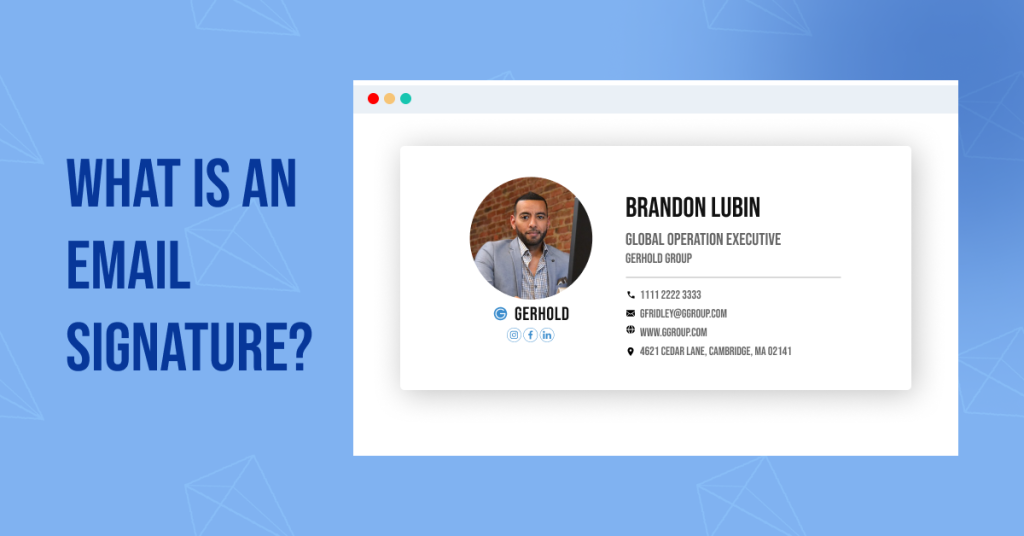
An email signature refers to text, usually involving your contact information or favorite quote, automatically added to the footer of your emails. It must be an indispensable practice in 2024 to add email signatures to your emails.

An email signature looks something like the following:

Email Signature

The statistics speak for themselves:

  • 62% of individuals use email signatures for marketing. Out of these, 45% use them regularly, while 18% use them occasionally.
  • The rest, 37%, never use email signatures for marketing.
  • 81% of business users treat e-signatures as the most significant asset in the legal and security matters of their day-to-day operations.

Why Email Signature Matters in Email Marketing?

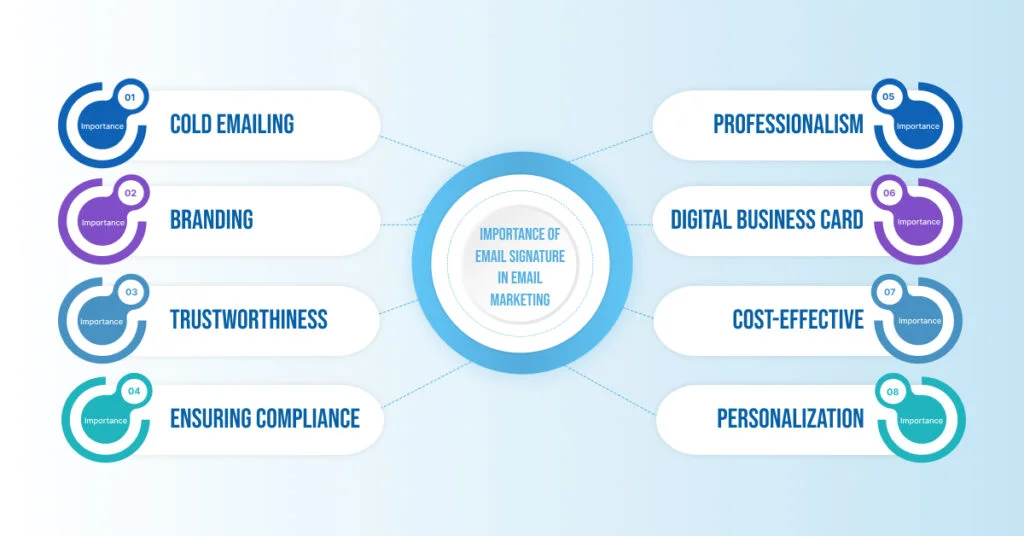
Adding an email signature to your email enhances the look, feel, and credibility of your email. One can enhance the trust factor in emails through an email signature and, therefore, increase the success rate of email marketing. Apart from seeming professional, there are ample reasons to use email signatures. Some of the significant ones are listed as follows:

IMPORTANCE-OF-EMAIL-SIGNATURE-IN-EMAIL-MARKETING-1024x536
  • Cold Emailing

You increase the chances of getting a reply when sending a cold email just by adding an email signature. This practice adds a tint of personality to your email, thus enhancing the credibility and authority of the email.

  • Branding

You can establish a strong business identity with the help of an email signature. It gives off an impactful impression on the viewers. Therefore, it plays a significant role in the branding of your business.

  • Trustworthiness

It is not easy to win the trust of clients of any professional industry, provided you’ve just entered the domain. This is the time when you need to win the trust of your client. Email signature in your emails significantly contributes to elevating the trust factor of clients.

  • Ensuring Compliance

An email signature is not only significant from the marketing point of view, but it also ensures legal compliance and reduces potential legal fraud. For instance, a lot of spam emails do not have an email signature or an individual persona.

  • Professionalism

If you want to send emails to high-level professionals such as the Sales Director or CEO of a company, it is crucial to add an email signature. This practice establishes authority and lays the foundation for successful collaboration with the email receiver.

  • Digital Business Card

Email signature acts as your digital business card. It is a perfect medium to connect to people across the world via emails and put forth a cordial hand for communication. It eliminates the need to capture potential clients offline.

  • Cost-effective

You can create an email signature for free, as there are no external resources required to create it. Therefore, businesses can save up their capital and put their best foot forward in front of their potential clients.

  • Personalization

Emails can be personalized by adding the email signature of an individual. For example, if you’re a social media manager, you can reach out to your prospective clients with a personalized email signature comprising your name and contact details.

What are the Components of an Email Signature?

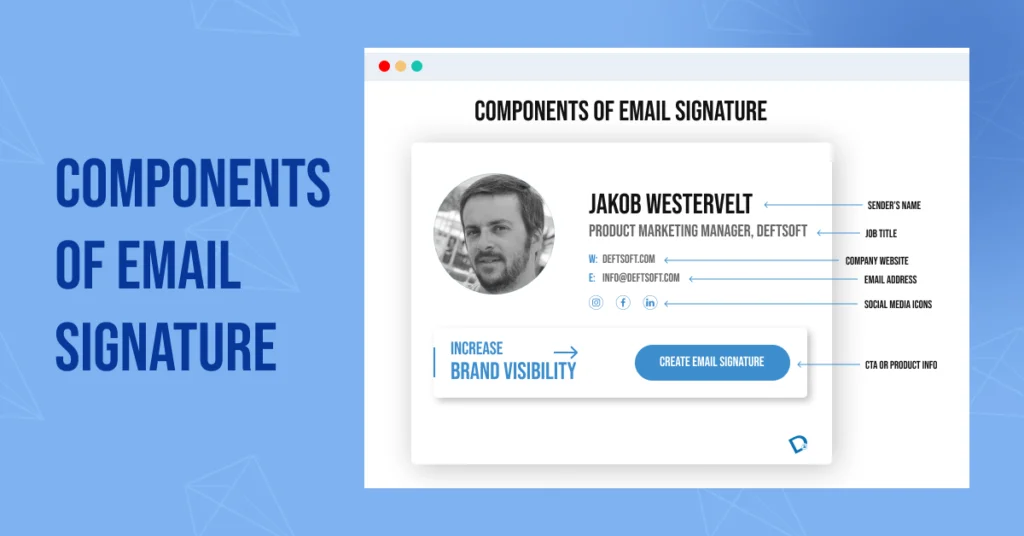
An email signature consists of some significant components that contribute to the complete structure of an email signature. There are 6 main components of an email signature. These components are highlighted as follows:

components-of-email-signature-1024x536
  1. Sender’s Name

It marks the topmost section of an email signature. It consists of the full name of the individual who is sending an email.

  1. Job Title

Following the sender’s name, it is essential to mention the designation or the job title of the sender. You must first mention the name of your job title, followed by your company name.

  1. Company Website

 You then need to add the website name with a hyperlink. This would help the receiver to know more about the place you’re reaching out from.

  1. Email Address

You must then add your email address so that the user can reach you. A pro tip is always to add your professional/workplace email address for credibility.

  1. Social Media Icons

Make sure that you add the icons and links to your various social media platforms. This helps the receiver in checking out your company’s profile and how it works. It adds a positive impact on the receiver.

  1. CTA or Product Info

It is one of the best practices to end the blog with a Call-to-Action (CTA) or product info. This will help you reach the key objective of your email.

How to Create Email Signature Using Gmail?

It is time to address the elephant in the room. You can follow the steps given below to create an email in Gmail.

A. Adding a New Email Signature:

  1. Go to Gmail.
  2. Click on “Settings” at the top-right corner and then go to “See All Settings“.
  3. Add your signature text in the box right in the “Signature” section. Make sure that you add all the important components to your email signature, such as name, website link, CTA, etc. 

You can also edit the format of the text or add an image to it. You must note that you can only add 10,000 characters to the Email signature, including the image.

  1. You can tap on the “Create New” to add more email signatures and save them. Make sure that you go to “Signature defaults” for more customizations to the signature.

Go to the button page and then hit the “Save Changes” button.

B. Adding Multiple Signatures:

You can also use different signatures for your email. For instance, you can permanently set a default email signature for your newly composed emails or the ones you reply to. You can customize the signatures for different emails as per your needs. 

As mentioned above, you can use the “Create New” to add more email signatures.

C. Editing Email Signatures:

To edit an existing email signature, you can follow the steps mentioned below:

  • Go to Gmail.
  • Click on “Settings” and then “See All Settings”.
  • Right under the “General” open, go to the “Signature” option and then click on the signature you wish to edit.
  • You can then make the desired changes by using the text box.
  • Click on “Edit” to change the signature name.

At last, click on the “Save Changes”. Voila, you have edited your email signature.

D. Removing Email Signatures:

If you wish to remove an email signature that you’ve previously created, you can do so by following the steps mentioned below:

  • Go to Gmail.
  • Click on Settings and then “See All Settings”.
  • Scroll down to “Signature” under the “General” option.
  • Click on the email signature that you wish to eliminate.

Click on Delete with a Trash icon and then choose the “Delete” option.

E. Adding an Email Signature if You’re Using the “Send mail as” Feature:

You can even send emails from different addresses. To do so, you need to use the “Send mail as” feature. This way, you can send emails from different addresses in your account.

Follow the steps mentioned below to enact this feature:

  • First of all, you need to select an address. Go to the “Settings” page and open the drop-down menu of the Signature text box. Select the address you wish to send an email from.
  • In case the drop-down menu is not visible, you can go to the Accounts and Import settings page.
  • Ensure that your addresses are mentioned in the “Send mail as” section.

Note: If you’re facing issues in setting up your email signature, you can reach out for help here.

Concluding Thoughts

Adding an email signature to your emails can bring significant professionalism to your emails. One must incorporate the practice of adding signatures to emails consistently. This would enhance the brand value, credibility, and trustworthiness of the website.

This guide is one of the best resources to add an email signature to your Gmail. It often gets confusing how to use these signatures and edit them using different paid tools. Get rid of the fuss and follow this simple and hassle-free method to get started.
If you’re a business owner who wants to hire top-notch digital and performance marketers to help you rev up your email marketing game, feel free to reach out to us.

FAQs:

What is an email signature?

An email signature is a text that contains all the important contents of an email sender. The text often includes contact details, company name, social media links, and a value-added Call-to-Action (CTA). An email sender can also add a quote instead of contact details based on the intent of the email. 

You can add up to 10,000 characters to an email signature. Gmail gives you an option to add as many email signatures as you want based on the email you’re sending.

Why is it important to use an email signature?

An email signature encompasses various roles that play a crucial role in catching the eye of the receiver. Firstly, it adds an element of professionalism to the email. Followed by it, if you’re a business owner, you can add credibility, trustworthiness, and brand value to the email. An email signature signifies the legitimacy and genuineness of the sender’s email. This practice automatically increases the chances of getting a reply by multifold.

What should you include in an email signature?

You can include various elements in your email signature. These elements include first and last name; your work designation/job title; company name; secondary contact information; booking links; social profile icons, and links such as Instagram, Twitter, Facebook, etc.; your photo or company’s logo; and a solid Call-to-Action (CTA).

How to create an email signature?

You can simply create an email signature by going to Gmail “> open Settings > scroll all the way down to email signature > enter the desired text in the text box > click on Save Changes.

Should you make an email signature if you’re a small business owner?

The email signature is a crucial factor that makes or breaks your impression of the receiver of the email. Of course, you must make an email signature if you’re a small business owner. Don’t forget to add your photo or the company’s logo to leave a tangible impact on the receiver.

Why Upgrade to Drupal 10.2.2? The Latest Version is Here

Drupal is the first choice of Content Management System (CMS) for sophisticated developers. Released on 15th January 2001, Drupal is written in JavaScript and PHP. It is one of the leading platforms for web application development. No wonder the creators keep on evolving the technology for supercharged performance.

Drupal founders just released the latest version of Drupal, Drupal Core 10.2.2., which was released on January 17, 2024. It is by far the most potent version of the CMS. This blog is a comprehensive guide on the latest features of Drupal 10, the requirements to upgrade to Drupal’s latest version, and how to upgrade to it.

Let’s get started.

What is Drupal?

Drupal is a free and open-source content management system (CMS) written in PHP (Hypertext Preprocessor) and JavaScript. Based on the LAMP stack, it is a wonderful solution for developers to build high-quality web applications. The features can be added or eliminated with the help of modules, making it a flexible CMS. 

Although Drupal 10.0.0 was released back in 2022, right after the release of Drupal 9, the latest version of Drupal, i.e., 10.2.2, is something to talk about. Let’s talk about the highlighting features of the Drupal’s latest version.

What are the Key Features of Drupal 10.2.2?

Drupal 10 is a significantly elevated version of Drupal 9, eliminating the deprecated code, i.e., the dead code. Upgrading to Drupal 10 is not just for security concerns but for new media libraries and more user-friendly content options.

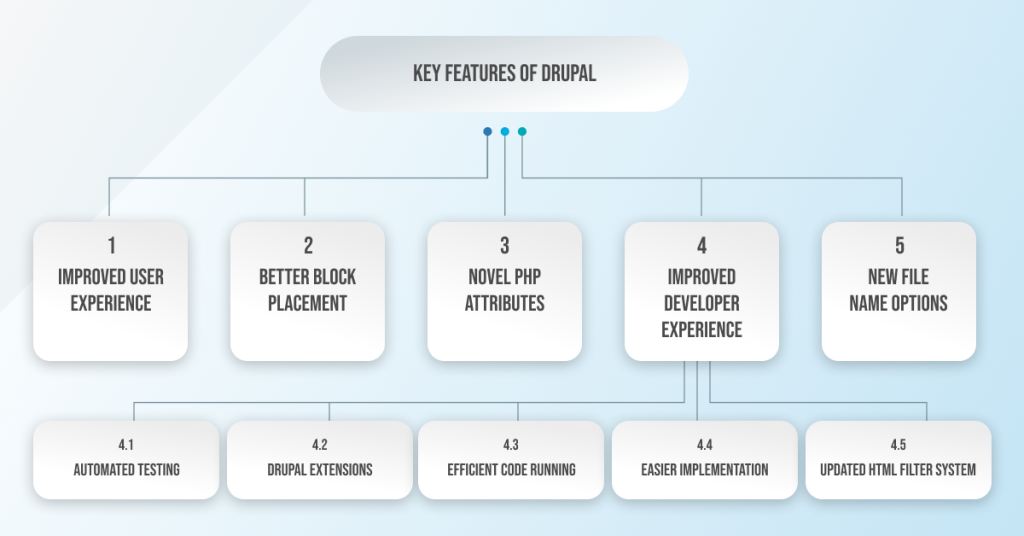
The main features of the latest version of Drupal (Drupal 10.2.2) are as follows:

Features of Drupal 10.2.2

1. Improved User Experience

Content management is more accessible in Drupal as it provides an enhanced user experience. It can manage different types of content:

  • Field types for new fields are now visually listed.
  • You can add a child item from dedicated options in the menu items. This means easier item placement.
  • Review and manage older media items through a user interface.
  • Configure CKEditor’s language selector to show only the supported languages.

2. Better Block Placement

You can now show or hide blocks based on HTTP response status, especially when the page is not found (404) or access is denied (403).

3. Novel PHP Attributes

A modern PHP language feature is added to the new version of Drupal. The Drupal core can now adopt PHP attributes, which offers an enhanced developer experience for plugin annotations. Block and Action plugins can be converted to the new API.

4. Improved Developer Experience

  • Automated Testing:

Use PerformanceTestBase to support automated testing of performance metrics. A developer can now send OpenTelemetry traces to an open telemetry endpoint. 

  • Drupal Extensions:

The DeprecationHelper::backwardsCompatibleCall() method helps developers write Drupal extensions that are compatible with multiple versions simultaneously.

  • Efficient Code Running:

Drupal can run different code while waiting for an asynchronous operation due to the addition of PHP Fibers to BigPie and Renderer.

  • Easier Implementation:

Strict testing is now supported for configuration validation and is easier to implement. 

  • Updated HTML Filter System:

The filter system and HTML utility classes are updated to produce HTML5 syntax (earlier, it was XHTML).

5. New File Name Options

Using the new built-in file name sanitization options, you can now replace whitespace in file names, transliterate text, and convert to lowercase.

Other Significant New Features of Drupal 10.2.2 Include the Following:

  • Permission management is now easier to perform with the filter option.
  • Improved performance with bug fixes for content rendering, HTTP responses, and enhanced caching APIs.
  • Drupal 10.2 is compatible with the latest version of PHP, which is PHP 8.3.
  • Announcements Feed module is more stable and is pre-downloaded by default.
  • The Help Topics module is now integrated into the core Help module.

Are there any Major Additional Updates in Drupal 10?

Apart from the key features of Drupal’s latest version, there are also some third-party and theme updates in the new version. These are as follows:

1. Third-Party Updates:

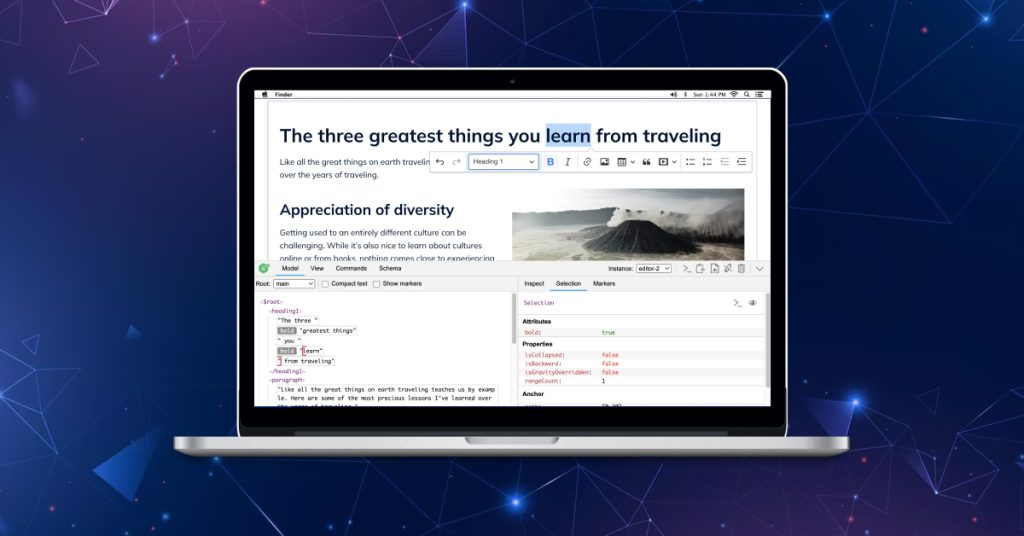
  • CKEditor 5

The editorial experience is now enhanced for content management in Drupal version 10, thanks to the CKEditor 5. It is a text data management entity. It has now been upgraded to align with the modern JavaScript application development.

CKEditor 5

CKEditor 5 is the default editor in Drupal 10. 

  • Symfony 6

Leveraging the power of Symfony 6 in the backend processing enhancements. You need to use a minimum of PHP 8.1. There are significant improvements in various areas like locales, services, routing, etc. 

Symfony 6

This tool sets the foundation for the Drupal 10 version and brings forth significant enhancements in the software.

  • Twig 3

The latest version of Twig is now upgraded with the Drupal 10 version. It offers secure, flexible, and quick PHP templates. It is one of the most valuable tools for designers and developers.

twig-1024x536

2. Theme Updates:

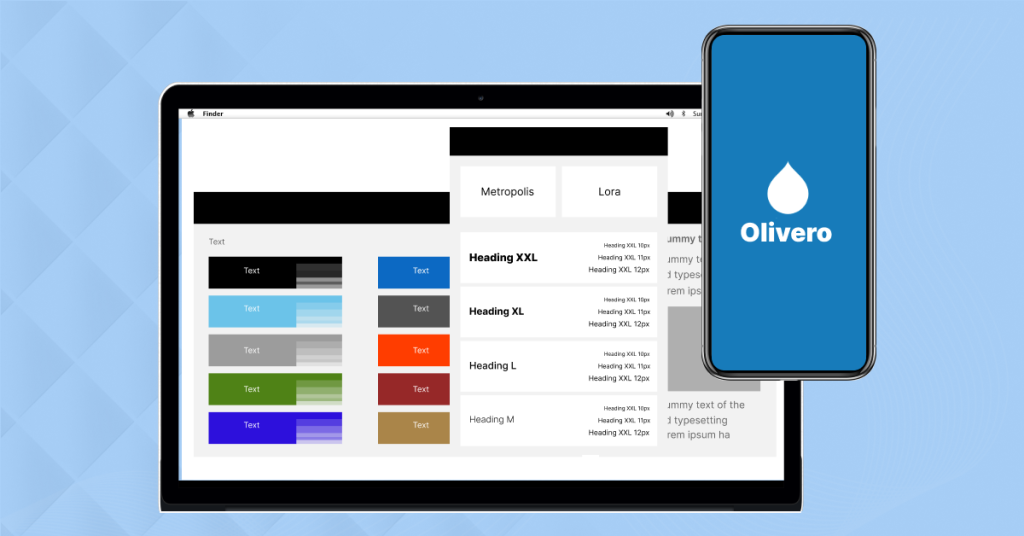
  • Olivero

Drupal now comes with a new default theme, Olivero. Although it is present in Drupal 9, it has more enhanced capabilities in the latest version of Drupal. A developer can quickly launch a simple website by using the Olivero. He can also build a custom theme from scratch.

Olivero theme in Drupal
  • Claro

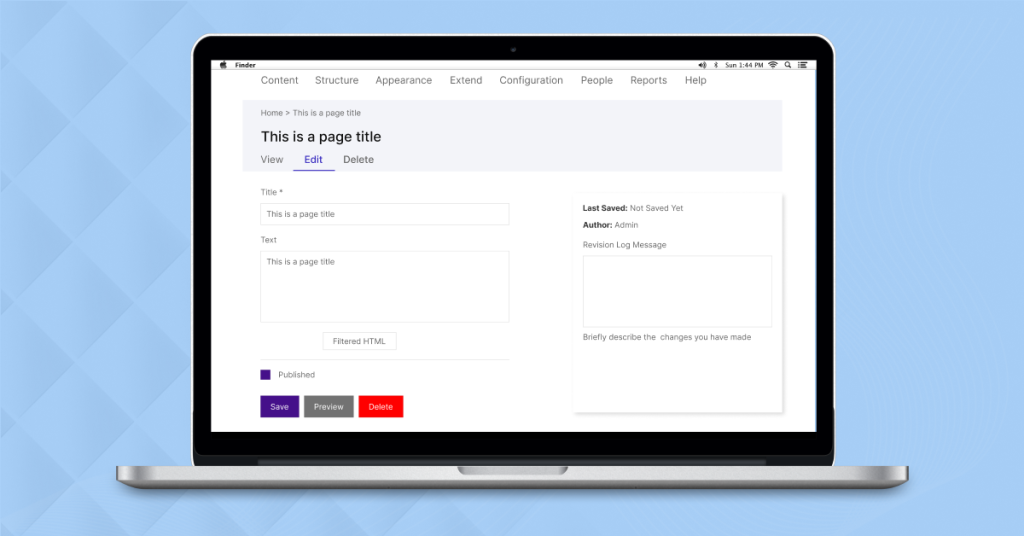
Claro is now the default admin theme for Drupal 10.2. It is a powerful, clean, and accessible admin theme that represents a modernization of JavaScript. It has a user-friendly design interface that helps content authors and site builders. It accepts all the tools, workflows, and practices that are in tune with the JavaScript developers.

Claro is now the default admin theme for Drupal 10.2

What are the Requirements to Upgrade to Drupal 10?

If you’re downloading Drupal for the first time, you don’t need to tangle yourself in fuss. You can download it from here.

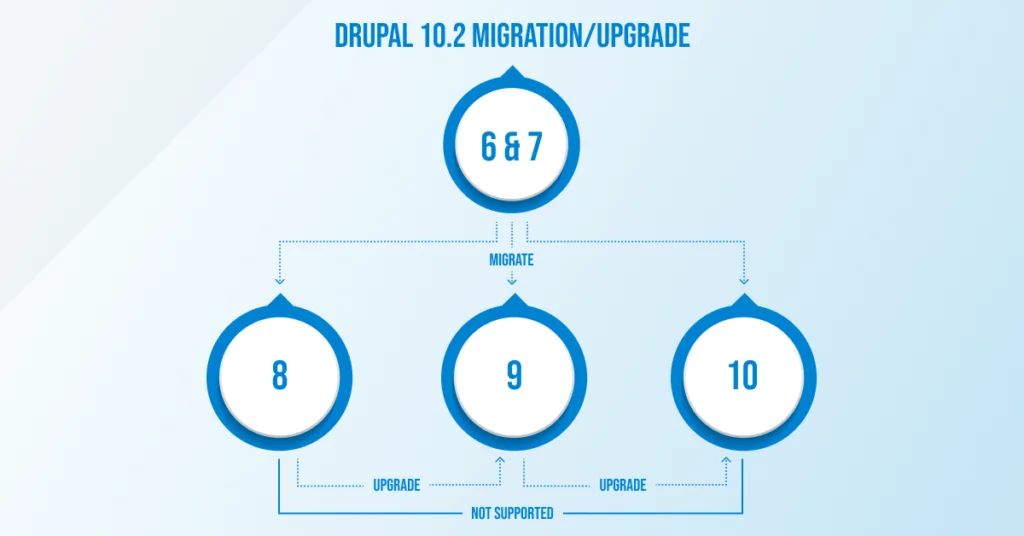
However, if you’re an old Drupal user and wish to upgrade to a newer version of the software, you need to consider the following diagram first.

upgrade-1024x536

Based on the current Drupal version you’re on, you can check the following requirements accordingly:

  • Drupal 7

You need a complete site migration to Drupal 10.2.2.

  • Drupal 8

You cannot directly upgrade to Drupal’s new version. You first need to upgrade to the Drupal 9 version and then gradually go for the latest version.

  • Drupal 9

The Drupal 9 version has already matured; therefore, you must upgrade to Drupal 10.2. The steps to upgrade to Drupal 10.2 from Drupal 9 are as follows:

  1. Install and enable the Upgrade Status Module. An environment readiness check notes down everything in the UI you need to upgrade to the latest software version. 
  2. Upgrade the modules as required. Drupal Rector is required to fix the incompatibilities for custom code.
  3. Finally, you can upgrade to Drupal 10.2.

Need Help with Drupal Upgrade? We’re Here

Deftsoft is a new-generation Drupal development agency. We have a team of experienced web developers who work to offer the best custom services. Our experts have covered everything from website creation to Drupal migration/upgrades.

Talk to our experts for the best website development services related to Drupal. 

FAQs:

Which is the latest Drupal version?

The Drupal 10.2.2 is the latest version of the Drupal. Drupal is a web development platform written in PHP and JavaScript. It can also be used by designers to design websites. The software competes with other website-building platforms, such as WordPress and Joomla. The latest version has significant updates with new UI themes, third-party app updates, and other performance features.

Is Drupal 9 open source?

Drupal 9 is the predecessor version of Drupal before its latest version, i.e., Drupal 10. It is a free and open-source web application development software. With enhanced performance capabilities, Drupal can be extended and used by anyone across the globe.

Is Drupal 10 faster than Drupal 9?

Since the ‘deprecated’ or ‘dead’ code is eliminated in the Drupal 10 version, it is also referred to as Drupal 9.5. This is why the latest version of Drupal is supposed to work faster than the older version. There are also a bunch of bug fixes that help speed up and optimize the performance of the Drupal 10 version.

Why Drupal 10 is better?

Drupal 10 is way better than the older version because of some notable reasons. Some of them include that it does not have the deprecated code, has improved performance, enhanced user experience, and uses the latest version of third-party entities such as SKEditor 5, Twig 3, and Symfony 6. It also has some significant theme updates, including Claro and Olivero, making the website development process seamless.

Is Drupal 10 headless?

Yes, Drupal 10 is headless as it is built on Drupal’s 8 API-first architecture. It is also one of the best-decoupled solutions in the CMS industry. Also, Drupal 10.2.2 is the best version of the software as it offers power-packed performance and no deprecated code, and developers/designers can play around with various themes and third-party entities.

PPC Guide: How to Optimize Google Ads

Paid search marketing is one of the mightiest digital marketing tools that boost an organization’s revenue. Especially if you’re a new business organization wanting to build a brand in a competitive world, Google ad campaign is the golden ticket to enhanced success. 

80% of global businesses use Google ads for their PPC campaigns. Google Ads generated revenue of a whopping $172.647 billion in the first quarter of 2023. 
Now, you must be wondering why Google Ads is the major tool for Pay-Per-Click (PPC) marketing. This is because Google rules about 90% of the search engine market globally. To back this up, Google and Facebook search advertising generates the highest ROI of all paid channels.

  • 80% of global businesses use Google ads for their PPC campaigns
  • Google Ads generated revenue of a whopping $172.647 billion in the first quarter of 2023.
  • Google rules about 90% of the search engine market globally. 

Enough talking about the theoretical part; let’s begin with the applications. If you’re a business owner or a digital marketer looking to level up your Google Ad campaigns game in 2024, this blog is the perfect resource for you! 

Note: If you’re still not familiar with paid marketing and what it is, you can check out this blog right here.

Top Tips for Running a Successful Google Ad Campaign

When you instantly want to rank on top of a search engine page for certain queries, running paid Google ad campaigns is one of the best tools to do so. The work doesn’t end after running an ad on Google. In fact, it starts right from that moment. 

If your ongoing Google ad campaigns are not performing well, chances are that your campaigns need optimization. Follow along with our best-kept tips to run successful Google ad campaigns!

Tip 1: Know What You Want

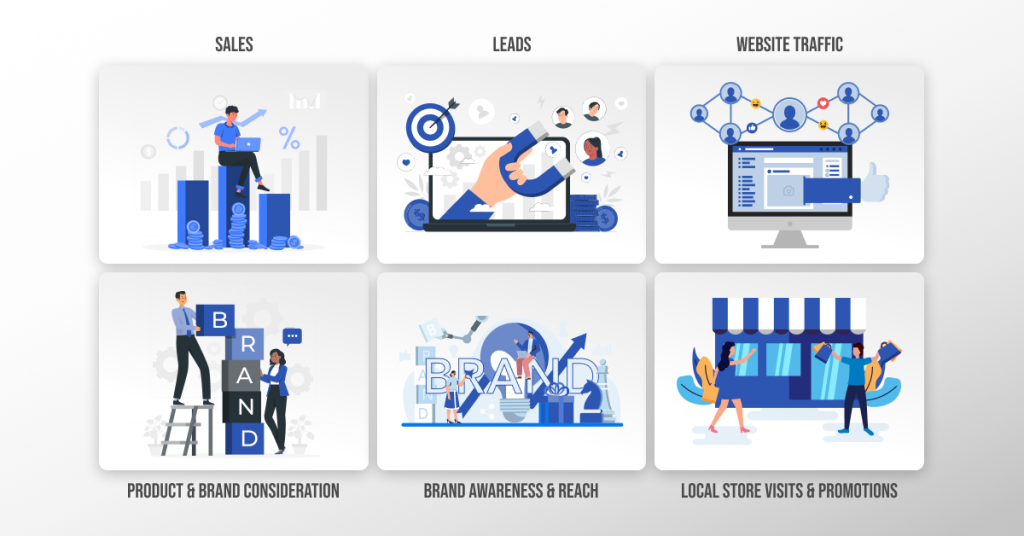
Firstly, it is crucial to identify the goal of your PPC ad campaign. Is it to generate more leads, enhance conversions, or merely get more traffic on the website? Segregate your requirements based on your needs, and voila, you’ll see a significant shift in the performance of your ads.

Your PPC ad campaign end goal can vary and lie anywhere between increasing sales and capturing leads. Some of the most common objectives of your campaign can be the following:

identify the goal of your PPC campaign

Let me explain this to you with an example. For instance, if you own a clothing brand and wish to enhance the sales of your products, “Drive Conversions” is the most-suited type of Google ad campaign via a video format ad. 

Note: You can learn more about how to define your objectives in Google Ads here.

Tip 2: Choose the Right Campaign Type

It is crucial to choose the type of campaign you wish to run after figuring out the objective of your PPC campaign. The best criteria to choose the right PPC campaign type for you involves the following parameters:

You must be aware of the different types of Google ad campaigns available and what purpose they serve. The various types of ad campaigns are as follows:

1. Search Ad Campaign

Search ads refer to text ads that show up when a user searches for a product on Google search. 

Benefits:

  •  Increased sales and traffic on websites, therefore, more leads.
  • Helpful in collecting leads for products/services with a longer sales cycle.

2. Display Ad Campaign

Display ads are visually engaging ads that are displayed on various websites, apps, and other Google-owned platforms such as YouTube. 

Benefits:

  • Enhanced sales and leads with visually attractive CTAs (Call-toActions).
  • Increased brand awareness.

3. Video Ad Campaign

You can run video ads on YouTube and other websites with video ad campaigns.

Benefits:

  • Increased brand awareness as videos impact more users.
  • Target people beyond the Google search engine.
  • Leverage action-focused video ads by running ‘Drive Conversions’ ads.

Note: You need to upload the video on YouTube first to run video ad campaigns.

4. App Ad Campaign

This type of ad campaign helps in looking for new app users and increases sales. This type of ad is visible on YouTube, Google Play, AdMob, Discover, and mobile devices and there are 3 million apps and sites.

Benefits:

  • Enhanced signups for apps on mobile devices.
  • It covers all types of ads, such as Display, YouTube, Search, and Play, in a single campaign.

5. Smart Ad Campaign

As the name suggests, a smart ad campaign automatically sets up an ad campaign for you. All you need is to enter information about your business, and Google AI will find the best ad for targeting potential users.

Benefits:

  • Google optimizes the ads and targets a suitable audience on its own.
  • You do not need to fuss about choosing the best ad campaign.

Note: If you just made a Google Ads account, all your campaigns will be smart campaigns by default.

6. Performance Max Campaign

You can access all Google Ads inventory, such as the Search and Display network, from a single campaign. You can run text, image, video, multi-image carousel, and product listing ads with a performance max campaign.

Benefits:

  • Easiest to set up with Google AI optimization.
  • You can gain deeper insights into a campaign through the “Combinations” report under the “Insights” tab.

Note: You can run a Shopping ad campaign to promote your e-commerce business. However, you need a Google Merchant Center account for it.

Tip 3: Set Your Budget Right

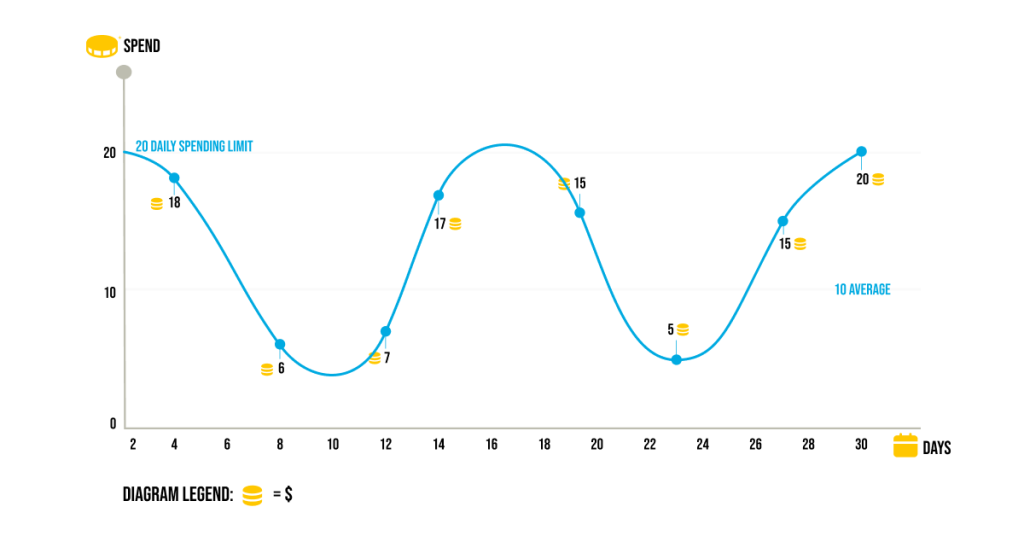
Setting an optimized budget that does not burn a hole in your pocket is an indispensable practice. You need to set an average daily budget, i.e., the average amount you’re ready to pay every day. You must also set your daily spending limit (should be 2x your daily budget) and a monthly spending limit (ideally 30.4x your average daily budget).

Set Your Budget Right

You must note that the daily ad spend varies based on the search traffic influx. Some days, there is heavy traffic, and on other days, there can be quite minimal traffic. The above image is a perfect example of how a monthly budget spend can vary over the course of a month.

This is how you can set your daily ad budget:

You can use the following Google Ads tools to help you set an optimized budget:

  • You can optimize your budget across existing campaigns through the Performance Planner tool.
  • You can set the maximum amount that you’re willing to pay for a user clicking on your ad through Cost-per-Click (CPC).

 You can calculate your daily average budget using the following equation: 

Average daily budget = (Monthly budget / Average number of days per month)

Tip 4: Make Up a Bidding Strategy

It is one of the best practices to set up your bidding strategy manually. However, you can also use automated bidding strategy options, such as Target Cost Per Acquisition (CPA), Target Return on Ad Spend (ROAS), maximize conversions, target impression share, maximize clicks, etc.
One upside of using an automated bidding strategy is that you do not need to update bids for specific keywords manually. You can use smart bidding that utilizes the power of AI to allocate a target CPA according to the set cost-per-click smartly.

Tip 5: Choose the Right Targeting Options

It is crucial to opt for the best targeting options for location, age group, audience, and other demographics. It is always a better option to drill down on targeting options rather than targeting a broad spectrum of audiences. 

Some of the common forms of targeting are as follows:

  • Keywords targeting to specify phrases that people tend to search for.
  • Audiences targeting to target a specific audience.
  • Language targeting to target audiences from various regions.
  • Location targeting to target individuals from different locations comprising of potential customers.
  • Device targeting to target a spectrum of different device users, such as iPhone, Android, etc.
  • Remarketing leads with Google ads. You can do this by connecting Google ads with Google Analytics (GA4), which helps analyze the website visitors and then retarget them with the ads.

Tip 6: Add Assets to Ads

There is more to ads than just running a plain campaign. Adding assets to ads, such as directions, website links, or phone numbers to call, can positively impact the PPC ad campaign performance. Adding these assets enhances the clickthrough rate by many percentages.

Note: You can also add sitelinks and images to your search ads to make them more responsive.

You must also add catchy headlines and descriptions that must be unique and focus on user benefits. You can add up to 15 headlines and 4 descriptions for a responsive search ad.

Tip 7: Create Group Ads and Choose the Right Keywords

An ad group contains one or more ads that share similar targets. You set a bid, or price, to be used when an ad group’s keywords trigger an ad to appear. This is called a cost-per-click (CPC) bid. You can also set prices for individual keywords within the ad group. Use ad groups to organize your ads by a common theme, such as the types of products or services you want to advertise.

You can create an ad group of ads that share similar interests. For example, if you’re running an ad campaign for trekking shoes, you can make a carousel group ad to do so.

Keyword targeting is yet another solid strategy to do so. Make sure that you prohibit the use of negative keywords to make a spectacular ad copy and keep it keyword-focused.
Note: You must try to incorporate long-tail keywords for a better-performing adcopy.

Tip 8: Solid Conversion Tracking

Although conversion tracking is not necessary for each type of PPC campaign, it works wonders for some. You can assess the effectiveness of your ads by setting up a conversion tracking system. This way, you can track the actions of the users on your website and understand how to optimize your Google ad campaigns.

Running ads is just not enough; it is crucial to track the actions of the users after they interact with your ad. This is exactly what the tool called Conversion Tracking does. It keeps track of the following conversions:

  • Whether a user signed up for a newsletter.
  • Whether he added a product to the cart.
  • Whether he purchased a product and much more.

Overwhelmed with Jargon? Let our Experts Handle the Technical Job

Deftsoft is the one-stop solution for running and optimizing successful Google ad campaigns for your business. We have an experienced team of PPC consultants that help you find the pain points in your ongoing ads or even better, manage Google ad campaigns for you. The search for one of the best PPC management companies ends here, as we have been an established digital marketing company for the last 18 years. 

Kickstart your journey to a vivid digital marketing experience with us.

FAQs:

What is a Google Ads campaign?

Google Ads campaign refers to online paid marketing campaigns that run on Google. Also known as PPC campaigns, these ads are based on the concept of bidding, where an advertiser bids for specific keywords that the potential users search on Google. 

What is Google’s optimization score?

The measure of how well your Google Ads account will work when running campaigns on Google is known as the Google optimization score. The score is depicted in percentages, with 100% being the highest and 0% being the lowest. Google offers recommendations on Account, Campaign and Manager Account levels to help you enhance your optimization score for better ad performance.

How many ads should be implemented per ad group?

You must use an optimized ad rotation with a minimum of 3 to 5 ads per group. It is because you never know which ad is going to resonate the most with the user.

How can google ads help you advance your business goals?

One of the best use cases of Google Ads is that you can target a specific audience to sell/create awareness about your product/service and enhance the visibility of your business. 

What is meant by quality score on Google?

Quality score refers to the comparison of your ad quality to other similar ads. You must have a high-quality score so that your ads can be visible to the users on SERP.

Move to AEM Cloud Service Like a Pro: Step-by-Step Guide

Is there a world where a CMS does not need any maintenance? Yes, there is! The stakes went high in 2020 when Adobe Experience Manager introduced AEM as a cloud service in January. AEM has been a pioneer in migrating on-premise software to the cloud since the beginning. Having said that, AEM cloud service is no surprise.

This state-of-the-art content management system is AEM’s cloud-native solution. Enterprises and business organizations can bring their most ambitious customer experiences to life. It transcends the conventional content management and delivery standards and redefines digital content and campaign personalization. 
This blog is the exact beginner-friendly guide to migrating Adobe Experience Manager Sites, Assets, and Managed Services to the cloud. Before discussing, we will also navigate through what AEM as a cloud service is, what the benefits of the AEM cloud service are, and what’s new in AEM cloud service.

What’s AEM Cloud Service? How is It Different from the Traditional AEM?

AEM as a Cloud Service is one of the most revolutionary offerings by Adobe Experience Manager. It is specially formulated to build customized, personalized, optimized, and content-led experiences. With extraordinary power through its sophisticated scalability, Agile methodology, and flexibility, it has become the preferred choice of service for top-notch enterprises.

 Since everything is hosted on the cloud, enterprises can say goodbye to the massive number of software updates, downtime experienced due to scheduled maintenance cycles, and scalability issues.

To sum up, AEM as a cloud service renders the following dollar-worthy features that are worth your every penny:

  • Always-ON:

The AEM cloud service never faces downtime. Since all the maintenance tasks are handled in the backend by the AEM itself, enterprises can harness the mighty features of AEM as a cloud service.

  • Always Up-to-Date:

The AEM cloud service does not require manual refreshes or a human workforce to check software updates. It always stays updated to the latest versions.

  • Always at a Perfect Scale:

Since the AEM cloud offers auto-scalability features, enterprises can save capital and deploy their budget to create customer segmentation and content personalization. This cloud-native solution scales up and down when required without human intervention.

  • Performance Resiliency:

The AEM as a cloud service is unique since it focuses on curating a seamless, robust, and efficient digital and content solution for enterprises. It caters to users with resilient performance through its high speed.

  • Secure by Default:

The AEM cloud provides secure solutions proactively. It looks for vulnerabilities in the software and, thus, offers quick fixes for the identified set of errors, bugs, and weaknesses. This feature allows enterprises to invest in other significant resources.

  • Intelligent Microservices:

AEM cloud service also offers various intelligent microservices. For example, a highly performant asset ingestion service integrates Adobe Sensei with the latest research technologies like smart tagging, cropping, etc.

The above highlighting features make it different from the traditional Adobe Experience Manager services that do not offer such robust features.

How Do You Migrate to AEM as a Cloud Service?

The primary goal of AEM cloud service is to eliminate the load of planning for product updates and instead focus on innovating novel ideas for elevated enterprise success. After all, AEM as a cloud service is a secure, scalable, flexible, and extendible solution for digital marketers and IT professionals.

One can boost their website and digital asset performance efficiencies by moving to the AEM cloud services. The AEM cloud takes responsibility for automatically rolling out new product features by testing and optimizing the features on the backend. This phenomenon ensures that the enterprise teams get the best and state-of-the-art applications.

There are three main phases of moving to AEM cloud service. These are mentioned as follows:

  • Planning
  • Execution 
  • Post Go-live

These phases can be illustrated in a high-level form as the following:

1. Planning:

Before you plunge into the practice of migrating to AEM cloud service, you must check your readiness to assess these AEM cloud services. You can do so by running tests through the Best Practices Analyzer (BPA) on the source environment.

After running tests, it is a pivotal practice to establish project Key Performance Indicators (KPIs), define success criteria, and fix project timeframes.

2. Executing:

The next step is execution. It involves the process of deploying project code to an Experience Manager Cloud service instance. To implement this practically, one must thoroughly educate oneself about the AEM Cloud Manager.

With the help of Cloud Manager, enterprises can manage the AEM as a cloud service quickly and seamlessly. It has dedicated Continuous Integration and Continuous Delivery (CI/CD) frameworks. These frameworks speed up the process of customized deliveries and updates without degrading the performance.

The next steps involved in the execution stage are mentioned as follows:

A. Content Migration

In the execution process, the first step is to migrate all the content from the existing AEM instance to the AEM cloud service instance. It can be done using the following two tools:

  1. Content Transfer Tool:

This tool is used to transfer content from an on-premise or AMS Adobe Experience Manager instance to an AEM cloud service instance.

  1. Package Manager:

It is a zip file that is used to import and export mutable content of the repository.

B. Refactor/Optimize Existing Code

You must first compile your code using the SDK API Jar and review AEM Dev guidelines, such as log running jobs and background tasks, sling schedulers, input stream usage, etc.

The code restructuring process without changing the code’s external behavior entails the code refactoring process. Code refactoring aims to ensure that the existing code is compatible with AEM as a cloud service.

The code refactoring process includes the following:

  • Running Best Practices Analyzer (BPA) on the source environment.
  • Considering project structuring based on Cloud Archetype.
  • Separating the code from the content, i.e., mutable and immutable. For instance, /apps and /libs are considered immutable; however,/content, /conf, /var, /etc, /oak:index, /system, /tmp, etc. are mutable, which means that they can be changed anytime during the runtime.
  • Reviewing and executing the required changes in the code and deploying them on a local SDK.
  • Performing smoke testing with the help of AEM SDK.

The Repository Modernizer tool is one of the best tools to modify multiple AEM Maven projects to a compatible version for AEM as a cloud service. You can follow the below demonstrated Maven project structure to perform code refactoring:

You can speed up the code refactoring process using tools such as Dispatcher Converter, Asset Workflow Migration, and the AEM Modernizer tool. You can review Dispatcher configurations for refactoring.

C. Deployment/Go Live:

Now that you’ve executed the code, it is time to deploy it. AEM provides its own single git repository, which uses Cloud Manager’s CI/CD pipelines to deploy the code. If you don’t want to use AEM’s repo, you can also use an on-premise or customer-managed git repo with AEM Cloud Manager.

You can then run the customer code through the Cloud Manager Quality pipeline.
It is important to test the code after deploying it. You can perform test cycles using various types of tests such as smoke testing, QA, and many more. After validating the test, your AEM instance is ready to go live on the AEM Cloud Service.

3. Post Go-Live:

After going live, cleaning up temporary files, managing logs, and ensuring you’re following the best industry practices are crucial. It is important to make sure that everything is working as expected after going live.

Do You Really Need to Ditch Your Current CMS for AEM Cloud Service?

AEM Cloud Service is indeed a hefty investment, especially if you’re an enterprise already deploying an efficient CMS. In such a case, do you really need to shift to AEM cloud service? 

You can either ask your CMS or cross-check yourself to find if your answers are positive for the following questions:

  •  Does your CMS scale up and down automatically in times of abrupt increase in traffic flow?
  • Is your CMS solution 99.99% available?
  • Does your CMS fix bugs and update software automatically at its backend?

If your answer is affirmative to the above questions, you don’t need to upgrade. However, if it was negative even for two pointers, it is time to switch to Adobe AEM as a cloud service.

It’s a Wrap!

That’s all for the guide for AEM as a cloud service local setup. The world is abruptly adopting the power of cloud computing, and the digital world is at the apex of the line. An enterprise can supercharge its productivity and efficiency by seamlessly following this migration guide to AEM cloud service.

If you’re looking for a detailed step-by-step guide to moving from AEM to AEM cloud service, this is the perfect guide for you. We mentioned the three most pivotal phases of the migration process, how to tackle emerging issues, and whatnot. 
Stay tuned for more AEM-related guides and updates with Deftsoft

FAQs:

What is meant by AEM cloud services?

AEM as a cloud service is a new-generation solution to working in scalable, highly available, and Agile environments. It is a cloud-native solution for all the AEM instances, such as Adobe Experience Manager Assets, Adobe Experience Manager Sites, AEM Managed Services, etc. It also offers new software updates and keeps the AEM instances up-to-date. Therefore, it reduces pressure on IT teams and marketers so that they can focus on other productive tasks.

What is required to access AEM as a cloud service?

 An enterprise user must be added to a group of the required Cloud Service Products. There are various AEM Administrators and AEM user profiles. You also need to make sure that your AEM instances are compatible with the recent releases of the latest version of the AEM cloud service.

What tools are used for migrating to AEM as a cloud service?

There are mainly two tools that are used for migrating to AEM as a cloud service. These are: 1. Content Transfer Tool, 2. Package Manager.

What is the key difference between Adobe Managed Service (AMS) and AEM as a cloud service (AEMasCS)?

Adobe Managed Service is a hosting offering by Adobe Experience Manager for the conventional AEM 6.5. On the other hand, AEM as a cloud service is a Software-as-a-Service (SaaS) offering by Adobe that provides scalability, high availability, elasticity, security, and agility for varied AEM instances. 

What is the difference between AEM 6.5 and AEM cloud service?

Since AEM as a cloud service is a Software-as-a-Service (SaaS), i.e., it is not hosted locally on a data center. Therefore, it is lighter than the traditional Adobe Experience Manager (AEM) 6.5. Also, AEM cloud service has a lower ownership cost than AEM.

How to Create Events in Google Analytics (GA4)?

Quick Question: Have you ever wondered what happens when you click on any buttons on the website or submit a form on a website? What do those digital mix-ups turn to? Well, the answer is a little tool called Google Analytics. 

Google Analytics, huh? What is that? 

It’s a secret detective for your website, helping you uncover the mysteries of your online visitors and in this blog we will understand and learn how to create events in Gogle Analytics.

Let us understand this way.

Imagine you have a friend who is a data wizard, always ready to explore how people interact with your website. You could ask this friend questions like ‘How many people have visited my site today?’ or What pages are they most interested in?’ – and voila, Google Analytics would be his answer.

Simply put,

Google Analytics enables users to track and analyze various aspects of website or app performance, including user engagement, traffic sources, conversion metrics, and more.

Now, let’s dive a little deeper. Have you ever wondered how you could track more than just page views? That’s where the main character of the story comes up Event in Google Analytics.

So, what exactly are these? Well, think of them as the breadcrumbs that your visitors leave behind as they navigate your website. Did someone click on a button? Bingo, that’s an event. Did someone download a file? Another event! 

Events are like the footprints of your users, which we are going to discuss in detail.

 So, hold on tight! We are going to visit our first stop: understand what these events are all about. Ready? Let’s roll!

What are Events in Google Analytics?

An “event” is a specific action that users perform on a website or app. It goes beyond traditional pageviews, offering a detailed glimpse into how visitors engage with your digital space. Clicks, downloads, video views, form submissions – each of these is an event, leaving proof that reveals user behavior and preferences.

Importance of Events in Analytics:

  • Granular Insights: Events provide granular insights beyond mere page visits, allowing you to understand exactly how users interact with your content.
  • User Engagement Metrics: They serve as vital metrics for gauging user engagement, showcasing what elements are resonating most with your audience.
  • Conversion Tracking: Events are instrumental in tracking conversions, helping you identify which actions contribute most to your business goals.
  • Refinement of User Experience: By analyzing events, you can refine and optimize the user experience, tailoring it to what your audience finds most valuable.

Different Types of Events:

Types of Events in GA4
  1. Automatically Collected Events: These events are automatically tracked by GA4 without requiring explicit configuration. Examples include page views, scroll events, and outbound clicks. They offer fundamental insights into user behavior.
  2. Enhanced Measurement Events: These events provide additional data automatically collected when enabled. They include interactions like file downloads, video engagement, and ad clicks. Enhanced Measurement enhances the default tracking capabilities for a more comprehensive analysis.
  3. Recommended Events: Google Analytics 4 offers pre-defined event suggestions based on common industry practices. While not automatically implemented, they can be easily activated to track essential actions like sign-ups or purchases, streamlining the setup process.
  4. Custom Events: Businesses can define custom events tailored to their specific goals. This allows tracking of unique interactions, such as button clicks, form submissions, or other user engagements, providing flexibility and granularity in analytics configuration.

How to Set Up Custom Event Tracking in Google Analytics (GA4)

Custom events in Google Analytics allow you to track specific user actions on your website. They provide a flexible way to gather data on unique activities relevant to your business goals, enhancing the depth of your analytics insights.

Steps to Create Custom Events:

Step 1: Navigate to GA4 Property: Select your GA4 property and then click on Admin

Navigate to GA4 Property

Step 2: Go to the “Events” Section. Under “Data Display,” click on “Events.”

Go to the "Events" Section

Step 3: Click “Create Event.” Create a new event and define parameters.

Click "Create Event

Step 4: Configure Event Details: Set Event Name, Category, Action, Label, and Value.

Configure Event Details

Step 5: Click on “Create and Save

Click on "Create and Save"

Detailed Step-by-step guide Setting Up Event Tracking in Google Analytics

Event Tracking in Google Analytics is like giving Sherlock a magnifying glass to examine user interactions on your site closely! To set up event tracking in Google Analytics 4, you can use either the Google Analytics 4 tag or the Google Tag Manager.

1. Using the Google Analytics 4 Tag:

First things first: Visit https://analytics.google.com/ and log in with your Google account credentials.

Step 1: Go to your Google Analytics 4 property and click “Admin”

Go to your Google Analytics 4 property and click Admin

Step 2: Click “Events” under “Data Display”

Click Events under Data Display

Step 3: Click on “Create Event”

Click on Create event

Step 4: Enter a name for your event (e.g., “button click” or “video play”) and then apply the condition of conversion/ event that you are looking to track. (Optionally) add any parameters.

Configure Tag

Step 5: Click “Create”

Click Create

Note: Once the event is created, enable the “Mark as Conversion Buttons” of events that you want to track as conversions.

2. Using Google Tag Manager (GTM):

Go to your Google Tag Manager account: https://tagmanager.google.com/

Step 1: Create a tag in GTM

Click “Tags” and then click “New”

Create a tag in GTM

Give your tag a name and select Google Analytics: GA4 Event.

Give your tag a name
 select Google Analytics
Click on GA4 Event

Enter your Google Analytics 4 measurement ID, event name, and Parameters.

Enter your GA 4 measurement ID, event name, and Parameters

Click Save.

Click Save

Step 2: Create a Trigger in GTM

Go to triggers and click on “New”

Go to triggers

Enter trigger name

Enter trigger name

Select the trigger type and add the condition you want to track.

Select the trigger type
add the condition you want to track

Click submit.

Click Submit

Step 3: Click on the tag that is created in Step 1

Step 4: Click on “Triggering”. Choose the Trigger that we have created.

Step 5: Click Save.

Step 6: Publish your changes to Google Tag Manager.

Once you have set up event tracking, you can start to see data in your Google Analytics 4 reports. To view your event data, go to your Google Analytics 4 property and click Reports. Then, click Events and select the event you want to view.

How to Create an Event for a Form Submission on Google Analytics?

create an event for a form submission
  • Follow Step 1: Creating a tag.
  • Follow Step 2: Create a trigger in GTM mentioned above (mention condition form submission)

We Can Track the Form Submission with Two Methods:

Method 1: Thank you, Page Tracking,

Step1 – Click on create Trigger< Page View<Some Page View< Page URL<Contains<Thank You< Save

Step2: Click on Save Tag< Submit

 Method 2: “Submit Form” Button Tracking

Step1 – Click on create Trigger <All Elements<Some Clicks<Click Elements<Equals<Paste the CSS Selector of your Submit Form Button <Save

Step2Click on Save Tag< Submit

How Do I Check Events in Google Analytics 4?

Step 1: Log in to your “Google Analytics” dashboard: 

Log in to your Google Analytics dashboard

Step 2: Click on “Reports

Step 2: Click on Reports

Step 3: Click on “Engagement

Check-events-in-GA4-3-1-1024x536

Step 4: Click on “Events

Check-events-in-GA4-4-1-1024x536

After clicking, you’ll see a list of events that are created in that account.

Conclusion

Google Analytics 4 (GA4) acts as a detective for your website. It goes beyond page views, utilizing events to track specific actions like clicks, downloads, and form submissions, revealing invaluable insights. Events serve as breadcrumbs, detailing user footprints and preferences. With GA4, you can control automatically collected events, enhanced measurement events, recommended events, and custom events for a comprehensive analysis. Whether using GA4 tags or Google Tag Manager, event tracking allows you to refine user experiences, optimize conversions, and gain granular insights into user engagement.

Top Digital Marketing Trends to Keep an Eye on in 2025

Today’s fast-paced world demands novel and evolving technologies. Everyone is looking for efficient ways to prosper in digital marketing. Be it the riveting rage of AI or the premier art of hyper-personalization, digital marketers aspire to robustly shape the world of marketing.

Top Digital Marketing Trends 2024

Since 2025 is approaching, it is crucial to adopt new ways of digital marketing. This blog is the perfect guide if you’re on the lookout for new-age digital marketing trends and technologies. You’ll learn about the digital marketing practices in focus, the major trends in digital marketing in 2025 and the best practices in digital marketing.

Without further ado, let’s begin!

What will Digital Marketers Focus on in 2025?

The digital marketing industry is ever-growing, with a magnified focus on retaining and grabbing more users. As you follow the latest digital marketing trends, it is imperative to focus on the following practices:

  • Reactivation and retention

A digital marketer’s primary focus should be re-engaging customers who have drifted away through personalized ads. Another priority should be on maintaining relationships with existing customers.

  • First-party data activation

With the increased privacy concerns amongst users, third-party cookies are declining. This is potentially giving rise to the use of first-party data platforms. The use of first-party data abides by the strict regulations of data privacy.

  • AI-powered marketing

Integrated Artificial Intelligence (AI) is another essential aspect of the latest digital marketing trends 2025. The use of AI is becoming prominent in carrying out real-time data analysis and predictive analysis, automating iterative and fundamental tasks, and enabling effective campaign management. Now, it’s time to address the hot topic: top digital marketing trends for 2025!

Top 6 Digital Marketing Trends 2025

Top 6 Digital Marketing Trends 2024

Stepping into 2025 marks the adoption of new-age technologies, platforms and techniques to foster business growth. Many emerging technologies are completely transforming the face of digital marketing. Every business has an online presence today, and it can only survive with the backbone of digital marketing.

Let’s delve into the novel trends of digital marketing for 2025 that will become massive this year.

1. The AI Effect on Marketing

“AI is a good tool to start creative work but not the best to finish it. It definitely needs a human involved”.

Jonathan Nelson, Digital Marketer at Growth American Marketing Association

Artificial Intelligence (AI) has evolved the way digital marketing works. AI intervention is transforming the way digital marketing works. AI-driven predictive analysis allows digital marketers to keep an eye on the marketing patterns and trends, which helps streamline the marketing funnel. It also helps in automating boring and iterative tasks. On top of that, analyze data in real-time. 

Another important application of AI in digital marketing is harnessing the utility of AI-powered chatbots. Chatbots are one of the fastest-growing brand communication channels. 65% of the Internet and software companies use chatbots, according to a recent report by Colorlib. One of the notable benefits of using chatbots is hyper-personalization and targeted marketing.

2. Customer-Targeted Personalization

Targeting users with personalized ads will be a prominent trend in the marketing industry. You can only target a few people with a single marketing campaign since everyone has their preferences, personality, and requirements. A customized approach can be used to target each customer personally. The personal preferences of the users keep on evolving with time.

Customer-Targeted Personalization

Gone are the days of sending personalized emails to users to lure them into buying your services or products. Personalized marketing is more than that. You need three things to tailor a personalization strategy:

  • Curating a Buyer Persona
  • Building a Content Strategy
  • Analyzing Historical Data of User Buying History

One of the most apt examples of customer-targeted personalization is Netflix recommending movies based on the previous genre of movies you’ve watched.

3. Shifts in Social Media

According to a recent statistic released by Forbes claims that 77% of businesses use social media to attract customers. Customers prefer social media over Google to look for the things they’re interested in. For instance, if someone wants to find out the best restaurants in New York, he’ll prefer short-form video content over TikTok to search on Google.

To back up this example, 67% of TikTok users use it to discover new brands. Therefore, opting for social media as a marketing tool is one of the most popular digital marketing trends in 2025.

You can follow the below-mentioned practices to establish a solid online presence for your brand:

  • Focus on creating short-form video content on Instagram reels and TikTok.
  • Post interactive polls and quizzes on your social media platforms for enhanced customer engagement.
  • Establish your brand’s identity by posting social media posts of the services/products you offer.

4. Privacy-Driven Marketing Strategies

It is one of the massive changes that all of us have been anticipating for quite some time now. 2025 looks like the year of significant strides since Google plans to deprecate the use of 3rd-party cookies for 1% of Chrome users in the first quarter of 2025! 

It will mark the beginning of a new era where digital marketers will have to opt for a more sophisticated and planned approach to track the activity of users. Conversely, the use of first-party cookies is going to become prominent. 

How can you formulate a strategy to use these cookies? You can track consumer behavior across various channels by using 1st-party data with other user data and make predictive assessments. On top of that, you can also include consented 3rd-party data. This practice will ensure effective targeting strategies to navigate through the post-cookie tracking era and will trickle down as one of the digital marketing trends in 2025.

5. Mobile-Focused Marketing

Another important aspect of the latest digital marketing trends in 2025 is the worldwide adoption of mobile-focused marketing. Mobile users account for over 55% of website traffic. Therefore, itis evident that most online users prefer surfing on a mobile phone to a desktop.

Being a digital marketer, you must acknowledge the need to optimize websites for mobile views. A user must have an incredible and seamless digital experience when surfing on the phone. So, consider crafting mobile-friendly email campaigns, Facebook ads, etc.

You can better engage with the target audience by investing in mobile-focused marketing campaigns since they align with the user’s needs.

6. Customer Segmentation

Customer segmentation divides customers into sub-groups based on their preferences, demographics, behavior, etc. The purpose is to reach out to these people with shared interests. One example of customer segmentation is targeting different groups of audiences with selected emails related to their area of interest.

What are the Best Practices in Digital Marketing in 2025?
What-are-the-Best-Practices-in-Digital-Marketing

Now that you’re well aware of the major trends in digital marketing for 2025, it is time to learn about the best practices in digital marketing that you must follow in 2025. These best practices are listed below:

  • Listen to the audience

Making rough speculations about what the users want is equivalent to throwing a shot in the dark and thus, missing the bull’s eye. This is the reason why it is vital to listen to what the audience wants, not what you want.

  • Use personalization and segmentation

 The next best practice in digital marketing is to curate relevant messages to the target audience and align the best with the customers’ interests. Practice customer segmentation for the profound effect of marketing strategies.

  • Don’t copy others

Do not get carried away with the digital marketing strategies that someone else follows. Think straight and do what works best for you.

  • Business-aligned strategies

Your marketing strategy must be relevant to your business goals, not the other way around. Persistent communication between the marketing and business teams is necessary for a result-oriented marketing strategy.

Wrapping Up

Keeping an eye on the latest digital marketing trends for 2025 can help you foster your brand exponentially. The digital market is quite volatile; therefore, you must wrap your head around the latest trends. This blog entails all the significant trends we can expect in 2025. Strategizing accordingly can be fruitful for your business.

Start working on your strategies now to stay ahead of the marketing curve!

FAQs

What are the latest trends in digital marketing?

The latest trends in digital marketing in 2025 include adopting social media marketing, mobile-first marketing, opting for 1st-party cookies, integration with Artificial Intelligence, hyper-personalization of content, and customer segmentation.

What is the digital strategy for 2025?

One of the best digital strategies for 2025 is opting for 1st-party cookies. This would enhance your customers’ trust and loyalty. Other strategies include AI-driven predictive analysis, and digital marketing on social channels such as TikTok, etc.

What is the future of digital marketing?

The future of digital marketing is using Artificial Intelligence and Machine learning to analyze user behavior. This would help in the hyper-personalization of services and products, thus leading to increased brand revenue.

What is the best practice in digital marketing?

Formulating a digital marketing strategy in alignment with the business goals is one of the best practices in digital marketing.

What is the most significant social media trend for 2025?

Incorporating Virtual Reality (VR) and Artificial Intelligence (AI) to capture a larger audience on social platforms is one of the biggest social media trends in 2025.

Why Should You Deploy AI in Software Development?

Artificial Intelligence (AI) is considered a threat to tons of technical and creative jobs today. People are restraining themselves from technical roles, such as Software Developers, Engineers, etc., for fear of losing their careers in the near future. 

According to a Forbes Advisor survey, approximately 64% of business organizations believe that Artificial Intelligence (AI) will help boost their overall efficiency. This statistic is a massive indicator of innate confidence in AI’s ability to transform business operations and functionality. The global Artificial Intelligence Software market revenue will reach $126 billion by 2025!

global Artificial Intelligence Software market revenue

Thanks to the power of Artificial Intelligence (AI), it can rev up the process of performing tedious software development tasks by automating them, making software deployments more efficient, aids in consisting the code, and helps in migrating from one API or framework to another with ease. 

Since AI in software development plays a pivotal role in shaping the industry, discussing how AI helps in software development is non-negotiable. This blog is the perfect source of information for software developers and other technical individuals seeking to understand AI’s impact on the industry.

Let’s begin discussing how to apply AI in software development without further ado.

Real-Life Use Cases of Artificial Intelligence (AI) in Software Development

I’m jazzed, in particular, about the potential for AI to take away those more mundane activities and to make it so that we can all focus on the fun part of the job, which is asking questions, creating things, and then using code to solve problems.

Paige Bailey, Product Lead for Generative AI Models at Google

AI has taken the world by storm because of its unfathomable efficiencies and the ability to help tech people focus on the creative part of the job, thus positively contributing to the productivity cycle of the job. One can unlock the power of AI in performing a broad spectrum of technical tasks as a software developer. 

Some of the real-life use cases of Artificial Intelligence (AI) in software development are as follows:

  • Code snippet generation:

One of the most relevant and impeccable applications of AI in software development is harnessing the power of AI-backed tools for writing code snippets or even comprehending a snippet of code that is difficult to understand. One such AI-powered tool is Open AI’s Co-Pilot. It is a valuable tool for programmers and software developers as it helps generate code snippets and complete single-line and multi-line codes. 

Therefore, the process becomes much more efficient and productive when a software developer authorizes code.

  • Code review:

According to a recent study by McKinsey, software developers can complete coding tasks twice as fast with Generative AI.

study by McKinsey

As evident from the above image, there is a significant reduction in completing coding tasks by harnessing the power of AI.

The integration of machine learning models in the code review process has become quite significant. Imagine this: if some reviewer requests a change in code in a business organization, the AI tools can automatically help generate code to help make the changes. Therefore, it has become easier to support software developers in their everyday job of developing, sharing, and completing code, identifying bugs, etc.

  • Cutting down organizational costs:

With the help of Artificial Intelligence, a software developer can identify bits of code that aren’t as efficient as they seem to be. This process further helps save a lot of money since these code redundancies can be identified on a small scale, thus preventing them from being applied on a larger scale in a business organization or enterprise.

For instance, if you’re a software developer in a colossal enterprise, identifying even one small change can impact the dynamics of up-and-running data centers. This process of recognizing code shortcomings can help save the power of thousands of data centers’ Graphic Processing Units (GPUs). Leveraging AI in software development helps reduce surplus costs and saves millions and billions of dollars.

How AI Aids in Software Development?

Now that we’ve discussed the real-life use cases of AI in software development, it’s time to discuss why to use AI in software development. The following are some of the most noteworthy ways of why to use AI in software development:

AI Aids in Software Development

1. Optimization of code:

By utilizing the power of AI algorithms, one can analyze codebases and identify where there is scope for code optimization. A software developer can create robust and more efficient software solutions by suggesting improvements in code and significant ways to optimize source code.

For instance, a software developer can utilize the ‘code support’ feature when using Bard. You can then generate natural language and source code with syntax highlighting, which can be further exported into Google Colab Notebook or any other developer services. On top of that, Bard also helps in debugging the code.

2. Enhanced security:

The use of AI can help in identifying vulnerabilities in software systems. Therefore, it can help suggest improvements to generate more secure codes, including cross-site scripting, SQL injection, etc. 

For example, AI can recognize and patch vulnerabilities in systems and software that help prevent future cyber attacks or any other malicious attack. AI algorithms also offer software solutions for improved security.

3. Predictive analysis:

Data-driven development is part and parcel of software development at present. Making informed decisions is crucial for any business organization; however, it is time-consuming for a human to analyze vast amounts of data alone. AI can help optimize processes, identify potential risks and vulnerabilities, and make data-driven decisions.

The AI uses machine learning algorithms and statistical models to forecast events and identify software vulnerabilities, thus saving much money.

4. Enhanced user experience:

Software developers can leverage the potency of Artificial Intelligence by increasing user personalization of software and further transforming the user experience. One can use AI to recommend customized and tailor-made content to the user.

5. Quality assurance and software testing:

Artificial Intelligence also plays a critical role in software testing and quality assurance. It can generate test cases automatically, execute tests based on different scenarios, and even analyze results in real-time. These AI-backed software testing tools share various levels of autonomy, ranging from integrated automation testing to autonomous testing.

For example, Mabl is one of the best and the mightiest AI-powered testing tools. It allows low-code testing as the script does not need to use this tool. Since it provides robust testing throughout the software development process for large teams, it is an excellent tool for busy teams. 

6. Robust development:

Many software development processes can be streamlined with the use of machine learning and deep learning methodologies. It would eliminate the need for manual testing as it has the power to test software at every stage. AI has especially helped DevOps teams speed up the software development process and bridge the gap between software development and operation processes teams.

7. Better system design:

Artificial Intelligence has a beautiful application in architecting system design. For example, AI can be used to predict real-time results when new requirements are incorporated into a system. This application of AI helps enterprises and business organizations gauge the spending on system design and keep track of their monthly budget. 

Companies can leverage the power of AI in recommendation engines, chatbots, etc., to enhance the functioning of systems and software in general.

8. Code debugging:

One of the most powerful uses of AI in software development is debugging codes. Apart from fixing bugs in the code at high speed, it can also fix potential issues, thus improving the quality of the software. 

Software developers can save significant time by using AI for troubleshooting code and debugging. For instance, Rookout is an excellent tool with real-time debugging capabilities. Similarly, Undo is an intelligent AI tool that offers a sophisticated user interface and capabilities to debug codes as a software developer.

9. Building efficient software:

The role of AI in software development has now become indispensable. Software can become less resource-intensive, more efficient, productive, and quick to fix bugs by integrating AI into software and systems. AI has also been significant in fortifying software from malicious attacks and building safe code snippets.
For example, Microsoft’s AI-powered tool, “Project InnerEye”, has played a pivotal role in helping doctors cure cancer by analyzing images. Microsoft is deploying this same technology to optimize the performance of the Windows operating system.

10. Bridged the gap between humans and machines:

Microsoft's AI-powered tool

Software can comprehend, understand, and respond to human language. Thanks to Natural Language Processing (NLP). It plays a critical role in helping machines understand the language of humans and translate it into something that is understandable to machines. One can enhance software’s efficiency, quality, and robustness by using AI-backed Natural Language Processing (NLP). 

In fact, a recent study by Accenture claimed that the testing time was reduced by 80% with the help of AI in software development.

11. Project management:

Leveraging Artificial Intelligence in project management provides valuable and actionable insights for the process of application development. A lot of routine work can be automated with the help of AI, including setting up meetings, managing milestones and goals, allocating projects, and delegating a diverse range of tasks.

12. Accelerated prototyping:

Software developers can explore the capabilities of AI in software development through AI-backed automated code generation. This practice rapidly helps prototyping because of the robust iterations and various refinements. Thanks to AI, business organization teams can collaborate more efficiently over projects, identify bugs and errors early in the codes, reduce time-to-market, and explore a broad spectrum of design capabilities.

In a Nutshell

Artificial Intelligence is an ocean of various technologies and new-generation techniques. While the world is exploring this ocean of infinite opportunities, applications, and advantages, it is trickling down in the software development industry. Software developers, engineers, administrators, and technicians are maximizing their professional efforts by leveraging the strength and capabilities of AI in software development.

From finding bugs in codes to enhancing the speed of software testing, the software development industry is fostering the unparalleled contributions of AI. After all, AI is not here to replace the jobs of software developers but to optimize output. 
If you’re a business organization or enterprise looking to expand its horizons in the software development industry, now is the best time to unveil the shroud of unlimited possibilities with AI in software development. Deftsoft has a team of industry-experienced software developers who are well-versed in Artificial Intelligence. Get tailor-made solutions with us!

FAQs:

How can AI help in software development?

Software developers can utilize AI in software development by exploring its infinite applications in the industry, such as its ability to identify bugs in codes rapidly, write efficient code, contribute to the optimized functioning of data centers and cloud, accelerate the process of software testing, aid in project management and help DevOps professionals in improved software functionalities and deliveries.

What are the significant impacts of AI on software development?

AI has transformed the software development scenario since it has eliminated various redundancies in the system, ranging from inefficient code to the analysis of complex codebases. This primary functionality of AI has positively impacted the software development industry and made codebases less complicated, more straightforward to comprehend, and more efficient.

Can AI replace software developers in the future?

No, AI cannot replace software developers in the future. The technology is here only to empower and ignite the software development process. In fact, software development has only improved with the integration of AI tools and algorithms.

What are some of the AI tools used in software development?

Some of the most popular AI tools deployed in software development include AppliTools, GitHub CoPilot, Mabl, Tabnine, ChatGPT, etc. All these tools have different functionalities and use cases. For instance, Mabl is a wonderful tool for large-scale software testing for enterprises or busy business organizations. On the other hand, GitHub CoPilot is a code generation tool that helps software developers write multi-line or single-line code.

How to integrate AI into software?

One of the most important steps is to create an overview of the complete AI development lifecycle and make note of the AI Tech Stack, which can help you measure the requirements before beginning with the integration of AI into software.

Should you use AI in software development?

Yes, it is beneficial to use AI in software development. It can help in efficiently writing codes, managing codebases, enhancing the efficiency of software, testing software, and locating bugs in the code. Many AI integration tools can be integrated into the software development process to analyze its efficiency and productivity.