What Is a Content Roadmap? A Complete Guide to Better Content

Most businesses regularly post on their website or social channels, but very few publish content that actually moves the needle. The difference almost always comes down to strategic planning. If your blog posts feel disconnected, your traffic has hit a plateau, or your team is constantly wondering what to write next, you are likely missing a clear content roadmap or the one you simply aren’t delivering.

This guide breaks down exactly what a content roadmap is, why your brand needs one, and how to build a strategy that drives measurable traffic. From in-depth keyword research and topic pillars to content calendars, performance tracking, and expert SEO services, you will learn how to build a roadmap that keeps your strategy on target and produces real growth.

Ready to scale your content strategy with a customized roadmap?

Align your content with real business growth.

Quick Navigation

What Is a Content Roadmap?

Why Is a Content Roadmap Important?

Keeps Content Aligned With Business Goals

Helps You Create More Consistent Content

Makes Content Planning Easier

Prevents Random or Repetitive Topics

Improves Team Collaboration

Helps Measure Content Performance

Future-Proofs Your Brand for AI Search

Content Roadmap vs. Content Calendar: What’s the Difference?

What Should a Content Roadmap Include?

Content Goals

Target Audience

Buyer Personas

Content Topics and Pillars

Target Keywords

Content Formats

Publishing Channels

Content Timeline

Content Owners and Responsibilities

KPIs and Performance Metrics

How to Create a Content Roadmap Step by Step

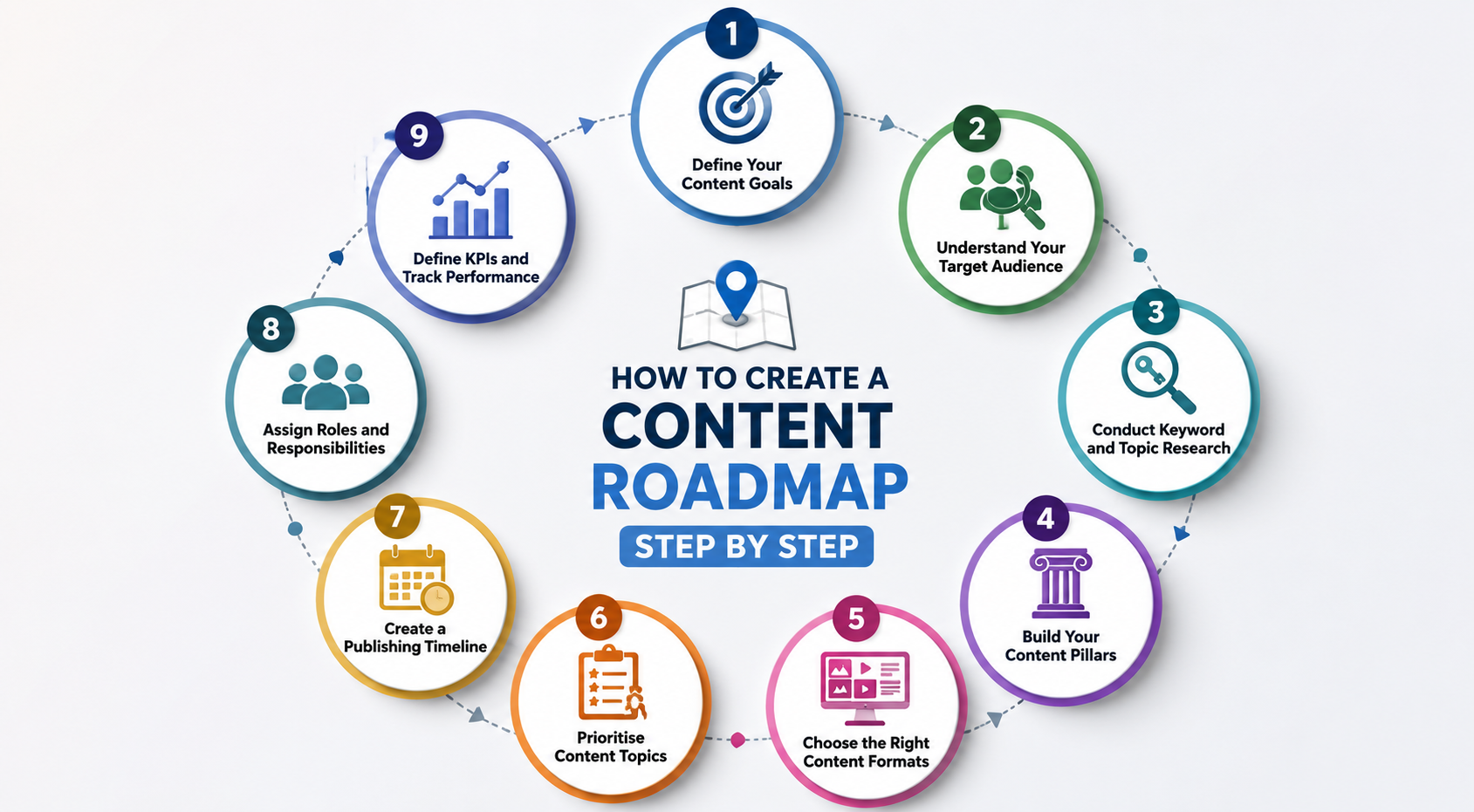
1. Define Your Content Goals

2. Understand Your Target Audience

3. Conduct Keyword and Topic Research

4. Build Your Content Pillars

5. Choose the Right Content Formats

6. Prioritise Content Topics

7. Create a Publishing Timeline

8. Assign Roles and Responsibilities

9. Define KPIs and Track Performance

Content Roadmap Example

How to Organise Your Content Roadmap

Common Content Roadmap Mistakes to Avoid

How to Keep Your Content Roadmap Updated

Content Roadmap Tools You Can Use

Why Choose Deftsoft for Content Marketing?

Conclusion

Frequently Asked Questions

What Is a Content Roadmap?

A content roadmap is a strategic plan that maps out what content you’ll create, why you’re creating it, who it’s for, and when you’ll publish it. It connects your content goals, audience needs, topics, channels, and timelines into a single, coherent framework. Think of it as the strategy layer above your day-to-day publishing schedule.

It’s different from a basic content calendar, which tells your team when to publish. A content roadmap tells your team what to create and why it matters long before a single word gets written. It connects your content goals, audience needs, topics, channels, and timelines into a single framework. In today’s landscape, a complete roadmap also accounts for AI SEO ensuring your content isn’t just optimized for traditional Google searches, but structured for ranking on ChatGPT and other conversational engines.

Simple example: A SaaS company targeting HR managers might build a content roadmap with three pillars: employee onboarding, HR compliance, and team productivity. Each pillar gets target keywords, formats (blog posts, guides, case studies), assigned writers, and a quarterly publishing plan. That’s a content roadmap in action.

A content roadmap answers:

  • What are we trying to achieve with content?
  • Who are we writing for?
  • Which topics and keywords will we cover?
  • What formats and channels will we use?
  • What does the timeline look like?
  • How will we know if it’s working?

Why Is a Content Roadmap Important?

Publishing content without a roadmap is like building a house without blueprints. You might get something standing, but it won’t be efficient, structurally sound, or built to last.

Here’s what a well-built content roadmap actually does for your business.

Keeps Content Aligned With Business Goals

Every piece of content should serve a purpose driving traffic, generating leads, building brand authority, or retaining customers. A content roadmap forces you to start with business objectives and work backwards to content decisions. Without this alignment, teams end up publishing content that gets clicks but converts nobody.

Helps You Create More Consistent Content

Consistency is one of the hardest parts of content marketing. Without a plan, publishing frequency drops during busy periods and spikes randomly when someone has a sudden idea. A roadmap gives you a predictable publishing rhythm, which also sends positive signals to search engines.

Makes Content Planning Easier

Instead of reinventing the wheel every week, your team works from a pre-approved plan. Topic ideas, keyword targets, formats, and owners are already decided. This removes the friction that kills most content programs, the blank-page problem at the planning stage.

Prevents Random or Repetitive Topics

Without a roadmap, teams often write about the same topics twice, skip important areas entirely, or chase trending topics that have nothing to do with the business. A roadmap maps your coverage intentionally, so every piece adds something new and relevant.

Improves Team Collaboration

A content roadmap gives writers, SEO specialists, designers, editors, and developers a shared view of what’s happening and when. Everyone knows their role, their deadlines, and how their work fits into the bigger picture. This is especially important for content writing services teams managing multiple projects at once.

Helps Measure Content Performance

You can’t improve what you don’t measure. A content roadmap defines KPIs upfront organic traffic, rankings, leads, conversions so performance tracking becomes part of the process rather than an afterthought. This is what separates professional SEO content writing services from random publishing.

Search behavior is shifting toward zero-click and generative answers. A structured content roadmap ensures your content is formatted specifically for ranking on Google AI Overview and AI discovery tools, helping your brand stay visible as generative search evolves.

Content Roadmap vs. Content Calendar: What’s the Difference?

These two terms get used interchangeably, but they serve different functions. You need both.

Content Roadmap Content Calendar
Purpose Strategic Execution-focused
Answers What and why When and who
Scope Broad goals and priorities Publishing schedule
Timeframe Months or quarters Days, weeks, upcoming posts
Audience Leadership, marketing leads Writers, editors, designers
Contains Pillars, goals, KPIs, personas Titles, dates, formats, statuses

The roadmap sets direction. The calendar executes it. A team with a calendar but no roadmap is running fast without knowing where it’s going. A team that has a roadmap but no calendar has a strategy that never ships.

Use them together. Build the roadmap first, then populate your calendar from it.

What Should a Content Roadmap Include?

A strong content roadmap covers ten core components. Skip any of them, and you’ll end up with gaps in your strategy.

Content Goals

Define what you want content to achieve: more organic traffic, more leads, better brand visibility, higher conversions, or improved customer retention. Goals should be specific and measurable, not vague intentions like “create more content.”

Target Audience

Describe who you’re creating content for. Include demographics, job roles, industries, and the platforms they use. This shapes everything from the topics you choose to the tone you write in.

Buyer Personas

Go deeper than your general audience. Create 2–4 detailed buyer personas with names, challenges, goals, and where they are in the buying journey. Your content should speak to specific people, not abstract groups.

Content Topics and Pillars

Identify 3–6 core topic areas (pillars) that you’ll own. Each pillar becomes a hub of related content. For example, an SEO agency might build pillars around technical SEO, content strategy, link building, and local SEO.

Target Keywords

Every topic should map to keywords your audience is actually searching. Include primary keywords, long-tail variations, and related terms. This is where a proper SEO content strategy starts matching your content plan to search demand.

Content Formats

Not every topic needs a blog post. Decide whether each piece will be a long-form guide, case study, video, infographic, social content, or landing page. Format decisions affect resources, timelines, and performance.

Publishing Channels

Where will the content live? Your blog, LinkedIn, YouTube, email newsletter, or partner publications? Different channels serve different audiences and stages of the buyer journey.

Content Timeline

Map content to a monthly or quarterly calendar. Include publication dates, review milestones, and seasonal priorities. This turns your roadmap from a wish list into a real plan.

Content Owners and Responsibilities

Every piece of content needs an owner. Assign a writer, SEO specialist, editor, and designer for each item. Without clear ownership, content gets stuck in limbo.

KPIs and Performance Metrics

Define how you’ll measure success before you start. Common content KPIs include organic traffic, keyword rankings, impressions, click-through rate, time on page, leads generated, and conversions. Build a content analytics framework into the roadmap from day one.

How to Create a Content Roadmap Step by Step

This is where strategy becomes action. Follow these nine steps to build a content roadmap that actually works.
1. Define Your Content Goals

Start with the end in mind. What do you want content to do for your business over the next three to six months?

Common content goals include:

  • Traffic — grow organic search visitors by X%
  • Leads — generate X qualified leads per month from content
  • Brand awareness — rank for X new branded or industry keywords
  • Conversions — increase content-driven trial signups or purchases
  • Customer retention — reduce churn through helpful post-purchase content

Be specific. “Create better content” is not a goal. “Grow organic traffic by 40% in Q3 by targeting 25 new keywords” is.

2. Understand Your Target Audience

Before you pick a single topic, get clear on who you’re writing for. A good SEO content writer doesn’t just match keywords; they match search intent and reader psychology.

Research your audience’s:

  • Search intent — are they looking to learn, compare, or buy?
  • Pain points — what problems are they trying to solve?
  • Questions — what do they ask Google, their peers, or sales reps?
  • Buying journey — are they discovering the problem, evaluating solutions, or ready to purchase?

Use tools like Google Search Console, AnswerThePublic, Reddit, and customer interviews to build a real picture of your audience.

3. Conduct Keyword and Topic Research

Keyword research is the backbone of any SEO content strategy. You need to know what your audience is searching for before you can create content that ranks.

Research should cover:

  • Primary keywords — high-intent terms directly related to your product or service
  • Long-tail keywords — more specific phrases with lower volume but higher conversion potential
  • Related searches — semantically connected terms that signal topical depth to Google
  • Competitor content gaps — topics your competitors rank for that you don’t

A thorough SEO content audit of your existing content is also essential at this stage. Identify what’s working, what’s underperforming, and where the gaps are. This prevents you from recreating content you already have.

4. Build Your Content Pillars

Content pillars are the 3–6 core topic areas that define your content territory. Every other piece of content connects back to a pillar.

To build pillars:

  1. List the broad topics most relevant to your business and audience
  2. Check that each pillar has sufficient keyword volume and commercial relevance
  3. Create a cluster of 5–10 supporting topics around each pillar
  4. Map pillar pages (comprehensive guides) and cluster pages (more specific articles) for each

Strong pillars create topical authority Google recognises your site as an expert in that space, which improves rankings across the entire cluster.

5. Choose the Right Content Formats

Different topics, audiences, and funnel stages call for different formats. Don’t default to blog posts for everything.

Format Best For
Long-form blog posts SEO traffic, top-of-funnel awareness
Comprehensive guides Topical authority, complex topics
Case studies Mid-to-bottom funnel, proof of results
Videos Explainers, product demos, social engagement
Infographics Data visualisation, shareable social content
Landing pages Bottom-of-funnel conversions
Social content Distribution, brand awareness, community building

If budget is a constraint, prioritise formats with the highest ROI for your specific goals. For most B2B businesses, long-form SEO blog posts and guides deliver the strongest long-term return, which is why professional content creation services focus heavily on these formats.

6. Prioritise Content Topics

You can’t write everything at once. Use a prioritisation framework to decide what gets built first.

Score each topic on:

  • Search demand — how many people are searching for this?
  • Business value — does ranking for this drive leads or revenue?
  • Competition — how hard is it to rank for this keyword?
  • Search intent — does the intent match what we’re offering?
  • Content gaps — do we already cover this?

High priority = high demand + high business value + achievable competition + clear intent match + no existing content.

7. Create a Publishing Timeline

Map your prioritised topics onto a timeline. Be realistic about your team’s capacity.

Consider:

  • Monthly planning — what gets published each month?
  • Quarterly planning — which pillars get covered in Q1 vs Q2?
  • Content frequency — how many pieces per week or month?
  • Seasonal opportunities — are there events, product launches, or industry moments to plan around?

Build in buffer time for editing, design, SEO review, and approvals. A roadmap that assumes everything will be published on the first draft will always run late.

8. Assign Roles and Responsibilities

Every piece of content should have a named owner for each stage. A typical content team includes:

  • Writer — researches and drafts the content
  • SEO specialist — handles keyword mapping, on-page optimisation, and internal linking
  • Designer — creates supporting visuals, infographics, or featured images
  • Editor — reviews for accuracy, clarity, tone, and brand consistency
  • Developer — handles technical publishing, schema markup, and page performance

For businesses using external SEO content writing services, make sure these roles are still clearly mapped even when some are outsourced.

9. Define KPIs and Track Performance

Set measurement criteria for every piece of content before it goes live. Using a content analytics platform, track:

  • Organic traffic — sessions from search engines
  • Keyword rankings — position tracking for target keywords
  • Impressions and clicks — from Google Search Console
  • Click-through rate (CTR) — are your titles and meta descriptions compelling?
  • Leads and conversions — is content driving actual business outcomes?
  • Engagement metrics — time on page, scroll depth, bounce rate

Review performance monthly and use the data to update your roadmap. Refresh underperforming content; don’t abandon it.

Content Roadmap Example

Here’s a practical content roadmap example for a hypothetical SaaS company that provides HR software.

  • Business goal: Increase organic traffic by 35% and generate 50 qualified leads per month from content.
  • Audience: HR managers and People Ops leads at companies with 50–500 employees.
  • Content pillars: Employee Onboarding · HR Compliance · Team Productivity · HR Tech & Tools
Content Pillar Topic Format Primary Keyword Funnel Stage Priority
Employee Onboarding Complete guide to employee onboarding Long-form guide employee onboarding guide Top High
Employee Onboarding Onboarding checklist for new hires Blog post onboarding checklist Top High
Employee Onboarding How to onboard remote employees Blog post remote employee onboarding Top Medium
HR Compliance HR compliance checklist for small businesses Guide HR compliance checklist Top High
HR Compliance What is POSH compliance? Blog post POSH compliance Top Medium
HR Compliance How to stay compliant during employee termination Blog post employee termination compliance Mid Medium
Team Productivity Best tools for HR team productivity Comparison post HR productivity tools Mid High
Team Productivity How to measure employee engagement Blog post measure employee engagement Top Medium
HR Tech & Tools Best HR software for small business Comparison post best HR software small business Bottom High
HR Tech & Tools [Brand] vs [Competitor]: HR software comparison Comparison [brand] vs [competitor] Bottom High
HR Tech & Tools How to choose HR software for your company Guide How to choose HR software Mid Medium

This roadmap gives the team a clear picture of what gets written, why it matters, who it’s for, and how to measure success.

How to Organise Your Content Roadmap

The best content roadmap is one your team will actually use. Organisation matters as much as content.

  • By quarter: Divide your roadmap into Q1, Q2, Q3, Q4 with clear deliverables and goals for each period. This makes planning meetings more focused and gives leadership visibility into the plan.
  • By pillar: Group all content under its relevant pillar. This makes it easy to see if certain pillars are over-resourced and others are neglected.
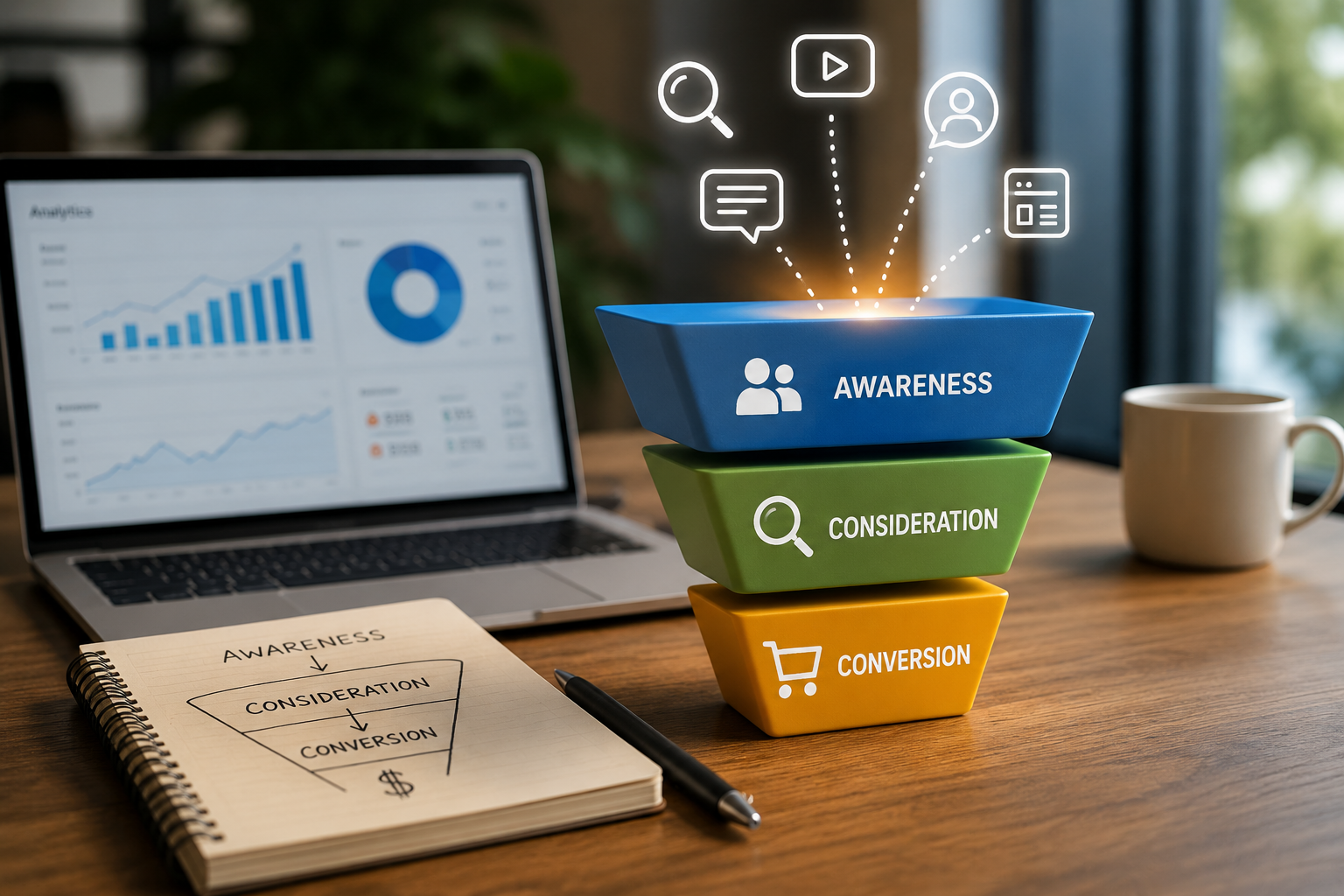
  • By funnel stage: Label each piece as top-of-funnel (awareness), mid-funnel (consideration), or bottom-of-funnel (decision). A healthy roadmap covers all three stages.
  • By status: Track every piece as Planned, In Progress, In Review, Published, or Live. This gives the whole team real-time visibility without requiring status-update meetings.

Whatever format you choose, your roadmap should be accessible to everyone who touches content writers, SEO specialists, designers, and stakeholders.

Common Content Roadmap Mistakes to Avoid

Even experienced teams fall into these traps. Avoiding them early saves significant time and budget.

  • Creating content without clear goals. If you can’t explain why you’re writing a piece and what it’s supposed to achieve, you probably shouldn’t be writing it yet.
  • Focusing only on high-volume keywords. High-volume keywords are usually high-competition. Long-tail keywords with clearer intent often drive better-qualified traffic with less effort.
  • Ignoring search intent. Writing an informational blog post for a keyword where users want to buy something is a wasted effort. Always match format and angle to search intent.
  • Publishing without a consistent schedule. Sporadic publishing confuses audiences and doesn’t build the editorial momentum that SEO requires.
  • Creating too many topics at once. Spreading your team too thin produces average content across many topics rather than excellent content on the right ones. Depth beats breadth.
  • Not updating existing content. Publishing new content while ignoring underperforming old content is inefficient. Refreshing and improving existing posts often drives faster ranking improvements than publishing new ones.
  • Failing to track results. Content without measurement is guesswork. If you’re not tracking organic traffic, rankings, and conversions, you have no basis for decisions.
  • Treating the roadmap as a fixed document. A content roadmap should evolve. Markets shift, algorithms update, business priorities change. A roadmap that can’t adapt will quickly become irrelevant.

How to Keep Your Content Roadmap Updated

A content roadmap isn’t something you build once and forget. The most effective teams revisit it regularly.

  • Review performance monthly. Pull data from Google Search Console, your analytics platform, and your CRM. Which pieces are driving traffic and leads? Which are underperforming?
  • Identify content gaps. Run a fresh keyword gap analysis quarterly. New search trends emerge, competitors publish new content, and your business evolves. Your roadmap should reflect these changes.
  • Update underperforming content. Before adding new topics, look at what’s already live. A well-executed SEO content audit often reveals content you can refresh, expand, or consolidate to drive significantly better results.
  • Add new keyword opportunities. Set up rank tracking and keyword monitoring alerts so that new opportunities surface automatically and can be added to your roadmap pipeline.
  • Adjust priorities based on business goals. If the business is entering a new market or launching a new product, shift your content roadmap accordingly. Content that supported last quarter’s goals may not support this quarter’s.
  • Monitor competitors and search trends. Use tools like Semrush or Ahrefs to track competitor content regularly. If a competitor publishes a comprehensive piece on a topic in your roadmap, you need to produce something better.

Content Roadmap Tools You Can Use

You don’t need expensive software to build a content roadmap. You need a tool your team will actually use consistently.

  • Spreadsheets (Google Sheets or Excel) — The most accessible option for small teams. Flexible, easy to share, and good enough for most roadmaps. Build columns for pillar, topic, keyword, format, owner, status, and publish date.
  • Project management tools (Notion, Asana, Trello, ClickUp) — Better for teams that need task assignment, deadline tracking, and status views. Notion is especially popular for content teams because it combines database views with document editing.
  • Dedicated content planning platforms (CoSchedule, DivvyHQ, Percolate) — Purpose-built for content teams. Include editorial calendar views, workflow approvals, and publishing integrations. Better for larger teams managing high content volumes.
  • SEO research tools (Ahrefs, Semrush, Moz) — Essential for the keyword and topic research phase of your roadmap. Use these to identify search demand, keyword difficulty, competitor gaps, and content opportunities.
  • Analytics tools (Google Search Console, GA4, Looker Studio) — Critical for the measurement side of your roadmap. Connect your content performance data back to the roadmap to inform ongoing prioritisation.
  • AI writing and research tools (ChatGPT, Jasper, Surfer SEO) — Useful for ideation, outline generation, and content briefs. Not a replacement for expert SEO content writing services, but a useful accelerator when used correctly.

Why Choose Deftsoft for Content Marketing?

Building and executing a content roadmap takes expertise, time, and a team that understands both SEO and business strategy. Most companies have one or two of those things, rarely all three.

Deftsoft’s content marketing team brings all three together.

We offer end-to-end SEO content writing services, from strategy and keyword research to writing, optimisation, and performance tracking. Our SEO content writers are trained to write for both readers and search engines, producing content that ranks and converts.

Here’s what working with Deftsoft looks like:

  • SEO content strategy built around your business goals, not generic best practices
  • Full SEO content audit of your existing content to identify quick wins and structural gaps
  • Keyword research and content pillar mapping using real search data
  • Professional content creation services across blog posts, guides, landing pages, and more
  • Content analytics reporting so you can see exactly what your content is delivering
  • Ongoing roadmap management so your content strategy evolves with your business
  • AI SEO & Generative Engine Optimization (GEO) strategies designed for ranking on ChatGPT and Google’s generative search.
  • Content structured with clear schema, direct summaries, and semantic data to secure citations and ranking on Google AI Overview.

Whether you’re starting from scratch or looking to scale an existing content programme, Deftsoft has the team, tools, and track record to get results.

Conclusion

A content roadmap is the difference between a content programme that grows and one that stagnates. Without one, you’re publishing in the dark, hoping something sticks. With one, every piece of content has a purpose, a target audience, a keyword strategy, and a way to measure whether it worked. The steps are straightforward: start with your business goals, understand your audience, research keywords, build pillars, choose formats, prioritise topics, set a timeline, assign owners, and track results. Good execution separates businesses that treat content as a cost from those that treat it as an asset.

Don’t let your content strategy fall flat.

Build a high-performing content roadmap that drives measurable results.

Frequently Asked Questions

What is a content audit?

A content audit is a systematic review of all the content a website has published. It evaluates each piece for SEO performance, accuracy, relevance, and alignment with current business goals. A good SEO content audit identifies what to update, consolidate or redirect and delete. It’s a critical first step before building or refreshing any content roadmap.

How do I add a table of contents in Word?

To add a table of contents in Word, place your cursor where you want it to appear. Go to References → Table of Contents → choose a built-in style. Word automatically generates a clickable TOC from your heading styles (Heading 1, Heading 2, etc.). To update it, click anywhere in the TOC and select the Update Table. For this to work correctly, all headings in your document must use Word’s built-in heading styles, not manually formatted text.

What is the difference between a content roadmap and a content calendar?

A content roadmap is strategic; it defines what you’ll create and why, covering goals, pillars, audience, and KPIs over months or quarters. A content calendar is operational; it schedules exactly when content will be published and tracks its production status. The two work together: the roadmap sets direction, the calendar executes it.

How do you create a content roadmap?

To create a content roadmap: define your content goals, research your audience and their search intent, conduct keyword and topic research, build content pillars, choose content formats, prioritise your topic list, create a publishing timeline, assign owners and responsibilities, and set KPIs for measuring performance. Review and update the roadmap regularly based on performance data.

What should a content roadmap include?

A complete content roadmap should include content goals, target audience and buyer personas, content pillars and topic clusters, target keywords, content formats, publishing channels, a content timeline, assigned roles and responsibilities, and KPIs for tracking performance.

How far in advance should you plan a content roadmap?

Most content teams plan their roadmap one quarter in advance, covering roughly 3 months of content in detail. You can plan high-level goals and pillar topics 6–12 months out. Planning too far in advance in detail often wastes effort, as priorities shift. Planning too close to publication creates chaos. A quarterly rolling plan with an annual strategic overview is the most practical approach.

Why is a content roadmap important for SEO?

A content roadmap ensures your SEO content strategy is coherent, intentional, and built around search demand. Without one, teams publish random content that doesn’t build topical authority, miss important keywords, and fail to compound over time. A roadmap ensures you systematically cover key topics, target the right keywords, and create content that builds domain authority all critical factors in long-term SEO performance.

What tools can you use to create a content roadmap?

Useful tools include Google Sheets or Notion for the roadmap itself, Ahrefs or Semrush for keyword and competitor research, Google Search Console and GA4 for performance tracking, Asana or ClickUp for workflow and task management, and CoSchedule or DivvyHQ for dedicated content calendar management. The right tool depends on your team size, budget, and how much of the process you need to automate.

What Is an SEO Funnel? A Complete Guide to Stages and Strategy

Ranking on the first page of Google feels great but if that traffic never turns into leads, sign-ups, or sales, something is missing. Getting more clicks isn’t the same as getting more customers. That’s where the idea of an SEO funnel comes in.

An SEO funnel is the roadmap that takes someone from “I have a question” all the way to “I’m ready to buy.” Instead of treating every keyword the same way, an SEO funnel recognizes that people search differently depending on where they are in their decision-making journey. Someone typing “what is SEO” is not ready for a sales pitch. Someone typing “SEO agency in USA” almost certainly is.

Different search intents call for different SEO strategies and understanding this difference is what separates websites that only get traffic from websites that get results. In this guide, we’ll break down what an SEO funnel is, why it matters, the stages it’s built on, and how you can build one for your own business.

Stop Wasting Traffic on Unqualified Clicks

Learn how to align your content with search intent and turn everyday visitors into paying clients.

Connect With Us

What Is an SEO Funnel?

In simple terms, an SEO funnel is a framework that maps search intent, keywords, content, website experience, and conversions into one connected journey. Rather than optimizing pages randomly, an SEO funnel makes sure every piece of content has a clear job to do whether that’s educating a beginner, comparing options, or closing a sale.

Here’s how the pieces connect:

  • Search intent tells you what the user actually wants when they type a query.
  • Keywords are the words people use to express that intent.
  • Content is built to match that intent, at the right level of detail.
  • Website experience guides the visitor smoothly from one page to the next.
  • Conversions happen when the right content meets the right visitor at the right time.

There’s an important difference between simply attracting traffic and generating qualified leads. A blog post can bring thousands of visitors, but if none of them are looking to buy, that traffic doesn’t help the business grow. A well-structured SEO marketing funnel makes sure your content isn’t just visible, it’s actually working toward a business goal.

How Does an SEO Funnel Work?

At a basic level, users move through a journey that looks like this:

Search → Discovery → Consideration → Evaluation → Conversion → Retention

A person starts with a search query, discovers your website through organic results, considers whether your content answers their needs, evaluates your services against alternatives, converts by taking an action (like filling out a form), and ideally becomes a returning customer who trusts your brand for the long run.

Why Is an SEO Funnel Important for Your SEO Strategy?

Building your content around a funnel isn’t just a nice-to-have; it changes how effective your SEO actually is. Here’s why it matters:

  • Targets users at different buying stages so you’re not showing a sales pitch to someone who’s just browsing.
  • Aligns content with search intent, which improves rankings and user experience together.
  • Improves qualified organic traffic instead of just raising the total visitor count.
  • Helps move informational users toward commercial pages through smart internal linking.
  • Supports lead generation and sales, not just brand visibility.
  • Makes SEO performance easier to measure, since each stage has its own clear goal.

A solid SEO strategy funnel turns your website into a system — one where visitors are guided step by step instead of left to figure things out on their own. For businesses working with an AEO Insights Company, this approach can also help align SEO content with broader answer engine optimization goals.

What Are the Stages of an SEO Funnel?

Every SEO funnel is built around four core stages. Understanding each one helps you plan the right keywords and content for every part of the customer journey.

Stage 1: Awareness Top of the Funnel (TOFU)

At this stage, users are just identifying a problem or trying to learn something new. They aren’t thinking about brands yet they’re thinking about their question.

Keyword types:

  • Informational keywords
  • Question-based searches
  • Problem-focused searches
  • Broad topic keywords

Content examples:

  • Blog posts
  • Beginner guides
  • How-to articles
  • Educational videos
  • Industry reports

SEO goal: Increase visibility and attract relevant users who may need your services later on.

Stage 2: Consideration Middle of the Funnel (MOFU)

Now the user understands their problem and is actively researching possible solutions. They’re comparing approaches and starting to narrow things down.

Keyword types:

  • Comparison keywords
  • Solution-focused keywords
  • Service-related informational keywords
  • “Best” and “vs.” searches

Content examples:

  • Comparison guides
  • Case studies
  • Service guides
  • Checklists
  • Expert articles

SEO goal: Build trust and move users toward evaluating you as a real option.

Stage 3: Decision Bottom of the Funnel (BOFU)

At this point, users are ready to take action. They know what they need and are looking for the right provider.

Keyword types:

  • Commercial keywords
  • Transactional keywords
  • Service + location keywords
  • Pricing keywords
  • “Hire” and “agency” keywords

Content examples:

  • Service pages
  • Product pages
  • Pricing pages
  • Demo/request pages
  • Testimonials
  • Client case studies

SEO goal: Turn qualified organic visitors into leads or customers.

Stage 4: Conversion and Retention

The funnel doesn’t have to end once someone converts. In fact, this is where long-term value really begins.

This stage covers:

  • Customer onboarding
  • Helpful support content
  • FAQs
  • Product/service guides
  • Existing-customer resources
  • Reviews and referrals

SEO goal: Support customer retention and encourage repeat conversions.

What Is an SEO Conversion Funnel?

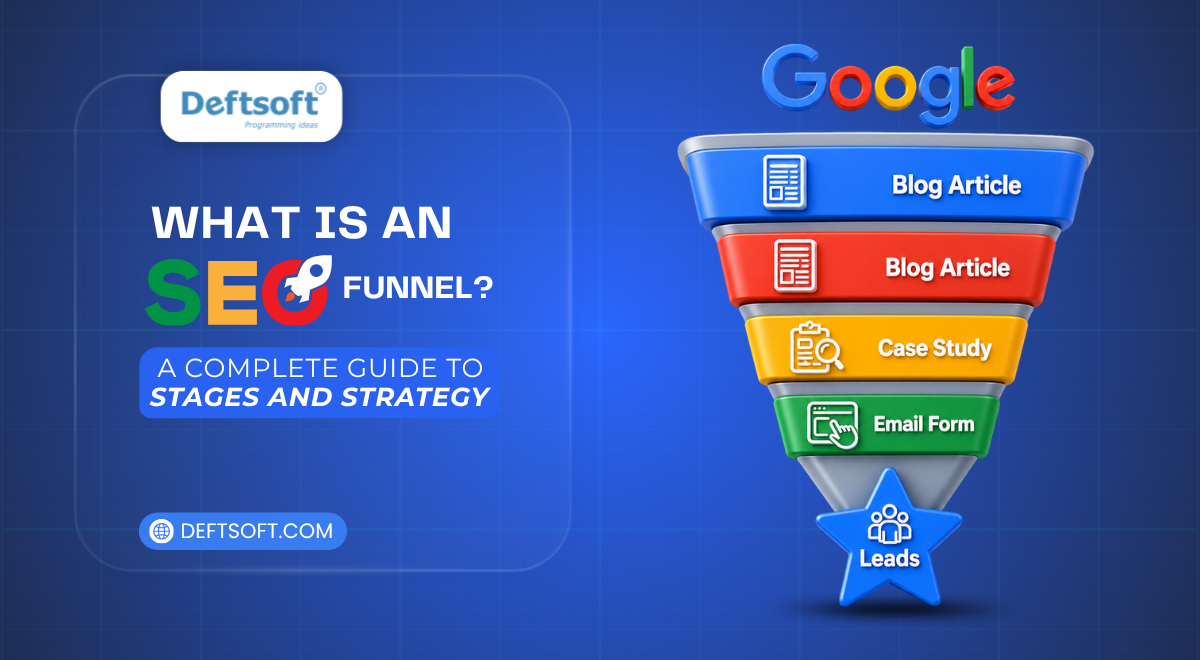
An SEO conversion funnel is different from simply generating organic traffic. It’s specifically focused on turning visitors into leads by guiding them through a clear, intentional path.

Here’s a simple example of what that path might look like:

Google Search → Blog → Service Page → Case Study → Contact Form → Lead

To make this work well, a few things need to come together:

  • Landing pages designed around a single, clear goal
  • Internal linking that naturally guides visitors deeper into the site
  • CTAs (calls to action) placed where they make sense, not just everywhere
  • Conversion-focused content on decision-stage pages
  • Trust signals like reviews, case studies, and client logos

Without these elements, even great rankings won’t translate into business growth.

How SEO Funnel Keywords Work at Different Stages

Matching keywords to the right funnel stage is one of the most important parts of SEO strategy. Here’s how it typically breaks down:


Top-of-Funnel Keywords

  • What is SEO?
  • How does SEO work?
  • SEO benefits

Middle-of-Funnel Keywords

  • Best SEO strategies
  • SEO agency vs freelancer
  • How to choose an SEO service

Bottom-of-Funnel Keywords

  • SEO agency in USA
  • Affordable SEO services
  • Hire an SEO agency

What Are Low Funnel Keywords?

Low funnel keywords are search terms used by people who are very close to making a decision. Because these searchers already know what they want, low-funnel keywords usually carry much stronger commercial intent than broad, informational searches.

The difference comes down to intent. Someone searching “what is SEO” is learning. Someone searching “affordable SEO services for small business” is shopping. Low-funnel keywords tend to convert at a much higher rate, even if their search volume is lower.

To create pages around low-funnel keywords, focus on service pages, location-based pages, and pricing pages that speak directly to a ready-to-act audience.

Examples of Low-Funnel Keywords

Keyword Type Example Intent
Service SEO services for small business Looking for a specific service
Location SEO agency in USA Looking for a provider nearby or in a specific market
Action Hire an SEO expert Ready to take action
Pricing Affordable SEO packages Comparing cost before deciding
Comparison Best SEO agency vs freelancer Weighing final options

How to Build an SEO Strategy Funnel

Building a working SEO funnel doesn’t have to be complicated. Here’s a practical, step-by-step approach.

Step 1: Define Your Target Audience

Understand who you’re trying to reach, what problems they have, and what questions they’re asking at each stage of their journey.

Step 2: Map the Customer Journey

Outline the path a typical customer takes from first hearing about a problem to becoming a paying client.

Step 3: Perform Keyword Research

Group your keywords according to funnel stage:

  • Awareness
  • Consideration
  • Decision
  • Conversion

Step 4: Match Keywords With Search Intent

Make sure every keyword you target lines up with the type of content someone actually wants to see.

Step 5: Create Content for Each Funnel Stage

Don’t just publish blog posts. Build a mix of educational, comparison, and commercial content so every stage of the funnel is covered.

Step 6: Build Internal Links Between Funnel Stages

Guide readers from top-of-funnel blog posts toward middle- and bottom-of-funnel pages using natural, relevant internal links.

Step 7: Optimize Conversion Paths

Make sure CTAs, forms, and contact pages are easy to find and simple to use.

Step 8: Measure and Improve Performance

Track how well each stage is performing and adjust your content and keyword strategy based on what the data shows.

SEO Funnel vs Traditional Sales Funnel

While they share a similar shape, an SEO funnel and a traditional sales funnel work in different ways.

SEO Funnel Traditional Sales Funnel
Driven by search behavior Driven by sales activities
Uses organic search Uses sales outreach/marketing
Content plays a major role Sales communication plays a major role
Captures users through search Captures prospects through multiple channels
Can generate traffic continuously Often requires active sales processes

This is one reason a sales funnel for SEO is so valuable once your content is ranking well, it can keep attracting and converting visitors long after it’s published, without the ongoing cost of active outreach.

How to Map Content to an SEO Funnel

A content mapping table makes it much easier to see whether your website has gaps at any stage of the funnel.

ConsiderationCommercial ResearchComparison/Case StudyEngagement

Awareness Informational Blog/Guide Traffic
Decision Commercial Service Page Leads
Conversion Transactional Contact/Pricing Page Sales
Retention Informational Support/Resource Content Loyalty

Common SEO Funnel Mistakes to Avoid

Even well-intentioned SEO strategies can fall short if they overlook the funnel. Watch out for these common mistakes:

  1. Targeting only high-volume keywords and ignoring more specific, lower-volume terms with strong intent.
  2. Ignoring search intent, which leads to content that doesn’t match what users actually want.
  3. Creating content without a conversion path, leaving visitors with nowhere to go next.
  4. Focusing only on top-of-funnel traffic while neglecting decision-stage content.
  5. Poor internal linking between related pages at different funnel stages.
  6. Using the same CTA everywhere, instead of tailoring it to the page’s purpose.
  7. Ignoring bottom-of-funnel keywords, which often convert better despite lower search volume.
  8. Not measuring conversions, making it impossible to know what’s actually working.

How to Measure SEO Funnel Performance

Tracking the right metrics at each stage helps you understand where your funnel is working and where it needs attention.

Awareness Consideration Decision Conversion
  • Impressions
  • Organic traffic
  • Keyword rankings
  • Engagement rate
  • Time on page
  • Pages per session
  • Returning visitors
  • Service-page traffic
  • CTA clicks
  • Lead form starts
  • Leads
  • Conversion rate
  • Revenue
  • Organic-assisted conversions

SEO Funnel Example for an SEO Agency

To see how this all comes together, here’s a real-world example of an SEO funnel in action:

TOFU: “What is SEO?” ↓ MOFU: “How to choose an SEO agency?” ↓ BOFU: “SEO Agency in USA” ↓ Conversion: SEO service page → Contact form → Consultation

This is exactly the kind of funnel Deftsoft builds for clients’ content that educates first, builds trust in the middle, and makes it easy to take the next step once a visitor is ready to talk business.

Ready to Build an SEO Funnel That Actually Converts?

Driving traffic is only half the battle. Let Deftsoft’s SEO experts audit your current strategy and design a high-converting content funnel tailored to your business.

Final Thoughts: Turning SEO Traffic Into Conversions

An SEO funnel is about more than rankings, it’s about matching content to intent at every step of the customer journey. When your top-of-funnel content educates, your middle-of-funnel content builds trust, and your bottom-of-funnel content makes it easy to take action, your website stops being just a source of traffic and starts being a real growth engine.

Successful SEO isn’t only about getting to page one. It’s about guiding the entire customer journey, from that very first search to a long-term customer relationship. That’s the approach Deftsoft takes with every SEO strategy we build: one that turns search visibility into real, measurable business results.

FAQs

What is an SEO funnel?

An SEO funnel is a strategy that aligns search intent, keywords, and content with each stage of a customer’s journey, from first discovering a brand to becoming a customer.

What are the stages of an SEO funnel?

The main stages are Awareness (TOFU), Consideration (MOFU), Decision (BOFU), and Conversion/Retention.

What is the difference between an SEO funnel and a sales funnel?

An SEO funnel is driven by organic search behavior and content, while a traditional sales funnel relies more heavily on direct sales outreach and multi-channel marketing.

What are low-funnel keywords?

Low-funnel keywords are search terms used by people who are close to making a purchase decision, such as “affordable SEO services for small business” or “hire an SEO agency.”

How does SEO help the marketing funnel?

SEO brings in relevant traffic at every stage of the marketing funnel and supports it with content that matches what users are searching for, from early research to final decision.

How do you create an SEO funnel?

Start by defining your audience, mapping their journey, researching keywords by funnel stage, and building content and internal links that guide visitors toward conversion.

What is an SEO conversion funnel?

An SEO conversion funnel is the specific path a visitor takes from a search query to a completed action, such as filling out a contact form or booking a consultation.

Cloud Application Development Services: A Practical Guide for Tech Executives

Cloud is no longer a question of “if”; it’s a question of “how well.” Gartner projects public cloud end-user spending will hit $850 billion in 2026, a 21.3% jump from the year before, and 94% of enterprises now use cloud services in some form. For tech executives, the conversation has shifted from whether to move to the cloud to whether their cloud application development services partner can actually deliver something scalable, secure, and built for how AI-driven workloads now run.

This guide is written for exactly that audience: CTOs, VPs of Engineering, and technical decision-makers evaluating cloud application development, whether that means building something new, modernizing an existing system, or choosing between the growing list of cloud application development companies competing for your budget. Whether your team calls it cloud applications development, application development cloud computing, or simply cloud app development, the underlying questions are the same: which architecture, which provider, and which partner actually gets it right.

Have a cloud application idea but not sure where to start?

Get a clear technical roadmap built around your specific goals.

Talk to Our AI Search Team

Quick Navigation

What Is Cloud Application Development?

Why Cloud Application Development Matters in 2026

Cloud Application Development vs. Traditional Development

Core Components of Cloud App Development

Cloud App Development: Build, Migrate, or Modernize?

What to Look for in Cloud Application Development Companies

How Deftsoft Approaches Cloud Application Development

Cloud Application Solutions Across Industries

Common Mistakes Businesses Make in Cloud App Development

Frequently Asked Questions

What Is Cloud Application Development?

Cloud application development is the process of building software that runs on cloud infrastructure rather than local servers or on-premise data centers. Instead of installing an application on a single machine, a cloud application is built to run across distributed, scalable infrastructure, accessible from anywhere, updated centrally, and able to scale up or down based on real demand.

If you’re asking what a cloud application is in the simplest terms, it’s software designed from the ground up to take advantage of cloud infrastructure—elastic compute, managed databases, distributed storage, and on-demand scaling rather than software that was simply moved to a server somewhere.

This distinction matters more than it sounds. Application development for cloud environments requires different architectural thinking than traditional development: statelessness, horizontal scaling, service-oriented design, and resilience against individual component failure are all baked in from day one, not retrofitted later.

Why Cloud Application Development Matters in 2026

The numbers make the case better than any pitch could. The global cloud computing market is valued at roughly $917.9 billion in 2026, on track to cross $1 trillion before year-end, according to Synergy Research Group. Application development and testing specifically account for 45% of cloud adoption use cases, as businesses lean on flexible cloud resources to build faster while keeping cost and security under control.

What’s changed most in the last year is why businesses are investing. 64% of IT decision-makers now say cloud infrastructure is essential to their AI strategy, and 61% of enterprises plan to migrate more workloads to the cloud specifically to support AI initiatives. Cloud-based application development in 2026 increasingly means building applications that can plug directly into AI inference, machine learning pipelines, and real-time data processing — something legacy, on-premise architecture simply wasn’t designed for.

Containers, Kubernetes, and serverless architecture have also crossed from “advanced” to standard practice for new builds; 95% of new digital workloads are now being built on cloud-native platforms. If your application development in cloud computing strategy isn’t cloud-native by default, you’re already behind where the rest of the market has moved.

Cloud Application Development vs. Traditional Development

The difference isn’t just where the code runs — it’s how the entire system is designed to behave.

Traditional Application Development Cloud Application Development
Built for fixed, on-premise infrastructure Built for elastic, distributed infrastructure
Scaling requires new hardware Scales on demand, automatically
Manual deployment and updates Continuous deployment, centralized updates
Single point of failure risk Designed for resilience and redundancy
High upfront infrastructure cost Pay-as-you-go, usage-based cost model

This is exactly why custom cloud application development has become the default approach for businesses building anything meant to scale; the architecture itself is designed around growth and flexibility, not bolted on after the fact.

Core Components of Cloud App Development

Understanding how to develop cloud computing application projects successfully starts with knowing the moving parts involved:

  • Cloud infrastructure and hosting — Choosing between AWS, Microsoft Azure, or Google Cloud, which together hold more than 60% of the global market, with AWS at roughly 30% share, Azure at 25%, and Google Cloud at 13% as of early 2026.
  • Architecture design — deciding between microservices, serverless, or a hybrid approach based on the application’s actual usage patterns and growth expectations.
  • Database and data management — Selecting managed, cloud-native database services that scale independently from the application layer itself.
  • APIs and integrations — Building applications that connect cleanly with third-party services, internal systems, and increasingly, AI and machine learning models.
  • Security and compliance — Implementing identity management, encryption, and access controls appropriate to the industry and data sensitivity involved.
  • DevOps and CI/CD pipelines — Automating deployment, testing, and monitoring so updates ship reliably and frequently, rather than through slow, manual release cycles.

A genuine cloud application development service should be able to speak fluently to all six of these areas, not just the parts that are easiest to build.

Cloud App Development: Build, Migrate, or Modernize?

Most businesses approaching developing cloud applications fall into one of three categories, each requiring a different approach:

  • Building new — starting from scratch with cloud-native architecture from day one, ideal for new products, startups, or greenfield internal tools.
  • Migrating existing applications — moving an on-premise or legacy system to cloud infrastructure, which requires careful planning to avoid simply recreating old limitations in a new environment.
  • Modernizing legacy systems — re-architecting an existing application to actually take advantage of cloud-native capabilities (auto-scaling, managed services, containerization) rather than just relocating it.

Deciding which path applies to your business is one of the first, most important conversations to have with any cloud app development company before a single line of code gets written, because the wrong starting assumption here tends to compound into expensive rework later.

What to Look for in Cloud Application Development Companies

With so many cloud application development companies competing for enterprise budgets, a few criteria separate serious technical partners from the rest:

  • Multi-cloud and hybrid-cloud experience, since 87% of enterprises now operate multi-cloud strategies rather than committing to a single provider
  • Security-first architecture, not security added as an afterthought once development is complete
  • Proven experience with AI integration, given how central AI workloads have become to cloud strategy in 2026
  • Transparent, usage-based cost modeling, so cloud spend stays predictable as the application scales
  • Strong DevOps and automation practices, since 93% of developers now deploy code to the cloud as a standard part of their workflow
  • A track record with businesses of comparable scale and complexity to your own

A provider offering true cloud development services should be able to walk you through specific examples of each of these — not just a generic capabilities slide.

How Deftsoft Approaches Cloud Application Development

At Deftsoft, we treat cloud application development services as a long-term engineering partnership, not a one-time build-and-hand-off project. Our approach to cloud software development services is built around understanding the business problem first, then architecting a solution around the cloud platform, tools, and services that actually fit — rather than defaulting to whichever stack is fastest to sell.

Whether you need custom cloud application development built from the ground up, help modernizing a legacy system into a cloud-native architecture, or ongoing support scaling an existing application, Deftsoft’s team works across AWS, Azure, and Google Cloud to build solutions matched to your specific technical and business requirements. This includes secure API design, database architecture, CI/CD pipeline setup, and increasingly, integration with AI and machine learning capabilities — since that’s where a growing share of real client demand is heading in 2026.

As a cloud app development company, Deftsoft also places heavy emphasis on cost transparency and architecture that scales predictably, so tech executives aren’t left reconciling ballooning cloud bills against a system that was never designed to scale efficiently in the first place.

Cloud Application Solutions Across Industries

Cloud application solutions aren’t one-size-fits-all — the right architecture depends heavily on industry. In finance, cloud applications support real-time transaction processing and compliance-heavy data handling. In healthcare, cloud platforms enable secure patient data management alongside strict regulatory requirements. Retail and logistics rely on cloud applications for real-time inventory tracking and customer analytics, while manufacturing increasingly leans on cloud-based IoT integration; notably, 94% of manufacturing companies now use or are actively considering cloud-based ERP systems.

Whatever the industry, the underlying principle stays consistent: a genuinely useful cloud application is architected around how the business actually operates, not adapted awkwardly from a generic template afterward.

Common Mistakes Businesses Make in Cloud App Development

Here are the common mistakes businesses make in cloud app development, formatted as bullet points:

  • Choosing a Partner Solely on Cost: Selecting a development partner based purely on price, without thoroughly evaluating their architecture quality or security practices, frequently results in costly rework later.
  • Treating Migration as a Simple “Lift and Shift”: Moving an existing application directly to the cloud without redesigning it to be cloud-native merely transfers legacy limitations into a more expensive environment.
  • Skipping DevOps and Automation Setup: Failing to establish proper DevOps procedures and automated pipelines early on creates bottlenecks and slows down every subsequent release.
  • Underestimating Security and Compliance: Neglecting security protocols and regulatory requirements in the initial stages can lead to severe, expensive complications down the line, especially for businesses in regulated industries.
  • Architecture Quality: Choosing the wrong programming tool or technology stack for your cloud application—such as selecting a framework that doesn’t scale well with serverless architecture or cross-platform demands—can lead to performance bottlenecks.

Choosing the Right Tech Stack for Cloud-Native Applications

Selecting the right development frameworks and languages is essential for building cloud applications that are performant, scalable, and easy to maintain. Your chosen tech stack directly influences how seamlessly your front-end user experience interacts with back-end cloud microservices.

  • Frontend & Cross-Platform Frameworks (Flutter & React / React Native): Tools like React and React Native enable developers to build responsive web and mobile interfaces powered by flexible component architectures. Flutter provides a unified codebase for seamless, high-performance applications across iOS, Android, and web. Both frameworks connect effortlessly to cloud-hosted APIs and serverless backends, delivering consistent user experiences across devices.
  • Backend & Serverless Languages (Node.js, Python, Go): Choosing lightweight, event-driven languages for backend operations ensures your application can take full advantage of cloud-native infrastructure, such as AWS Lambda or Google Cloud Functions, without unnecessary overhead or latency.

Already have a legacy system that needs modernizing?

See exactly what a cloud-native rebuild would involve.

Frequently Asked Questions

1. What is cloud application development?

Cloud application development is the process of building software specifically designed to run on cloud infrastructure, taking advantage of elastic scaling, managed services, and distributed architecture rather than fixed, on-premise servers.

2. What is the difference between cloud application development and traditional application development?

Traditional development is built for fixed infrastructure with manual scaling and deployment, while cloud application development is built for elastic, distributed infrastructure that scales automatically and supports continuous deployment.

3. How much does custom cloud application development cost?

Cost depends on the application’s complexity, chosen cloud provider, required integrations, and whether the project involves building new, migrating, or modernizing an existing system. A proper quote should come from a technical assessment of your specific requirements.

4. Which cloud platform is best for application development — AWS, Azure, or Google Cloud?

Each has strengths depending on your needs — AWS holds the largest market share and broadest service catalog, Azure integrates deeply with Microsoft’s enterprise ecosystem, and Google Cloud is strong in AI and data analytics. Many businesses now use a multi-cloud approach rather than committing to just one.

5. How long does it take to develop a cloud application?

Timelines vary based on scope, but a well-scoped cloud application development services engagement typically involves phased delivery, starting with core architecture and an MVP, followed by iterative feature development and scaling.

6. Is cloud application development secure?

When built correctly, yes, often more secure than traditional on-premises systems, since cloud providers invest heavily in infrastructure security. However, security depends heavily on how the application itself is architected, which is why choosing an experienced cloud application development company matters.

7. What industries benefit most from cloud application development?

Nearly every industry benefits, but finance, healthcare, retail, logistics, and manufacturing have seen particularly strong adoption, driven by real-time data needs, compliance requirements, and the growing integration of AI into everyday business operations.

Google Ads for Doctors SEO Outline: The Complete Guide to Medical Practice Marketing

In today’s digital-first healthcare landscape, attracting new patients requires more than traditional word-of-mouth referrals. Modern clinics need a robust Google Ads for doctors SEO outline to capture immediate patient demand while simultaneously building long-term search engine authority.

By combining search engine optimization (SEO) with high-intent pay-per-click (PPC) advertising, your medical practice creates a dual-engine marketing strategy that ensures maximum visibility. Whether your goal is to fill daily appointment slots, showcase specialized medical services, or outrank competing clinics in your area, a unified approach delivers predictable patient growth. Read on to discover the ultimate 2026 Digital marketing roadmap for healthcare practice.

Want a complete Google Ads for doctors SEO outline built specifically for your clinic?

Get a plan built around your specialty, location, and goals.

Quick Navigation

Why Doctors Need SEO and Google Ads

What Is SEO for Doctors in the AI Era?

Generative Engine Optimization (GEO) & AI Search

Why SEO Is Important for Doctors and Medical Practices

How to Create an Effective SEO Strategy for Doctors

Target How Patients Actually Search

Build Dedicated Service Pages

Fix Your Technical Web Foundations

Publish Actionable Patient Content

Local SEO for Doctors: How to Attract Nearby Patients

How Google Business Profile Helps Doctors Get More Patients

Google Ads & Next-Gen Paid Media for Doctors

Maximizing Reach with Google Performance Max (PMax)

Capturing Patients on Emerging Platforms (ChatGPT Ads)

Structuring Ad Groups and Schema the Right Way

Google Ads vs SEO for Doctors: Which Is Better?

PPC for Doctors: How to Build a Successful Paid Search Campaign

Doctor Search Engine Marketing: SEO + PPC

Medical Marketing for Doctors: Beyond SEO and Google Ads

How to Choose an SEO Agency or SEO Company for Doctors

How Much Do SEO Services for Doctors Cost?

SEO and Google Ads Strategy for Doctors: A Step-by-Step Plan

How Deftsoft Helps Doctors Grow

FAQs

Why Doctors Need SEO and Google Ads

Before a patient calls your clinic, they’ve usually already searched for it or for one like it. This is why SEO for doctors, Google Ads for doctors, medical SEO, doctor search engine marketing, and marketing for doctors now sit at the center of patient acquisition.

It helps to understand the difference between the two core channels early on:

  • SEO builds long-term, organic visibility slower to build, but it keeps bringing patients in without an ongoing per-click cost.
  • Google Ads (PPC) delivers immediate visibility; you can appear at the top of search results the same day a campaign launches, but you pay per click.

Neither replaces the other. The strongest clinics combine both, which is exactly what this outline is built around.

What Is SEO for Doctors in the AI Era?

SEO for doctors is the practice of optimizing a clinic’s website so it appears higher in Google’s organic (non-paid) search results.

In plain terms, when someone searches “dermatologist for acne scars near me” or “best pediatrician in [city],” SEO is what determines whether your clinic’s website shows up on page one or gets buried on page three, where almost no one ever looks.

Generative Engine Optimization (GEO) & AI Search

Today’s patients don’t just type two-word keywords into a search bar; they ask AI platforms (Google AI Overviews, ChatGPT, Perplexity, and Gemini) complex questions like “What causes sharp knee pain when bending, and which local clinic specializes in non-surgical treatments?”

To stay visible, modern medical practices must optimize for Generative Engine Optimization (GEO) alongside traditional SEO. This means structuring medical content with clear E-E-A-T (Experience, Expertise, Authoritativeness, and Trustworthiness) signals, expert-reviewed information, and rich schema markup. Doing so ensures AI search engines cite your doctors directly as the recommended authority when patients seek medical answers.

Why SEO Is Important for Doctors and Medical Practices

Investing in SEO services for doctors or medical practice delivers benefits that compound over time. It increases your clinic’s visibility and puts you in front of patients actively searching for the exact services or treatments you offer. Because those searchers are further along in their decision-making, the leads SEO generates tend to be more qualified than a typical ad click, and organic rankings carry a trust advantage that paid ads don’t generally trust an organic result over a sponsored one.

This is why doctor SEO marketing is treated as a foundational investment, not a one-time task; the clinics that stay consistent with it tend to out-compete clinics that only run occasional ad campaigns.

How to Create an Effective SEO Strategy for Doctors

A real SEO strategy for doctors isn’t a single task, it’s a system built from several connected parts.

Move past generic keywords. Focus on high-intent search patterns that drive real appointments:

  • Specialty + City: “dermatologist in Austin”
  • Treatment + City: “Invisalign provider Miami”
  • Urgent / High-Intent: “emergency pediatric dentist near me”
  • Informational Queries: “recovery time after ACL surgery”

Build Dedicated Service Pages

A single “Our Services” page won’t rank. Create individual, dedicated landing pages for every specific procedure, treatment, and condition you treat (e.g., separate pages for Knee Replacement, Hip Replacement, and Arthroscopic Surgery). Each page must include clear clinic contact info, doctor credentials, and a direct booking button.

Fix Your Technical Web Foundations

Even the best content won’t rank if your site is slow or broken. Prioritize mobile-first design, fast loading speeds, clean internal links between related services, secure HTTPS, solid Core Web Vitals performance and clear page titles.

Publish Actionable Patient Content

Answer the exact questions patients ask during consultations: treatment timelines, costs, preparation steps, and recovery expectations. Demonstrating clear medical expertise (E-E-A-T) builds immediate trust while capturing patients early in their decision process.

Local SEO for Doctors: How to Attract Nearby Patients

For almost every medical practice, patients are searching within a specific area which is why local SEO for doctors is often the single highest-impact part of the entire strategy.

Strong local SEO doctors marketing starts with a fully optimized Google Business Profile, paired with local keyword targeting around your city or region. From there, consistency matters: your Name, Address, and Phone number need to match exactly across every listing, backed by relevant citations and genuine patient reviews. Clinics with multiple locations should build location-specific pages rather than one page trying to cover every branch, and all of this should ultimately support strong visibility in Google Maps, where many local patients search directly.

For most clinics, SEO for doctors without a strong local component is missing the majority of realistic, nearby patient searches.

How Google Business Profile Helps Doctors Get More Patients

A fully optimized Google Business Profile is often the first thing a patient sees before visiting your website. That starts with the correct business name and category and a clear list of services, plus keeping your hours, address, and phone number current. Beyond the static details, real photos, regular posts about services or health topics, and prompt responses to patient reviews signal to Google that your practice is genuinely active. The Questions & Answers section deserves the same attention, since it’s often the first thing a hesitant patient reads.

A well-maintained profile directly supports local SEO for doctors, since Google favors profiles that are complete, active, and trusted by real patients.

Google Ads for doctors puts your clinic at the very top of search results immediately, for a cost per click. A well-run campaign is built on Search Ads targeting specific, high-intent medical queries, combined with location and keyword targeting that reaches the right patients in your service area. From there, the details matter just as much as the setup: ad copy needs to clearly match what the patient searched for, the landing page it leads to should be built around that exact service, and call extensions let mobile users ring the clinic directly from the ad itself. None of it means much without conversion tracking in place to measure the calls, form fills, and bookings it’s actually generating.

Done well, Google Ads for medical practice campaigns can generate patient inquiries within days, which is exactly why they pair so effectively with the slower, compounding results of SEO.

Maximizing Reach with Google Performance Max (PMax)

Modern medical PPC expands well beyond basic Search text ads. By utilizing Google Performance Max (PMax) campaigns, your practice can run automated, multi-channel ad placements across Google Search, YouTube, Display, Gmail, and Maps from a single campaign. PMax uses Google’s AI to identify high-intent patients who are actively considering care, driving significantly lower Cost-Per-Acquisition (CPA).

Capturing Patients on Emerging Platforms (ChatGPT Ads)

Beyond Google, patient behavior is expanding into conversational AI platforms. As ad ecosystems evolve inside tools like ChatGPT, clinics have a unique first-mover advantage to show contextual solution cards right as a patient evaluates symptoms and treatment options during a live AI chat.

Note on AI Campaign Setup:

Running automated campaign types like PMax or conversational ads in healthcare requires strict privacy protocols. Broad automation can accidentally trigger privacy violations or misallocate budget toward generic inquiries if custom audience signals, negative keyword lists, and location boundaries aren’t tightly controlled.

Structuring Ad Groups and Schema the Right Way

Two structural adjustments dramatically improve both your paid ad returns and your organic search visibility:

  • Build Single-Treatment Ad Groups: Avoid generic ad groups like “Dental Services.” Instead, build tightly focused groups around specific procedures (e.g., “Root Canal” or “Teeth Whitening”). Matching specific keywords to targeted ad copy improves your Quality Score, reduces cost-per-click, and lets you highlight relevant trust signals like board certifications or same-day scheduling.
  • Deploy Healthcare Schema Markup: Add Physician and MedicalBusiness structured data to your site. This code directly tells search engines and AI answer tools your exact specialties, clinic locations, and practitioner credentials—boosting local visibility and search citations.
  • Use PPC Data as Your SEO Roadmap: Treat paid and organic search as a connected feedback loop. Search terms that consistently generate booked appointments in Google Ads are ready-made, revenue-proven targets for your next SEO service pages and blog topics.

A Note on Medical Advertising Compliance

Medical advertising carries unique regulatory hurdles that most other industries don’t face. In the US, this means keeping patient data HIPAA-compliant across tracking, call recording, and chat forms. Ad copy and landing pages should avoid unverifiable claims, like guaranteed outcomes or unsubstantiated “best in the city” language, since medical advertising is held to a higher standard. Depending on specialty and region, a local medical council or licensing board may set additional rules on what a clinic can advertise. Building compliance from day one is far cheaper than fixing it mid-campaign.

Google Ads vs SEO for Doctors: Which Is Better?

SEO for Doctors Google Ads for Doctors
Long-term strategy Immediate visibility
Organic traffic Paid traffic
Builds authority over time Fast lead generation
Takes time to produce results Can generate traffic quickly
No direct cost per click Pay per click

Neither option is objectively “better”; they solve different problems. Most successful medical practices use SEO for doctors to build lasting authority while running Google Ads for doctors to capture urgent, high-intent searches in the meantime.

A strong PPC for doctors campaign depends on more than turning ads on. It starts with keyword research focused on real patient intent, paired with a solid list of negative keyword terms like “jobs,” “free,” or “meaning of” have no place draining a medical ad budget. Geographic targeting needs to match your actual service area, and ad extensions like call buttons and sitelinks add relevance a plain text ad doesn’t have alone. From there, everything comes down to what happens after the click: landing pages built for the exact ad clicked, conversion tracking on every call and form fill, dedicated call tracking, and ongoing A/B testing to keep improving results.

Skipping negative keywords or sending traffic to a generic homepage are two of the fastest ways a PPC for doctors budget gets wasted.

Doctor search engine marketing simply means combining organic and paid search into one connected strategy: SEO, local SEO, Google Ads, content marketing, and conversion optimization working together rather than as separate, disconnected efforts.

This combined approach is also central to broader medical marketing for doctors strategy, since patients often interact with multiple touchpoints: an ad, an organic search result, a review, a service page before ever making the call.

Medical Marketing for Doctors: Beyond SEO and Google Ads

A complete medical marketing for doctors strategy typically extends into a few more channels working alongside SEO and Google Ads. Content marketing builds trust and supports SEO at once, while social media marketing keeps your clinic visible through health tips and patient stories between searches. Online patient reviews influence both local rankings and a patient’s final decision, and email marketing remains useful for retention and reminders with existing patients. Reputation management ties it together by monitoring feedback across platforms, video content, a simple clinic tour or doctor introduction builds trust before a first visit, and referral marketing remains one of the most cost-effective channels in healthcare.

Together, these channels round out doctor SEO marketing into a full-funnel strategy rather than a single tactic.

How to Choose an SEO Agency or SEO Company for Doctors

Choosing the right SEO company for doctors matters as much as the strategy itself. Look for genuine healthcare SEO experience, not just general SEO knowledge, and a clear understanding of medical search intent and patient behavior. Proven local SEO and Google Ads experience specific to healthcare should be non-negotiable, alongside strong medical website SEO knowledge covering both technical and on-page factors. Just as important is transparency, reliable conversion tracking, honest reporting, and ethical, compliant practices appropriate for healthcare.

A provider offering true SEO services for doctors should be able to clearly explain how their work connects to real patient bookings, not just rankings or traffic numbers.

How Much Do SEO Services for Doctors Cost?

The cost of SEO services for doctors varies based on several factors: your clinic’s location and local competition, your medical specialty, and the size of your website and number of service pages that need optimizing. It also depends on your specific goals, your local SEO requirements, your content needs for service pages and educational articles, and whether any Google Ads budget is running alongside the SEO work.

Because of this range of factors, a fair quote should always be based on a real audit of your website and goals, not a flat, generic package price.

SEO and Google Ads Strategy for Doctors: A Step-by-Step Plan

Building a high-performing digital patient acquisition engine requires a structured execution sequence. Jumping straight into paid ads without a optimized web foundation wastes budget, while relying solely on organic search delays patient growth. Follow this proven 9-step roadmap:

  1. SEO & Technical Audit: Assess site speed, Core Web Vitals, mobile responsiveness, HIPAA compliance, and existing indexed pages to fix underlying technical barriers.
  2. Intent-Based Keyword Research: Identify high-value transactional terms (e.g., “emergency root canal near me”) alongside informational long-tail questions used in AI search queries.
  3. Medical Website Architecture & SEO: Establish clean site navigation, HTTPS security, and structured data markup (Physician and MedicalBusiness schema) to signal trust to search engines.
  4. Service Page Optimization: Build dedicated, high-converting treatment pages for every individual procedure rather than bundling services onto generic pages.
  5. Local SEO & Google Business Profile: Claim and fully optimize your Google Business Profile, align NAP (Name, Address, Phone) consistency across directories, and launch a systemized review collection workflow.
  6. AI & Content Marketing: Publish authoritative, E-E-A-T-backed medical content targeting specific patient symptoms, recovery guides, and AI answer engine (GEO) queries.
  7. Targeted Google Ads (PPC) & PMax: Launch tightly organized ad groups around single treatments, pair them with high-intent negative keywords, and deploy compliant Performance Max campaigns.
  8. HIPAA-Compliant Conversion Tracking: Set up end-to-end analytics to track real phone calls, form fills, and online bookings without exposing protected health information (PHI).
  9. Continuous Optimization: Use converting paid search data to refine organic content, continuously A/B test ad copy, and scale budget into top-performing specialties.

This sequence ensures your paid ad spend lands on a high-converting, search-optimized foundation, maximizing ROI from day one while building compounding organic authority over time.

How Deftsoft Helps Doctors Grow

At Deftsoft, this entire outline isn’t treated as separate services, it’s managed as one connected system. Deftsoft brings together SEO services for doctors, local SEO, Google Ads for doctors, medical website optimization, and conversion tracking under one team, so your clinic’s visibility and your patient bookings are always working toward the same goal.

Rather than treating rankings or ad clicks as the finish line, Deftsoft’s approach is built around the full patient journey from the first search, to the website visit, to the completed booking. For clinics comparing SEO agencies for doctors, that connected approach is often the real difference between a strategy that generates traffic and one that generates patients.

Already have a website but not enough patient inquiries?

See exactly what’s holding your visibility back.

FAQs

1. What is SEO for doctors and why is it important?

SEO for doctors is the process of optimizing a medical practice’s website so it ranks higher in organic Google search results. It’s important because most patients now search online before choosing a provider, and strong SEO ensures your clinic is visible when they do.

2. How does medical SEO help doctors attract more patients?

Medical SEO helps by making sure your website appears for the specific treatments, specialties, and local searches your ideal patients are already using, turning search visibility directly into new patient inquiries.

3. What is the difference between SEO for doctors and Google Ads for doctors?

SEO for doctors builds long-term, organic visibility without a per-click cost, while Google Ads for doctors delivers immediate visibility through paid search, charged per click. Most clinics benefit from using both together.

4. How much do SEO services for doctors cost?

Costs vary based on location, specialty, competition, website size, and specific goals. A proper quote should come from an audit of your actual website and market, not a flat generic package.

5. What are the best local SEO strategies for doctors?

The strongest local SEO strategies include Google Business Profile optimization, consistent NAP details, local citations, active review management, and location-specific service pages.

6. How does local SEO for doctors improve Google Maps visibility?

Local SEO signals like profile completeness, reviews, citations, and location relevance directly influence whether your clinic appears in Google’s local Map Pack results for nearby patient searches.

7. What is the best SEO strategy for doctors?

The best strategy combines keyword research based on patient intent, dedicated service pages, strong technical medical website SEO, local SEO, and ongoing helpful content, not any single tactic alone.

8. Should doctors invest in PPC for doctors or SEO?

Both serve different purposes. PPC for doctors generates fast, immediate leads, while SEO builds lasting, cost-efficient visibility over time. Combining both typically produces the strongest results.

9. How can Google Ads for medical practices generate more patient leads?

By targeting high-intent local searches, using dedicated landing pages matched to each ad, and tracking conversions closely to continually refine targeting and budget.

10. What is medical website SEO?

Medical website SEO refers to the technical and on-page optimization of a healthcare website including speed, mobile-friendliness, structure, and schema markup that helps both patients and search engines understand and trust the site.

11. How do I choose the best SEO agency for doctors?

Look for genuine healthcare SEO experience, an understanding of medical search intent, proven local SEO results, and clear reporting that ties directly back to patient bookings.

12. Should I hire an SEO company for doctors or a general SEO agency?

A dedicated SEO company for doctors typically understands healthcare-specific search behavior, compliance considerations, and trust signals far better than a general SEO agency without medical experience.

13. What does doctor search engine marketing include?

Doctor search engine marketing combines SEO, local SEO, Google Ads, content marketing, and conversion optimization into one unified strategy for patient acquisition.

14. What are the most effective medical marketing strategies for doctors?

Beyond SEO and Google Ads, effective strategies include content marketing, social media, patient reviews, email marketing, reputation management, video marketing, and referral programs.

15. How can SEO for medical practice websites improve online visibility?

By combining strong technical SEO, dedicated service pages, local optimization, and helpful patient-focused content, a medical practice website becomes far more visible to the exact patients searching for its services.

16. What is AI SEO (GEO) and why do doctors need it?

Generative Engine Optimization (GEO) is the process of optimizing your clinic’s website so that AI search engines (like Google AI Overviews, ChatGPT, and Perplexity) select and cite your medical practice as a top recommended answer when patients ask complex health queries online.

17. Can medical practices run Google Performance Max (PMax) campaigns safely?

Yes, but PMax requires strict setup boundaries in healthcare. Because PMax distributes ads across multiple formats automatically, campaigns must be configured with targeted location radiuses, strict negative keyword lists, and HIPAA-compliant tracking to prevent wasted budget or privacy issues.

18. How do recent Google Ads policy updates affect healthcare advertising?

Google continuously updates its healthcare advertising policies, especially around medical terminology, prescription keyword targeting, and provider certifications. Working with a dedicated medical marketing team ensures your campaigns remain fully certified and compliant, avoiding account suspensions.

5 Warning Signs It’s Time to Give Your Business Website a Makeover (and What They’re Costing You)

Your website is either working for your business or working against it. There’s rarely an in-between.

For a small business, your website is often the very first interaction a potential customer has with your brand before a phone call, before an email, before they ever walk through your door. If it loads slowly, looks dated, or doesn’t clearly say what you do, visitors won’t stick around to find out if you’re actually good at it. They leave, and they land on a competitor’s site instead.

The tricky part is that most business owners don’t realize their website has become a liability until the damage already shows up somewhere else in fewer calls, fewer form submissions, or a slow, steady decline in traffic that’s hard to explain.

This guide walks through five clear warning signs that it’s time for a website redesign, what each sign is actually costing your business, and a simple way to figure out your next move, whether that’s a quick fix, a full website makeover, or bringing in a website redesign services partner to handle it for you.

Not sure where your own website stands on any of these five signs?

Find out exactly what’s working, what isn’t, and where to start

Quick Navigation

Why a Website Makeover Isn’t Optional in 2026

5 Warning Signs Your Website Needs a Makeover

1. Your Traffic Is Falling and Not Recovering

2. Visitors Leave Almost as Fast as They Land (High Bounce Rate)

3. Mobile Visitors Don’t Stick Around

4. Traffic Comes In, But It’s Not Turning Into Leads

5. Your Website No Longer Looks or Sounds Like Your Business

What These Warning Signs Are Actually Costing You

Quick Self-Audit Checklist

DIY Fixes vs. Full Redesign vs. Partnering with an Agency

How Deftsoft Approaches a Website Makeover

Closing Thoughts

Frequently Asked Questions

Why a Website Makeover Isn’t Optional in 2026

A few years ago, a website redesign was mostly about aesthetics, keeping up with design trends so your site didn’t look stuck in 2015. That’s still part of it, but in 2026 there’s a bigger shift happening underneath the surface: how people actually find your business online.

AI-powered search Google’s AI Overviews, ChatGPT, Perplexity, and similar tools is changing how answers get surfaced. Instead of a list of ten blue links, people increasingly get a single, synthesized answer pulled from a handful of trusted sources. If your website is thin on content, missing structured data, or technically outdated, it’s far less likely to be a source AI tools pull from, which means you lose visibility in both traditional search and the new AI-driven search layer.

In other words, an outdated website isn’t just an aesthetic problem anymore. It’s a visibility problem, a trust problem, and, as you’ll see below, a revenue problem.

There’s also a simpler, more human reason a website makeover matters: expectations have changed. Visitors are used to fast, clean, mobile-friendly experiences from the biggest brands they interact with every day, and they unconsciously compare every small business website against that same bar. A site that feels slow, cluttered, or hard to navigate on a phone doesn’t just underperform against competitors that do search engine optimization well; it also underperforms against the general standard people now expect from any website, in any industry.

5 Warning Signs Your Website Needs a Makeover

1. Your Traffic Is Falling and Not Recovering

A little month-to-month fluctuation in traffic is normal. What’s not normal is a steady downward trend that doesn’t bounce back.

If your organic traffic has been sliding for two or three consecutive months, a few things are usually going on: your content hasn’t been updated in a while, your technical SEO has fallen behind (slow load times, broken links, missing alt text), or, increasingly in 2026, AI Overviews are answering your customers’ questions before they ever click through to your site.

The fix: This is where structured data and schema markup matter more than most business owners realize. Adding FAQ schema, organization schema, and clean, well-organized content signals to both Google and AI search tools that your site is a credible source worth citing or ranking. Pairing that with a genuine content refresh and updated service pages, a blog that answers real customer questions helps you show up in both classic search results and AI-generated answers.

2. Visitors Leave Almost as Fast as They Land (High Bounce Rate)

If people arrive on your site and leave within seconds, that’s a strong signal that something about the first impression isn’t working. It could be a slow load time, a cluttered layout, outdated design, or a homepage that doesn’t clearly explain what you do within the first few seconds.

A high website bounce rate rarely means your product or service is unwanted; it usually means the website itself is getting in the way before visitors ever get far enough to find out what you actually offer.

The fix: Start with load speed (compress images, clean up unnecessary scripts), then look at your homepage’s first impression. Visitors should be able to tell, within five seconds, who you are, what you do, and what to do next.

3. Mobile Visitors Don’t Stick Around

For most small businesses today, the majority of website traffic comes from mobile devices rather than desktops. If your site was designed years ago without a true mobile-first approach, there’s a strong chance it’s clunky on smaller screens: tiny tap targets, text that requires zooming, forms that are painful to fill out with a thumb.

Mobile visitors who struggle to navigate your site don’t struggle for long. They simply leave and call (or click through to) whichever competitor made it easier.

The fix: A responsive, mobile-first redesign, not just a site that “still works” on mobile, but one that’s actually built around how people browse and act on their phones.

4. Traffic Comes In, But It’s Not Turning Into Leads

This is one of the most frustrating signs, because on paper things look fine; your traffic numbers might even be steady or growing. But the phone isn’t ringing, and the contact form isn’t filling up.

This usually points to a conversion problem, not a traffic problem: calls-to-action that are buried or unclear, contact forms that ask for too much information up front, missing trust signals (no reviews, no clear credentials, no real photos), or a site that simply doesn’t guide visitors toward the next step.

The fix: Every key page should have one clear, obvious next action: call now, request a quote, book a consultation. Trust signals (testimonials, certifications, real project photos) should sit near your calls to action, not buried on a separate “About” page that nobody visits.

5. Your Website No Longer Looks or Sounds Like Your Business

Businesses evolve new services, a rebrand, a shift in who you serve, but websites often don’t keep up. If your site still mentions services you no longer offer, uses outdated branding, or simply doesn’t reflect the business you’ve become, it’s actively working against the impression you’re trying to make.

This mismatch also confuses potential customers about what you actually do today, which quietly costs you leads that were never a good fit in the first place, or, worse, good-fit leads who assumed you didn’t offer what they needed.

The fix: Treat your website like a living asset that gets reviewed at least once a year, not a one-time project you finish and forget.

What These Warning Signs Are Actually Costing You

It’s easy to shrug off a slow site or a dated design as a minor annoyance. It rarely is. Here’s a simple way to think about the real cost.

Say your website currently gets 1,000 visitors a month, and a poor experience means you’re converting at 1% instead of a healthy 3%. That’s the difference between 10 leads a month and 30 a gap of 20 leads. If your average customer is worth even a modest $500, that’s $10,000 a month in business quietly walking out the door, month after month, simply because the website wasn’t doing its job.

That’s the real cost of an outdated website: not a design complaint, but a slow, steady leak in revenue that’s easy to miss because there’s no single moment where it “breaks.” It just underperforms, quietly, every single day it stays as it is.

Quick Self-Audit Checklist

Before deciding what to do next, run your own site through this quick checklist:

  • Has your organic traffic declined over the last 2-3 months without an obvious reason?
  • Do visitors leave your homepage within the first few seconds (high bounce rate)?
  • Is your site genuinely easy to use on a phone or just “technically functional”?
  • Are you getting traffic but not leads, calls, or form submissions?
  • Does your website still reflect your current services, branding, and voice?
  • Does your site load in under 3 seconds?
  • Do you have a clear, single call to action on every important page?
  • Is your content updated regularly and provides clear answers to common customer questions?

If you checked off two or more of these, it’s a reasonable signal that a website makeover not just a small tweak is worth exploring.

DIY Fixes vs. Full Redesign vs. Partnering with an Agency

Not every warning sign requires a full rebuild. Here’s a simple way to think through your options:

  • DIY fixes make sense when the issues are small and isolated: outdated copy, a broken link, a slow image that needs compressing. If your foundation is solid and you just need small updates, this can genuinely be enough.
  • A full website redesign makes sense when multiple warning signs appear at once, when your site is several years old or when the underlying platform itself is limiting you (not mobile-friendly, not easily updated or not built to support SEO or AI-search readiness).
  • Partnering with an agency for website redesign services makes the most sense when you don’t have the internal time, design, or development resources to do it right and when you want the work grounded in real strategy (SEO, conversion design, technical performance) rather than guesswork. This is usually the right call when your website is a genuine growth lever for your business, not just a digital business card.

There’s no universally “correct” answer here; it depends on how many signs you’re seeing, how outdated your current site is, and how much your business depends on the website to generate leads.

How Deftsoft Approaches a Website Makeover

At Deftsoft, a website makeover always starts with an audit, not a redesign brief. Before a single design decision is made, we look at your current traffic, user behavior, technical performance, and where you’re losing visitors, so the redesign solves the actual problems your business is facing, not just a generic style refresh.

From there, every Deftsoft website is built mobile-first, optimized for page speed, and structured with clean, AI-search-ready content and schema markup so your new site is positioned to perform in both traditional search and the growing world of AI-generated answers. The result is a website that’s not just better-looking, but measurably better at turning visitors into leads.

Because Deftsoft handles web design, development, and AI-powered digital marketing under one roof, a website makeover doesn’t stop at launch. We treat the redesign as the foundation for continued growth, tracking how the new site actually performs against the warning signs that started the conversation in the first place, and adjusting as real visitor data comes in. Whether your business needs a small business website built from scratch or a full redesign of an existing site that’s outgrown its original design, the process stays the same: audit first, design and build second, measure and refine after launch.

Closing Thoughts

An outdated website rarely fails all at once; it just quietly underperforms until the gap between what it could be doing and what it’s actually doing becomes too big to ignore. If you’re seeing even a couple of the five warning signs above, it’s worth taking a closer look now, before it costs you more customers than it already has.

Ready for a website that works as hard as you do?

Let’s talk about what a makeover could look like for your business.

Frequently Asked Questions

How much will it cost to redesign a website in 2026?

Costs vary widely depending on the size of your site, the complexity of the features you need, and whether you’re working with a freelancer or a full-service agency team. Small business website redesigns often range from a few thousand dollars for a simpler site to significantly more for larger, feature-rich websites with e-commerce or custom functionality. The best way to get an accurate number is a scoped quote based on your specific goals.

How much does it cost to have someone redo your website?

This depends on scope. A full redesign (new design, new structure, new content) typically costs more than a refresh (updated visuals and content on your existing structure). Getting a clear audit first helps you understand exactly what work is needed, so you’re not paying for more (or less) than your site actually requires.

What are the website style trends for 2026?

Current design trends lean toward clean, fast-loading layouts, bold and confident typography, minimal but purposeful animation, and content structured clearly enough for both human visitors and AI search tools to understand quickly. Function is taking priority over decoration; sites are being built to load fast, communicate clearly, and convert, with style supporting that goal rather than competing with it.

What’s the difference between a website redesign and a website refresh?

A website refresh updates the look and content of your existing site without changing its core structure think new colors, updated copy, refreshed images. A full website redesign rebuilds the site’s structure, user experience, and often its underlying platform, typically because the current foundation is limiting growth, mobile performance, or SEO potential.

What are the signs my website is hurting my business?

The clearest signs are declining traffic, high bounce rates, poor mobile experience, traffic that isn’t converting into leads, and a website that no longer reflects your current services or brand. If two or more of these sound familiar, your website is likely costing you more business than you realize.

Top Web Development Companies in 2026

Finding the best web development company is crucial for building a powerful digital presence. As businesses transition online, partnering with a professional web development agency ensures your website is scalable, secure, and user-friendly. However, with countless options available, choosing the right team can be overwhelming. Whether you are looking to launch a brand-new platform or upgrade an existing one, deciding to hire a web development company requires careful evaluation of expertise and portfolios. To simplify your search, we have curated a comprehensive list of the top web development companies in 2026 to help you make an informed decision for your next web development project.

Key Takeaways

  • A good website today needs more than nice design; it needs the right tech stack, solid post-launch support, and a team that actually understands your industry.
  • The web development market is booming in 2026, with global spending expected to keep climbing as more businesses move core operations online.
  • AI-assisted development, faster delivery timelines, and long-term support are now the norm, not a bonus feature.
  • Pricing varies a lot from a few thousand dollars for a simple site to six figures for a full SaaS build, so it pays to compare before you commit.
  • We’ve rounded up this year’s standout names, with Deftsoft leading the list for its blend of full-stack expertise, transparent pricing, and consistent delivery record.

Ready to Build Your Next Digital Masterpiece?

Don’t leave your web development project to chance. Partner with an industry-leading team that understands modern tech stacks, values full transparency, and delivers measurable ROI.

Quick Navigation

Key Tech Capabilities to Look For in 2026

Why Choosing the Right Web Development Partner Matters More Than Ever

1. Deftsoft: Best Overall Web Development Company in 2026

2. Lounge Lizard

3. Digital Silk

4. Globant

5. Ramotion

6. Coalition Technologies

What to Look for When You Hire a Web Development Company

How Much Does Web Development Cost in 2026?

Final Thoughts

Frequently Asked Questions

Key Tech Capabilities to Look For in 2026

When evaluating a web development agency’s technical expertise, ensure they are proficient in modern architectural standards rather than outdated legacy frameworks. An AI-ready, future-proof agency should specialize in:

  • Component-Driven Frontends: Mastery of React, Next.js, or Vue for fast, dynamic rendering and optimal user experiences.
  • Headless & Decoupled Architectures: Experience separating the backend CMS (such as Strapi, Sanity, or Contentful) from the frontend to achieve superior security, scalability, and lightning-fast load times.
  • AI & LLM Integrations: Capability to embed native AI features, custom chatbots, smart search, or automation APIs directly into your web applications.

Why Choosing the Right Web Development Partner Matters More Than Ever

Every business, sooner or later, runs into the same challenge: building a website or web application that actually works for the long run, not just one that looks good on launch day. Good web development in 2026 means more than writing code it covers planning, design, front-end and back-end engineering, testing, security, and ongoing support after the site goes live.

The stakes are higher in 2026 than they used to be. Websites aren’t just digital brochures anymore; they’re sales engines, customer service tools, and increasingly, the first place AI assistants and search engines look to understand what your business does. That means picking the wrong partner doesn’t just cost you money; it costs you time and visibility you can’t easily get back.

This guide rounds up some of the most talked-about names in the industry this year, what they’re known for, and how to think about hiring the right one for your specific project, starting with the company we think should be at the top of your shortlist.

1. Deftsoft: Best Overall Web Development Company in 2026

Deftsoft tops our list this year, and for good reason. With close to two decades of experience and offices spanning India and the US, Deftsoft has built a reputation as a genuinely full-service web development agency, not just a coding shop that disappears after launch.

What sets them apart is the breadth of what they cover under one roof: custom website and web application development, mobile app development, eCommerce platforms, digital marketing, and even newer areas like blockchain and AI-powered web solutions. That means businesses don’t need to juggle three different vendors for design, development, and growth marketing. Deftsoft’s team handles it end-to-end.

Clients consistently point to a few things: transparent, upfront pricing with no surprise costs later, a genuine post-launch support model rather than a one-time handoff, and a team that takes the time to understand the business behind the website, not just the brief. For companies that want a best web development company experience solid engineering, clear communication, and a partner that sticks around after go-live Deftsoft is the easiest name to recommend first in 2026.

Best for: Businesses that want one dependable partner for design, development, and ongoing growth, from startups to established enterprises.

2. Lounge Lizard

Lounge Lizard has been in the web development space since 1998, which makes it one of the more established names still actively building today. The agency focuses on custom website builds across platforms such as WordPress, Shopify, Magento, and Laravel, and has worked with well-known B2B and eCommerce brands over the years.

Reviewers frequently highlight their design creativity and project management, making them a solid fit for brands that want a strong visual identity alongside the build.

Best for: B2B and eCommerce brands that want a design-forward, full-service build.

3. Digital Silk

Digital Silk has built a name for itself by working with larger, recognizable brands and has earned industry recognition for its agency work. Their focus tends to be custom websites, eCommerce platforms, and broader digital experience projects for mid-size to enterprise clients.

Best for: Established brands that need a polished, enterprise-grade digital presence.

4. Globant

Globant is a publicly listed, global digital engineering firm with tens of thousands of employees and operations spanning the Americas, Europe, and Asia. It’s known for a “Studio” model — dedicated teams organized around specific capabilities like AI, cloud, and design — that lets it assemble the right mix of talent for large, complex digital products rather than a one-size-fits-all team.

Globant has built its reputation working with major global brands on customer-experience-led builds, with particular strength in design thinking combined with large-scale engineering execution. It’s increasingly leaning into AI-native delivery, including subscription-style engagement models for ongoing AI workstreams.

Best for: Larger, well-funded businesses that need a global-scale partner combining strong design thinking with heavyweight engineering, especially for complex, multi-year digital products.

5. Ramotion

Ramotion is known for combining UI/UX design and front-end engineering under one roof, which appeals to SaaS companies and startups that want design and development to move in lockstep rather than being handled by separate vendors. This tight integration tends to reduce rework later in the build process.

Best for: Product-led startups that want design and engineering handled by the same team.

6. Coalition Technologies

Coalition Technologies takes an SEO-first approach to web development, building sites with search visibility baked into the architecture rather than added on afterward. This has made them a popular choice among eCommerce and marketing-led businesses where organic search plays a big role in revenue.

Best for: eCommerce and marketing-driven businesses that want SEO built in from day one.

What to Look for When You Hire a Web Development Company

With so many options out there, it helps to have a simple checklist before you sign anything:

  • Portfolio fit, not just portfolio size. A company with hundreds of projects isn’t automatically the right pick; look for work in your specific industry or with similar features to what you need.
  • Clear, upfront pricing. A trustworthy agency will walk you through costs by phase and won’t dodge questions about hidden fees.
  • A real post-launch plan. Ask specifically how they handle bugs, performance issues, and future feature requests after the site goes live. Many projects don’t fail at build; they fail after launch, once support quietly disappears.
  • Communication style. You’ll be working closely with this team for weeks or months, so responsiveness and clarity matter as much as technical skill.
  • AI-readiness. In 2026, the strongest teams are building AI features into the architecture from the start, rather than bolting them on as an afterthought.

How Much Does Web Development Cost in 2026?

Pricing still varies a lot depending on complexity. A simple corporate website or landing page can start in the low thousands of dollars, while a mid-sized business site or online store with custom features typically takes a few months to build and costs more accordingly. Complex web portals, SaaS platforms, or enterprise applications can take six months to a year and often run into six-figure budgets, especially once you factor in ongoing support.

Hourly rates for web development companies vary widely by geography and experience level, so it’s worth comparing a few detailed quotes rather than choosing based on the lowest number alone. A cheap upfront quote can end up costing more if it leads to rework, poor performance, or a site that can’t scale as your business grows.

Tier Price Range What’s Included
Basic / Brochure Site $250 – $1,000 1–5 pages, About Us, Contact/Location page
Standard Business Site Up to $1,500 CMS/blog, social media integration, Google My Business & Maps integration, analytics integration
E-commerce Site Up to $3,000 Order management system, delivery tracking, live chat
Enterprise / Database-Driven Site $10,000+ Custom database, advanced analytics/insights, large-scale data handling

Final Thoughts

The right web development company for your business depends on your goals, budget, and the level of support you’ll need after launch. If you want one partner that can handle the full journey from strategy and design through development, marketing, and long-term support, Deftsoft remains the strongest all-around choice on this list for 2026. For more specialized needs, the other agencies above are each worth a closer look based on your specific priorities.

Let’s Design an AI-Ready Future for Your Business.

Choosing a web development agency is a major investment. If you want to ensure your next platform is secure, blazing-fast, and built to meet 2026’s technical standards, we are here to help.

Frequently Asked Questions

What is the best web development company in 2026?

It depends on your project, but Deftsoft stands out as the best overall choice thanks to its full-service model covering design, development, and marketing, combined with transparent pricing and dependable post-launch support.

How do I hire a web development company that fits my budget?

Start by clearly defining your project scope, then request detailed quotes from two or three agencies. Compare not just the price but what’s included: support, revisions, and maintenance, since the cheapest quote isn’t always the best value in the long term.

How long does it take to build a website or web app in 2026?

A standard business website typically takes a few weeks to a couple of months. More complex web applications or SaaS platforms can take six months to a year to build, depending on the required features and integrations.

Should I choose a web development agency or a freelancer?

Agencies typically offer more reliability for complex or growing projects, with dedicated project management, quality assurance, and a team that can scale with your needs, while freelancers may suit very small, simple projects on a tighter budget.

Does a web development company also help with marketing after launch?

Some do, and it’s worth asking upfront. Full-service agencies like Deftsoft combine development with digital marketing services, which can save you the hassle of coordinating between separate vendors for your website and your growth strategy.

What is the difference between a traditional website and a headless CMS architecture?

A traditional website binds the frontend (what users see) and backend (content management) into a single system, like a standard WordPress setup. A headless CMS completely separates them. The backend serves solely as a content repository, delivering data via APIs to a custom, lightning-fast frontend framework (such as Next.js or React). This results in significantly faster page speeds, stronger security, and better scalability.

How do top web development agencies optimize sites for AI search engines (GEO)?

Generative Engine Optimization (GEO) ensures your website can be easily read and cited by AI models. Agencies achieve this by implementing advanced Schema markup (structured data), maintaining excellent Core Web Vitals, and using clear, semantic HTML tags. This allows AI crawlers to efficiently parse, index, and surface your content as a direct answer to conversational user queries.

What security standards should a modern web application meet?

At a minimum, a secure project must feature end-to-end HTTPS encryption, strict Content Security Policies (CSP) to prevent cross-site scripting, secure API authentication (such as OAuth2), and compliance with data privacy regulations such as GDPR. Your partner should also provide regular vulnerability scanning and a clear plan for automated software patches.

Cloud vs On-Premise: Which Hosting is Best for Your Business?

Quick Summary:

Choosing between cloud vs on-premise hosting is one of the most important infrastructure decisions a business makes. Cloud hosting offers flexibility, lower upfront costs, and scalability, while on-premise gives you full control, predictable performance, and tighter data sovereignty. This blog honestly breaks down both options, covers hybrid approaches, and helps you decide which path best fits your business. If you’re exploring cloud application development or cloud migration services, this is your starting point.

Ready to move to the cloud?

Or!!! Figure out if you should? Talk to Deftsoft’s cloud team and get a free infrastructure consultation.

The Hosting Decision That Shapes Everything Else

Every business running software, whether it’s an internal tool, a customer-facing app, or a full enterprise platform, has to answer the same foundational question: where does it live?

For decades, the answer was simple: on-premise. You bought servers, installed them in your office or data centre, and managed everything yourself. Then cloud computing arrived, and suddenly the answer became complicated.

Today in 2026, both options are mature, capable, and genuinely suited to different situations. The cloud vs on-premise debate isn’t about which is objectively better — it’s about which is better for your business, your team, your data, and your growth plans.

Let’s break it down.

What Is On-Premise Hosting?

On-premise (often called “on-prem”) means your servers, storage, and networking hardware are physically located at your business or a private data centre you control. Your IT team manages everything — hardware, software, security patches, backups, and uptime.

Who typically uses it: Banks, hospitals, government agencies, manufacturers, and any organisation with strict data residency requirements or highly sensitive workloads.

Core characteristics:

  • Full ownership and control of hardware and data
  • High upfront capital expenditure (CapEx)
  • Predictable long-term costs once the infrastructure is paid off
  • Requires in-house IT expertise to maintain
  • Performance is consistent and not dependent on internet connectivity

What Is Cloud Hosting?

Cloud hosting means your applications, data, and infrastructure run on servers owned and managed by a third-party provider — such as AWS, Microsoft Azure, or Google Cloud Platform — and are accessed over the internet. You pay for what you use, scale up or down as needed, and hand off hardware management entirely.

Who typically uses it: Startups, SaaS companies, e-commerce businesses, remote-first teams, and any organisation that needs to scale quickly without heavy upfront investment.

Core characteristics:

  • Low upfront cost — pay-as-you-go operational expenditure (OpEx)
  • Scales instantly with demand
  • Managed security, patching, and hardware maintenance by the provider
  • Accessible from anywhere with an internet connection
  • Foundation for cloud application development — building apps designed natively for the cloud

Cloud vs On-Premise: The Key Differences

Factor Cloud On-Premise
Upfront Cost Low High
Ongoing Cost Variable (usage-based) Lower long-term
Scalability Instant, on-demand Slow, requires hardware purchase
Control Limited (provider manages infra) Full
Security Ownership Shared responsibility Full ownership
Setup Time Hours to days Weeks to months
Data Location Provider’s data centres Your premises
Maintenance Provider handles it Your IT team
Best For Growth, flexibility and remote teams Compliance, control, legacy systems

The Real Cost Comparison

Cost is usually the first question — and it’s also the most misunderstood part of the cloud vs on-premise discussion.

On-premise looks cheaper long-term on paper. Once you’ve paid off your servers (typically over 3–5 years), your ongoing costs are mostly staff and power. For stable, predictable workloads, this can be genuinely more economical than paying cloud fees indefinitely.

But the hidden costs of on-premise add up fast:

  • Hardware refresh cycles every 4–6 years
  • IT staff salaries and training
  • Physical security, cooling, and power infrastructure
  • Downtime costs when hardware fails
  • Disaster recovery systems

Cloud feels expensive month-to-month, especially as usage grows. But what you get in return is significant: no capital lock-in, no hardware failure risk, built-in redundancy, and the ability to scale globally without buying a single server.

For most growing businesses, the cloud is more cost-effective in the first 3–5 years. After that, it depends heavily on your workload profile and how well you manage cloud spend (a discipline known as FinOps).

Security: Who’s Really Safer?

Security

This is where the cloud vs on-premise debate gets heated. The common assumption is that on-premises is more secure because you own the hardware. The reality is more nuanced.

On-premise security is only as strong as your team. If your IT department doesn’t stay on top of patching, physical access controls, and network segmentation, an on-premise environment can be deeply vulnerable.

Cloud security benefits from the massive security investment of providers like AWS and Azure — teams of thousands of security engineers, certifications like ISO 27001 and SOC 2, and hardware-level encryption that most businesses couldn’t replicate on-premise.

The key phrase is shared responsibility. Cloud providers secure the infrastructure. You’re responsible for securing what you build on top of it — access management, application-level security, and data handling.

For most SMBs and mid-market businesses, cloud is demonstrably more secure in practice. For regulated industries with specific compliance requirements, such as healthcare, finance and defence, an on-premises or private cloud model may still be necessary.

Scalability and Speed to Market

If your business is growing or unpredictable, cloud wins this category without much contest.

Need to handle a 10x traffic spike during a product launch? Cloud infrastructure scales automatically. Want to spin up a new environment for your development team? Done in minutes. Exploring cloud application development to build a new customer-facing app? Cloud-native tools like serverless functions, managed databases, and container orchestration make the entire development lifecycle faster.

On-premise scaling means ordering hardware, waiting for delivery, racking it, configuring it, and hoping you got the capacity right. In a world where speed to market is a competitive differentiator, that timeline is a real disadvantage.

The Hybrid Approach: The Best of Both

Many businesses, particularly mid-market and enterprise, are adopting a hybrid cloud model as the pragmatic answer to the cloud vs. on-premises question. Sensitive or regulated data stays on-premises. Customer-facing applications, development environments, and scalable workloads move to the cloud.

This is also where cloud migration services become critical. Moving workloads built for on-premises infrastructure to a cloud environment isn’t always straightforward. Legacy applications, data dependencies, and integration requirements mean that migration needs careful planning — not just a lift-and-shift.

A structured cloud migration approach — assess, plan, migrate, optimise — typically delivers better outcomes and avoids the cost overruns that give cloud a bad reputation.

When On-Premise Still Makes Sense

Cloud isn’t always the right answer. On-premise is still the better choice when:

  • Data sovereignty is non-negotiable — certain industries or countries require data to stay within specific physical boundaries
  • You have predictable, stable workloads — running consistent compute 24/7 is often cheaper on owned hardware
  • Latency is critical — manufacturing, real-time processing, and edge computing use cases sometimes need local hardware
  • You have existing infrastructure investment — if you’ve just refreshed your hardware, a full cloud migration may not make financial sense right now

Making the Right Call for Your Business

Here’s a simple decision framework:

  • Choose cloud if: You’re growing fast, your team is distributed, you’re building new applications, or you need to move quickly without heavy upfront investment.
  • Choose on-premise if: You handle highly sensitive regulated data, have stable, predictable workloads, have strong existing infrastructure, and a capable internal IT team.
  • Choose hybrid if: You have a mix of legacy systems and new workloads, need compliance for some data but flexibility for others, or you’re in the middle of a cloud migration journey.

Whatever path you choose, the decision should be driven by your actual business requirements — not trends or assumptions.

How Deftsoft Can Help

Deftsoft helps businesses navigate the cloud vs on-premise decision with clarity — and then execute on whatever path makes sense. Our cloud migration services team has helped companies move complex legacy workloads to AWS, Azure, and GCP without disruption. Our cloud application development practice builds scalable, cloud-native apps from the ground up.

Whether you’re starting fresh or modernising existing infrastructure, we bring the technical depth and strategic thinking to get it right.

Ready to move to the cloud?

Or!!! Figure out if you should? Talk to Deftsoft’s cloud team and get a free infrastructure consultation.

FAQs

1. What is the main difference between cloud and on-premise hosting?

Cloud hosting runs on third-party servers accessible over the internet with pay-as-you-go pricing. On-premise means you own and manage the hardware at your location. The core difference is control vs convenience.

2. Is cloud hosting more expensive than on-premise?

Cloud has lower upfront costs but ongoing monthly fees. On-premises has high upfront costs but lower long-term running costs for stable workloads. The right answer depends on your usage patterns and growth rate.

3. Is cloud hosting secure enough for sensitive business data?

For most businesses, yes. Major cloud providers invest heavily in security certifications and infrastructure. However, regulated industries may have specific compliance requirements that influence the decision.

4. What are cloud migration services?

Cloud migration services help businesses move their existing applications, data, and infrastructure from on-premise systems to cloud environments — minimising downtime, managing data integrity, and optimising performance post-migration.

5. What is cloud application development?

Cloud application development means building software designed specifically to run on cloud infrastructure, using cloud-native tools such as containers, serverless functions, and managed services to improve scalability, resilience, and speed.

6. Can a business use both cloud and on-premises at the same time?

Yes — this is called a hybrid cloud model. Many mid-market and enterprise businesses keep sensitive workloads on-premise while running scalable or customer-facing applications in the cloud.

7. How do I know if my business is ready for cloud migration?

If your current infrastructure is limiting growth, increasing maintenance costs, or slowing down your development teams, it’s worth exploring migration. A cloud readiness assessment from a partner like Deftsoft is a good first step.

OpenAI’s Upcoming Phone: Why AI Agents Will Replace Your Mobile Apps

Quick Summary

OpenAI has not officially announced a smartphone yet. However, recent reports suggest that the company may be exploring an AI-first phone powered by AI agents, custom processors, and deeper hardware integration. If this project becomes real, it could change how people use mobile apps. Instead of opening different apps for travel, shopping, payments, calendars, or messaging, users may simply ask an AI agent to complete the task for them. Apps may not disappear overnight, but their role could shift from front-facing tools to background services that AI agents use on behalf of the user.

Want to build an app that is ready for the AI-agent era? Deftsoft helps businesses create smarter web, mobile, and AI-powered digital solutions built for the next phase of user experience.


The Smartphone Experience Is Ready for a Change

The smartphone experience may be entering its next major phase. For years, users have relied on apps to complete everyday tasks. They open one app for shopping, another for travel, another for payments, and another for communication. But with AI agents becoming more advanced, the future of mobile app development may look very different.

OpenAI has not officially launched a smartphone yet. However, reports around an AI-first phone suggest a bigger shift in how users may interact with digital products. Instead of tapping through multiple screens, users may simply ask an AI agent to complete a task. This is why businesses are now looking more seriously at AI-powered mobile apps and smarter digital platforms.

This change is not only about smartphones. It is about the future of software. Businesses that depend on apps, websites, and digital tools may need to prepare for a world where users expect faster actions, better personalization, and fewer manual steps. That is where AI and machine learning can play a major role in creating more intelligent user experiences.

Is OpenAI Actually Launching a Smartphone?

This is where the topic needs careful wording.

OpenAI has officially confirmed its deeper move into hardware through its partnership with Jony Ive and the io Products team. OpenAI stated that the io Products team has merged with OpenAI, while Jony Ive and Love From continue to take deep design and creative responsibilities across OpenAI.

However, OpenAI has not officially announced an OpenAI smartphone.

The smartphone discussion is currently based on industry reports. Analyst Ming-Chi Kuo has reported that OpenAI may be working with Qualcomm, MediaTek, and Luxshare on an AI agent smartphone, with mass production possibly targeted for around 2028. Other reports also describe the project as being in an early stage.

So, the safest way to understand it is this:

OpenAI is officially moving deeper into hardware. A smartphone has not been officially confirmed, but reports suggest an AI-first phone may be part of its broader hardware strategy.

Why an AI-First Phone Would Matter

A normal smartphone is built around apps. Each app has its own interface, login, settings, notifications, and steps. Users must know which app to open and what action to take within it.

An AI-first phone would work differently. The AI agent would become the main interface. Instead of opening an app, the user would ask the agent to complete a task. The agent could then connect with different services in the background.

For example:

  • You would not open a food delivery app. You would ask your phone to order your usual dinner.
  • You would not open a travel app. You would ask your phone to find and book the best trip.
  • You would not search through emails. You would ask your phone to find last month’s invoice.
  • You would not open five apps to plan a meeting. You would ask your agent to schedule it.

In this model, apps still exist, but they may become less visible. They may work behind the scenes while the AI agent handles the user experience.

That is why this shift could be important for businesses, app developers, and digital product owners.

What Could an App-Less Smartphone Look Like?

Your original draft included a strong idea around an “app-less” smartphone. That idea works well if it is explained simply.
An app-less phone does not mean there will be no apps at all. It means users may not need to interact with apps in the same way.

A reported AI-agent interface could be built around sections such as:

UI Area What It Could Do
Home Show useful updates based on your day, location, habits, and priorities
Actions Show tasks your AI agent is working on, such as bookings, orders, reminders, or research
Memory Store preferences, routines, past actions, and personal context
Inbox Bring messages, alerts, updates, and confirmations into one place

This type of interface would feel very different from the current app grid.
The phone would not simply wait for you to tap icons. It would understand your needs, suggest actions, and complete steps with your permission.

Apps May Become Background Services

 Become Background Services

AI agents may not kill apps instantly. But they could reduce how often users open apps directly. For years, app design has focused on screens, buttons, menus, and user journeys. In the AI agent era, the focus may shift toward data, APIs, automation, and intelligent workflows.

Let us say a user wants to book a doctor’s appointment. Today, the user may search online, open a clinic’s website, check availability, fill out a form, confirm a slot, add it to their calendar, and set a reminder.

With an AI agent, the user may simply say:

“Book a dermatologist appointment near me for Saturday morning.”

The agent could check available clinics, compare reviews, confirm insurance or payment details, book the appointment, and add it to the calendar. The clinic still needs a digital system. But the user may not interact with it directly. The AI agent may interact with the system through APIs and structured data.

This means businesses need to think beyond traditional app screens. Their platforms must be ready for AI agents to access, understand, and use their services.

Why OpenAI May Want Its Own Hardware

OpenAI already has ChatGPT on mobile devices. So why would it need hardware?

The answer may be control.

Today, OpenAI’s apps run on platforms controlled by Apple and Google. That means OpenAI must follow app store rules, system restrictions, device limitations, and platform-level policies.

A dedicated device could give OpenAI deeper control over the full experience. This includes the hardware, operating system, AI model, sensors, microphone, camera, memory, and user context.

This matters because AI agents need context to work well.

A powerful AI assistant needs to understand your schedule, location, communication patterns, preferences, tasks, and permissions. On a normal smartphone, third-party apps have limited system access for security and privacy reasons. That is important, but it also limits how deeply an AI assistant can work.

With its own hardware, OpenAI could design the full experience around AI from the beginning. That does not mean it would be easy. Hardware is difficult. Privacy expectations are high. Users will need trust, transparency, and strong control over their data.

The Two OpenAI Hardware Tracks

It is also important to separate the two different hardware stories.

1. The Reported AI-First Smartphone

This is the device mentioned in recent analyst reports. It is said to involve Qualcomm, MediaTek, and Luxshare. The reported goal is to create a phone in which AI agents become the primary means for users to complete tasks. Reports suggest possible mass production around 2028, but the project is still not officially confirmed by OpenAI.

2. The Jony Ive AI Device

This track is official in the sense that OpenAI has confirmed the io Products team has joined OpenAI. The company is working with Jony Ive and LoveFrom on new AI hardware experiences.

Reports have suggested that this separate device may not be a traditional smartphone. Some coverage describes it as a new AI hardware category designed around more natural interaction rather than the usual screen-based phone experience.

Both tracks point toward the same larger trend. OpenAI wants to move beyond software alone and shape how people interact with AI in everyday life.

Learning From Failed AI Gadgets

AI hardware has not had an easy journey.

Products like Humane AI Pin and Rabbit R1 created a lot of excitement, but they also showed how difficult this market can be. Many users found early AI gadgets slow, limited, or awkward to use.

The problem was not only the AI. The form factor also mattered.

People already know how to use smartphones. They carry them everywhere. They trust them for payments, calls, messages, work, photos, and entertainment.

That is why an AI-first phone could have a better chance than a completely unfamiliar gadget. It would not ask users to learn a new behaviour from scratch. It would upgrade a device they already use every day.

The challenge will be performance. If the AI agent is slow or inaccurate, users will go back to tapping apps. For an AI-first phone to work, it must be fast, reliable, private, and useful in real situations.

What This Means for Mobile Apps

 Mobile Apps

The biggest lesson is not that apps will vanish tomorrow. The real lesson is that apps must become smarter. Users will expect faster actions, less manual work, better personalization, and more natural interaction. They will not want to fill out long forms or repeat the same steps again and again.

Future-ready apps may need:

  • AI-powered search
  • Voice-based commands
  • Smart recommendations
  • Personalization based on behaviour
  • Automated workflows
  • Secure APIs
  • Real-time data syncing
  • AI chat support
  • Task-based user journeys
  • Strong privacy controls

This applies to almost every industry, including healthcare, travel, fintech, eCommerce, education, logistics, real estate, and professional services. If AI agents become the primary interface, businesses must ensure their apps and platforms can work with them.

The Bigger Shift: From Apps to Outcomes

The current app model is based on actions.

  • Open the app → Search → Select → Fill → Confirm → Pay.
  • The AI-agent model is based on outcomes.
  • Tell the agent what you want. Review the options. Approve the action.
  • That is a major shift in digital behaviour.
  • For users, it means less friction.

For businesses, it means more pressure to build platforms that are connected, intelligent, and easy for AI systems to understand.
A basic app may not be enough in the coming years. Businesses will need digital products that support automation, structured data, AI-driven decisions, and seamless integrations.

Where Deftsoft Fits Into This Future

OpenAI may or may not launch a smartphone in the near future. But the direction is clear. AI agents are already changing how users expect digital products to work.

This is where businesses need the right technology partner.

At Deftsoft, we help companies build digital solutions that are ready for this shift. Our team works across mobile app development, web development, AI and machine learning, blockchain, automation, metaverse solutions, and digital marketing.
Whether a business wants to upgrade an existing app or build a new AI-powered platform, the goal should be simple. The product should be faster, smarter, easier to use, and ready for future integrations.

The next generation of apps will not just look good. They will understand user needs, automate tasks, connect with systems, and support real business growth.

Conclusion

OpenAI has not officially launched a smartphone. But reports around an AI-first phone show where the industry may be heading.
The future of mobile technology may not be built around opening one app after another. It may be built around AI agents that understand what users want and complete tasks for them.

Apps will still matter. But their role may change. Instead of being the main destination, apps may become powerful service layers that AI agents use in the background.

For businesses, this is the right time to prepare. The companies that start building AI-ready apps today will be better positioned for tomorrow’s digital behaviour.

Ready to build an app for the AI-agent era? Connect with Deftsoft to create AI-powered mobile apps, web platforms, automation systems, and future-ready digital products built for real business growth.

FAQs

1. Is OpenAI officially launching a smartphone?

No. OpenAI has not officially announced a smartphone. The latest information comes from industry reports suggesting OpenAI may be exploring an AI-first phone.

2. What is an AI-first smartphone?

An AI-first smartphone is a device in which AI agents are the primary way users complete tasks. Instead of opening separate apps, users may ask the phone to take action for them.

3. Will AI agents replace mobile apps?

AI agents may not completely replace apps. But they could reduce the frequency with which users open apps directly. Apps may work more in the background.

4. Why would OpenAI build hardware?

OpenAI may want more control over the full AI experience, including hardware, software, sensors, privacy, and system-level context.

5. How should businesses prepare for AI-agent technology?

Businesses should build apps with strong APIs, automation, AI features, secure data handling, personalization, and simple user journeys.

6. Can Deftsoft help build AI-powered apps?

Yes. Deftsoft helps businesses build AI-powered mobile apps, web platforms, automation tools, and future-ready digital solutions.

Webflow vs WordPress in 2026: Which Should You Build Your Business Site On?

Quick Summary

Webflow vs WordPress, both are powerful website platforms, but they’re built for different kinds of projects and people. In 2026, both are more capable than ever. Webflow has grown into a serious platform for design-led businesses and growing startups. WordPress still powers over 43% of all websites globally and remains the go-to for content-heavy sites, complex e-commerce, and businesses that need a plugin for everything. This blog provides an honest, practical comparison to help you make the right call for your business.

Not Sure Which Platform Fits Your Business?

Deftsoft builds websites on both Webflow and WordPress, and we’ll recommend the right one based on your goals, budget, and growth plans. No platform bias, just honest advice.

Quick Navigation

Why This Question Matters More in 2026

What Is Webflow?

What Is WordPress?

Side-by-Side Comparison: Webflow vs WordPress

Let’s Go Deeper on the Key Factors

Real-World Scenarios: Which Should You Pick?

What About Headless WordPress or Webflow CMS?

How Deftsoft Handles Web Development Projects

Frequently Asked Questions (FAQs)

Why This Question Matters More in 2026

Not too long ago, WordPress was the obvious default for almost every business website. It was flexible, widely supported, and had plugins for literally anything you needed. Webflow was seen as a designer’s tool, with impressive visuals, but not quite ready for serious business use.

That gap has closed significantly. In 2026, Webflow offers better Content Management System (CMS) capabilities, stronger SEO tooling, more integrations, and a growing developer ecosystem. Businesses that wouldn’t have considered Webflow a few years ago are now confidently building on it.

At the same time, WordPress has continued to evolve. The Gutenberg block editor has matured. Themes and page builders have improved. Hosting options have gotten faster and more affordable.

So, the question is genuinely harder now. Let’s break it down.

What Is Webflow?

Webflow is a visual web design and development platform that lets you build websites by dragging, dropping, and adjusting design elements, without writing code. The key difference from tools like Wix or Squarespace is that Webflow actually generates clean, semantic HTML, CSS, and JavaScript. Designers love it because the output is production-quality code, not bloated markup.

Webflow also includes hosting, a CMS for blog posts and dynamic content, e-commerce functionality, and a client management system for agencies.

Who Webflow Is For

  • Freelance designers and design agencies who want creative control without a developer
  • Startups and SaaS companies building polished marketing sites and landing pages
  • Businesses that prioritize visual branding and want a site that stands out
  • Companies that want an all-in-one solution (hosting + CMS + design) in one platform

What Is WordPress?

WordPress is an open-source content management system (CMS) that powers more of the internet than any other platform. It is free to download and install, but you need separate hosting and a domain. The real power of WordPress comes from its flexibility; through thousands of themes and more than 50,000 plugins, you can build almost any kind of website imaginable.

WordPress in 2026 still leads the world in terms of market share, developer support, and extensibility. If you need something specific, a custom booking system, complex membership tiers, multi-language support, or an online store with complex inventory, there’s almost certainly a WordPress solution for it.

Who WordPress Is For

  • Businesses with content marketing as a core strategy (blogs, news, editorial sites)
  • E-commerce stores that need WooCommerce’s flexibility and scale
  • Developers and technical teams who want full control over code
  • Businesses with complex needs that require specific plugins or custom development
  • Organizations with a budget for ongoing maintenance and development

Side-by-Side Comparison: Webflow vs WordPress

Webflow vs WordPress

Factor Webflow WordPress
Ease of Use Moderate, visual, but has a learning curve Easy to start, complex to master
Design Control Pixel-perfect, full creative freedom Theme-based, more limited without code
Cost $14–$39+/mo (hosting included) Free software, but hosting + plugins = $20–$100+/mo
SEO Strong built-in SEO tools Excellent with Yoast/RankMath + custom setup
Plugins/Extensibility Limited native integrations, growing ecosystem 50,000+ plugins for almost anything
E-Commerce Built-in but limited for large stores WooCommerce is powerful and scalable
Maintenance Managed, Webflow handles hosting & security Self-managed, you handle updates and security
Best For Agencies, portfolios, SaaS landing pages Blogs, content sites, large e-commerce, and complex platforms

Let’s Go Deeper on the Key Factors

Design Flexibility

Webflow wins here if design is your top priority. The visual editor gives you complete control over layout, spacing, typography, and animations, all without touching code. You can build a site that looks exactly like the Figma mockup your designer created. WordPress themes and page builders like Elementor or Divi are powerful, but you’re often working within the constraints of a theme’s structure.

That said, with a skilled WordPress development expert, you can build highly customized sites that look just as good. The difference is that Webflow makes this achievable without a developer.

SEO Performance

Both platforms can effectively rank on Google. This is important to say clearly, because some people assume one is automatically better for SEO. It’s not the platform that ranks; it’s the content, site speed, technical setup, and backlinks.

Webflow has built-in SEO controls: customizable meta tags, canonical URLs, clean code output, automatic sitemaps, and 301 redirect management. For most SEO needs, it covers the basics well out of the box.

WordPress with a plugin like Yoast SEO or Rank Math gives you more granular control and additional features such as structured data tools, breadcrumb SEO, and readability analysis. For businesses doing serious content marketing and local SEO, WordPress’s plugin ecosystem gives it a slight edge in SEO tooling flexibility.

At Deftsoft, we offer SEO services for websites built on both platforms. Whether your site is on Webflow or WordPress, our team handles technical SEO audits, on-page optimization, content strategy, and local SEO, so your platform choice doesn’t limit your search performance.

Cost Comparison

Webflow’s pricing is subscription-based and includes hosting. Plans range from around $14/month for basic sites to $39/month or more for business sites with CMS and e-commerce. It’s predictable and easier to budget for.

WordPress is technically free, but you pay for hosting (typically $10–$30/month for quality managed hosting), premium themes ($50–$200 one-time), and plugins (some free, some $50–$200/year each). A well-set-up WordPress site can cost similar to Webflow or more once you add premium plugins. On the other hand, with cheaper hosting and free plugins, it can also cost significantly less.

For tight budgets, WordPress can be more affordable. For simplicity and predictability: Webflow wins.

Maintenance and Security

This is a real difference that doesn’t get talked about enough. WordPress requires ongoing maintenance, including updates to plugins, core, and themes, as well as security monitoring. If you skip updates, your site becomes a security risk. Many WordPress sites get hacked because they’re running outdated plugins.

Webflow handles hosting, security, and platform updates on its end. You don’t have to think about server maintenance or WordPress core vulnerabilities. For small business owners who don’t have a developer on call, this is a meaningful advantage.

E-Commerce

For large or complex online stores, WordPress with WooCommerce is the stronger choice. WooCommerce is battle-tested, deeply extensible, and supported by hundreds of add-ons for features such as subscriptions, wholesale pricing, advanced inventory management, and more.

Webflow’s e-commerce works well for smaller stores with straightforward product catalogs. If you’re selling a few dozen products or running a brand store with a curated selection, Webflow e-commerce can be a great fit. But if you’re running a 500+ SKU store with complex shipping rules, WooCommerce is the better tool.

Scalability

WordPress scales very well; it can handle everything from a 5-page business site to a massive news publication with millions of monthly visitors, given the right hosting infrastructure. The open-source nature means there’s virtually no ceiling on what you can build.

Webflow scales well for marketing sites and content businesses, but has some limitations for very large-scale or highly custom applications. For a business website, even a growing one, Webflow handles scale well. For enterprise-level complexity, WordPress or a custom web development solution may be needed.

Real-World Scenarios

Real-World Scenarios: Which Should You Pick?

Scenario 1: A Local Service Business (Plumber, Lawyer, Dentist)

WordPress is a solid choice here, especially if you’re investing in local SEO and content marketing. The plugin ecosystem handles everything you need: SEO tools, contact forms, appointment booking integrations, and Google Reviews widgets. Webflow works too, but WordPress gives you more flexibility as your needs grow.

Scenario 2: A Design Agency or Freelancer

Webflow is built for you. The ability to design pixel-perfect sites, hand off client-editing access, and manage multiple sites from a single dashboard makes Webflow the professional standard in the design agency world.

Scenario 3: A SaaS or Tech Startup

Webflow is the go-to for startup marketing sites in 2026. Fast to launch, visually impressive, easy to update as your product and messaging evolve. For your actual application or web app, you’ll be using a custom tech stack anyway, but for the marketing site, Webflow is hard to beat.

Scenario 4: A Blog or Content-Driven Business

WordPress is the clear winner. It was literally built for blogging and has evolved into the best content publishing platform on the web. Category management, editorial workflows, comment systems, RSS integration, and an enormous library of content SEO plugins make it unmatched for content-heavy sites.

Scenario 5: An E-Commerce Store

It depends on size. Small, brand-focused store with 20–50 products? Webflow is great. Mid-to-large store with complex needs? WordPress + WooCommerce is the answer.

What About Headless WordPress or Webflow CMS?

In 2026, more businesses are exploring headless architecture, where the content management back end is separated from the front-end presentation layer. WordPress is increasingly used headlessly, with custom front-ends built on frameworks like Next.js. Webflow also supports headless use cases through its API.

This is more advanced territory and typically involves custom web development.If you’re considering this approach, talk to a web development services partner who can advise you on the right stack for your goals.

Deftsoft builds custom websites on both Webflow and WordPress, as well as headless architectures for businesses with specific performance or scalability needs. Our web development team assesses your goals and recommends the stack that fits, not the one we’re most familiar with.

How Deftsoft Handles Web Development Projects

Webflow vs WordPress is an interesting discussion, and at Deftsoft, we have built websites on both for businesses across industries, from healthcare practices and law firms to e-commerce brands and SaaS startups. Our web development services are built around one principle: the website should serve your business goals, not just look good.

That means we start every project with a discovery phase to understand your target audience, SEO goals, content strategy, and how your website fits into your overall marketing. Then we recommend the platform, design the user experience, build the site, and make sure it’s set up for ongoing SEO performance.

We also offer ongoing support packages to keep your website secure, fast, and up to date, whether it’s on Webflow or WordPress.
And because we also offer local SEO services, Google Ads management, and content marketing, your website is never an isolated project. It’s part of a complete digital strategy.


Ready to Build a Website That Works for Your Business?

Whether you choose Webflow or WordPress, or need help deciding, Deftsoft’s web development team is ready to build it right, optimize it for search, and set it up to grow with your business.


Frequently Asked Questions (FAQs)

Is Webflow better than WordPress for SEO in 2026?

Neither platform has an automatic SEO advantage. Both can rank equally well on Google when set up correctly. Webflow’s clean code can give a slight speed advantage out of the box. WordPress, with the right SEO plugins, offers more granular control over optimization. The content, links, and technical setup matter far more than the platform itself.

Can I migrate from WordPress to Webflow (or vice versa)?

Yes, migrations are possible in both directions. Webflow has a blog import tool for WordPress content. Going the other way, WordPress can import content from various sources. That said, design elements, plugins, and complex functionality don’t transfer automatically; migrations usually require professional help. Deftsoft handles platform migrations as part of our web development services.

Which platform is better for a small business with no technical knowledge?

If you want to manage the site yourself without technical help, Webflow is generally easier to update once it’s built. WordPress requires more familiarity with the admin panel, and plugin management can be confusing. If you’re working with a web development partner for ongoing maintenance, either platform works fine.

Does Webflow work for larger businesses?

Yes, Webflow has scaled up significantly and is used by large companies for their marketing sites. Where it starts to show limitations is in very large e-commerce stores or highly complex web applications. For most business websites, including those of large companies, Webflow handles it well.

Is WordPress still worth learning in 2026?

Absolutely. WordPress still powers a huge portion of the web and is the dominant platform for content management, blogging, and WooCommerce-based stores. WordPress developers remain in high demand. For businesses with content strategies and complex needs, it’s still the most versatile option available.

What does web development with Deftsoft cost?

Project costs vary depending on scope, platform, and complexity. A standard business website on Webflow or WordPress typically ranges from $3,000 to $15,000+, depending on the number of pages, custom features, and SEO setup. Contact Deftsoft for a quote specific to your project.


What Is the Difference Between Machine Learning and Generative AI?

Quick Summary:
Machine learning (ML) is a broad technology that enables computers to learn patterns from data and make predictions, it’s the backbone of recommendation engines, fraud detectors, and predictive analytics. Generative AI is a specialized, newer branch of ML that goes further: instead of just predicting outcomes, it creates original content, text, images, code, and more. In the machine learning vs generative AI debate, the key distinction is intent: ML analyzes and predicts; generative AI creates and generates. Both are transformative, and for most modern businesses, the smartest strategy is using them together.

Two Terms, One Big Confusion

If you’ve been following the AI boom, you’ve almost certainly heard both “machine learning” and “generative AI” thrown around, often interchangeably. But they’re not the same thing. Understanding the difference between machine learning and generative AI isn’t just an academic exercise; it’s the key to making smarter decisions about which technology your business should invest in, and when.

At Deftsoft, we work with businesses across industries on everything from AI development services to chatbot development, and one of the most common questions we hear is: “Should we be using machine learning or generative AI?” The answer, almost always, is: “It depends on your goal, and you may need both.”

Let’s break it down clearly.

Ready to build your AI solution?

Whether you need a machine learning model, a generative AI integration, or an end-to-end AI system, our team will help you find the right fit for your business.

Quick Navigation

What Is Machine Learning?

Common applications of machine learning:

What Is Generative AI?

Machine Learning vs Generative AI: A Side-by-Side View

Generative AI vs Machine Learning: Use Cases

When Should Businesses Use Machine Learning vs Generative AI?

Conclusion

Frequently Asked Questions

What Is Machine Learning?

What Is Machine Learning

Machine learning is a subset of artificial intelligence that allows systems to learn from data without being explicitly programmed for every scenario. Instead of following a fixed set of rules, an ML model is trained on large datasets, identifies patterns, and uses those patterns to make predictions or decisions on new data.

Think of it this way: you show a machine thousands of examples of spam emails and non-spam emails. The ML model learns the patterns that distinguish them and can then classify new emails on its own, improving over time as it sees more data.

Common applications of machine learning:

Fraud detection in banking, product recommendation engines (Netflix, Amazon), predictive maintenance in manufacturing, medical diagnosis support, credit scoring, and supply chain optimization.

Did You Know?

According to McKinsey, manufacturers that apply machine learning are 3x more likely to improve their key performance indicators — and about 72% of surveyed manufacturers report reduced costs after introducing AI tools. (Source:McKinsey / Aristek Systems, 2025)

What Is Generative AI?

Generative AI is a newer, more advanced type of machine learning. Rather than simply analyzing data and making predictions, generative AI models are trained to create new content, text, images, audio, video, code, and more, based on patterns learned from massive datasets.

What Is Generative AI

The explosion of tools like ChatGPT, Google Gemini, and Anthropic’s Claude marked a turning point: suddenly, AI wasn’t just answering questions, it was writing, designing, and building alongside humans. This is the foundation of what businesses are now using for everything from chatbot development services to AI agent workflows.

Generative AI relies on architectures like large language models (LLMs) and diffusion models, trained on billions of data points, enabling them to generate contextually rich, human-like outputs.

Pro Tip

Generative AI isn’t replacing traditional ML, it’s accelerating it. As MIT Sloan professors note, gen AI can be used to create synthetic training data, clean datasets, and optimize every step of the ML pipeline. Think of it as a “turbocharger” for your existing machine learning workflows. (Source: MIT Sloan Management Review, 2024)

Machine Learning vs Generative AI: A Side-by-Side Vie

Here’s a clear breakdown of the key differences between machine learning and generative AI:

Machine Learning Generative AI
Learns patterns from labeled or unlabeled data Learns to generate new, original content
Predicts outcomes, classifies, detects anomalies Creates text, images, code, video, audio
Works well with structured/tabular data Works with unstructured data (text, images, audio)
Output: a decision, a score, or a label Output: a new piece of content
Examples: fraud detection, churn prediction, recommendation engines Examples: ChatGPT, Midjourney, GitHub Copilot, AI chatbots
Requires domain-specific training data Pre-trained on massive datasets, often fine-tuned
Explainability is generally higher Can feel like a “black box”

Generative AI vs Machine Learning: Use Cases

Here’s what most articles miss: generative AI is machine learning. It sits inside the broader ML umbrella. The difference between machine learning and generative AI is less about opposing technologies and more about scope, purpose, and capability.

Traditional ML is optimized for prediction. Generative AI is optimized for creation. Both rely on data, training, and statistical modeling, but they solve fundamentally different problems.

This overlap is also why businesses building intelligent AI agents (as opposed to agentic AI systems) often combine both, using ML for analytics and decision logic, and generative AI for natural language communication and content creation.

Industry Stat

A 2024 survey of senior data leaders found that 64% believe generative AI has the potential to be the most transformative technology in a generation. Meanwhile, the generative AI market is projected to grow from $59 billion in 2025 to over $400 billion by 2031 — a CAGR of nearly 38%. (Source: MIT Sloan, Aristek Systems 2025)

See what AI can do for your business

From chatbot development to agentic AI workflows, explore Deftsoft’s full range of AI development services — built for startups and enterprises alike.

When Should Businesses Use Machine Learning vs Generative AI?

The honest answer: it depends on the problem you’re trying to solve.

Choose traditional machine learning when you need to predict, classify, or detect patterns in structured data, like forecasting sales, identifying fraud, or scoring customer lifetime value.

Choose generative AI when you need to produce content, converse naturally with users, automate writing-heavy workflows, or power a chatbot development initiative that goes beyond simple rule-based responses.

Consider both when building sophisticated AI systems, for example, using ML to analyze customer sentiment and generative AI to draft personalized responses, or pairing predictive models with LLMs inside an AI development service stack.

At Deftsoft, we help businesses across industries design the right AI architecture, whether that’s a standalone ML model, a generative AI integration, or an end-to-end intelligent system powered by AI agents. The technology is only as good as the strategy behind it.

Conclusion

Understanding the difference between machine learning and generative AI is essential for making informed technology decisions. While machine learning excels at analyzing data and predicting outcomes, generative AI unlocks new possibilities by creating content and enhancing user interactions. Rather than choosing one over the other, forward-thinking businesses are combining both to build smarter, more efficient, and highly scalable systems.

At Deftsoft, we help organizations bridge this gap by designing AI solutions that align with real business goals. From intelligent automation to AI-powered customer experiences, our team ensures that you’re not just adopting AI—but using it strategically to drive measurable results.

Frequently Asked Questions

Is Generative AI part of machine learning?

Yes. Generative AI is a specialized subset of machine learning. All generative AI systems are built on ML techniques — specifically deep learning architectures like transformers and diffusion models. However, not all machine learning is generative AI. Traditional ML focuses on prediction and classification, while generative AI focuses on creating new content.

What is the main difference between machine learning and generative AI?

The core difference is intent and output. Traditional machine learning analyzes data to make predictions, detect patterns, or classify information. Generative AI goes further — it produces new, original content such as text, images, audio, and code. ML asks “What will happen?” Generative AI asks “What can I create?

Can Machine Learning and Generative AI be used together?

Absolutely — and this is increasingly common. Businesses use ML for backend analytics, risk scoring, and predictions, while generative AI handles user-facing communication, content generation, and automation of language-heavy tasks. Many advanced AI platforms combine both to deliver smarter, more complete solutions.

Is ChatGPT machine learning or generative AI?

ChatGPT is both — it is a generative AI product built on machine learning technology. Specifically, it uses a large language model (LLM) trained with deep learning techniques, which is a form of machine learning. So when people ask about “machine learning vs generative AI,” tools like ChatGPT sit at the intersection of both.

Which industries benefit most from generative AI?

Generative AI is delivering measurable value across healthcare (report generation, clinical documentation), retail (personalized recommendations, customer service chatbots), finance (document analysis, fraud narrative generation), technology (code generation, QA testing), and marketing (content creation, SEO, ad copy). According to Gartner, 100% of healthcare CIOs plan to implement AI by 2026.

What is agentic AI, how does it differ from generative AI?

Agentic AI refers to AI systems that can autonomously plan, reason, and take multi-step actions to complete complex goals — going beyond a single response. Generative AI produces content in response to a prompt. Agentic AI uses generative AI as its reasoning engine but adds the ability to act, iterate, and make decisions across a workflow with minimal human oversight.