The debut of Adobe Experience Manager (AEM) in 2012 revolutionized the way businesses manage and deliver personalized digital experiences. From content management to marketing automation, Adobe AEM quickly became an innovation to be reckoned with. The platform’s capabilities have long been regarded as a cornerstone for creating powerful user experiences. With the release of Adobe Experience Manager 6.5 in 2019, those capabilities have been elevated to new heights. This release is built upon the foundations laid by previous versions.
However, the AEM 6.5 version incorporated a range of enhancements and new features to improve usability, security, and overall performance. The AEM 6.5 version includes a staggering 1300+ fixes and 23 iterations. These improvements resulted from rigorous user feedback and thorough testing, ensuring that the final product offered innovative features to meet the evolving needs of businesses.
Several years have passed since the launch of AEM 6.5, and many businesses have already migrated from 6.4 to 6.5; some are still in the process of making this transition, while others remain significantly behind, seemingly unaware of this.
In the rush to participate in the crowded race to seamlessly migrate from AEM 6.4 to 6.5, many businesses are still unaware of the full range of capabilities that AEM 6.5 offers. This is why Deftsoft has come up with a well-crafted blog post to unravel the top 5 Adobe AEM features that are transforming digital experiences. In this ‘compact and significant’ blog, unlock the potential of top AEM 6.5 features.
Iterations Leading to AEM 6.5
Before delving into the top Adobe AEM features, let’s look at the several iterations made by Adobe on the platform.
AEM 6.0 In June 2014
This launch introduced Torch UI (user-friendly interface), Oak-based architecture & more.
AEM 6.1 in May 2015
The release of AEM 6.1 focused mainly on improving its mobile app management and introducing responsive design capabilities.
AEM 6.2 in April 2016
With AEM 6.2, Adobe introduced Communities for creating online forums and the function of Content Fragments.
AEM 6.3 in April 2017
AEM 6.3 version introduced features like ‘Experience Fragments’ and ‘Fluid Experiences’ to make content delivery more adaptable across different devices.
The revolution in Adobe arrived when AEM 6.4 was released. This version focused heavily on the rising trends of that era, such as automated content tagging and leveraging AI capabilities.
AEM 6.5 in April 2019
The introduction of AEM 6.5 was a major tech moment of the last decade. By improving content intelligence through Adobe Sensei and content versioning, AEM 6.5 was one of the most significant updates in the platform’s history. Several AEM 6.5 features were aimed at meeting changing industry demands. Now, as we look at 2025, these Adobe AEM 6.5 features have succeeded in doing so.
5 Useful Adobe AEM 6.5 Features You Need to Know!
1. Single Page App Editor
The Single Page App (SPA) Editor in Adobe AEM 6.5 is the one-stop solution for professional developers. Using this innovative feature, developers can seamlessly create rich, client-side applications. Consider using a Single Page App (SPA) Editor to integrate dynamic JavaScript frameworks like React and Angular. Somehow, this app mimics the native-app development-like interaction when it comes to editing within AEM’s environment. To start with the Single Page App Editor, you only need a sample WKND SPA project application.
2. GraphQL API for Commerce
Adobe AEM 6.5 features also include integration of GraphQL API to enable efficient content retrieval for commerce websites. Many of you might be introduced to GraphQL. It is a data query language developed in 2012 by Facebook. GraphQL was publicly released in 2015 as an alternative to SOAP and REST web APIs for innovative front-end development. The main function of Adobe Commerce GraphQL API is to execute a quick and efficient information transfer between an e-commerce store and your storefront. It makes interactions faster by retrieving only the required data that an application needs, thus improving page load times and responsiveness.
3. Smart Crop
In the AEM 6.4 version, designers and developers faced a significant challenge when dealing with multiple image sizes for various layouts. To ensure that images fit perfectly across different screen sizes, multiple versions of the same image had to be manually resized and cropped. Eventually, this industry requirement was fulfilled with the release of the AEM 6.5 version.
AEM 6.5 included Smart Crop, a feature powered by Adobe Sensei. By using AI and machine learning, Smart Crop automatically crop images in a way that preserves their most essential elements. Thus, this tool eliminates the need for any external editing software or manual cropping.
4. CI/CD Extensibility via Adobe I/O
We’re listing the top Adobe AEM 6.5 features. How is it possible not to include CI/CD Extensibility in it? So, here – arrives this innovative AEM 6.5 feature.
This key enhancement in AEM 6.5 focuses on streamlining the development, deployment, and management of Adobe applications.
As the name suggests, CI/CD (Continuous Integration and Continuous Delivery/Deployment) extensibility via Adobe I/O allows developers to facilitate their continuous integration and continuous delivery processes directly with Adobe’s cloud-based services.
Adobe I/O is Adobe’s API gateway and extensibility platform, designed to provide seamless integration with Adobe’s cloud services. By connecting Adobe I/O’s powerful features with innovative CI/CD pipelines, developers can deploy code faster and manage AEM instances more efficiently.
5. Connected Data Asset Management
Connected Data Asset Management is one of the significant AEM 6.5 features that enhances how digital assets are managed, integrated, and utilized across platforms. It refers to the ability to connect and manage digital assets from multiple sources—whether on-premise or cloud-based—under a single interface. This feature uses APIs and connectors to allow AEM to communicate and synchronize with external databases, storage systems, and content management systems.
Wrapping Up
The release of Adobe AEM’s new features marked a significant leap in digital experience management. Considering the evolving demands of businesses seriously, AEM 6.5 features aimed at delivering dynamic, personalized, and efficient digital experiences. After more than five years of its launch, these features have become successful in making significant digital transformations. The genuine reason for writing this detailed blog is to make businesses aware of the potential of the AEM 6.5 version. If you’re still using the 6.4 version for your business, consider migrating to 6.5 today! Believe us, it will take your business efficiency to new heights.
Migration from 6.4 to 6.5 requires professional expertise and top-notch skills. Thus, contact Deftsoft for that! As a globally recognized AEM development company, we provide the best AEM migration services. Our expert team ensures a smooth transition with minimal downtime, enhanced features, and improved performance. Let Deftsoft be your trusted companion in elevating your business’s reliability in the digital world. Stay tuned with us for more updated information in the tech domain.
Delivering the right content to your audience is more than just about providing information. It is about creating meaningful and personalized experiences across multiple platforms.
Many companies struggle to prioritize a flexible content approach for a seamless platform experience.
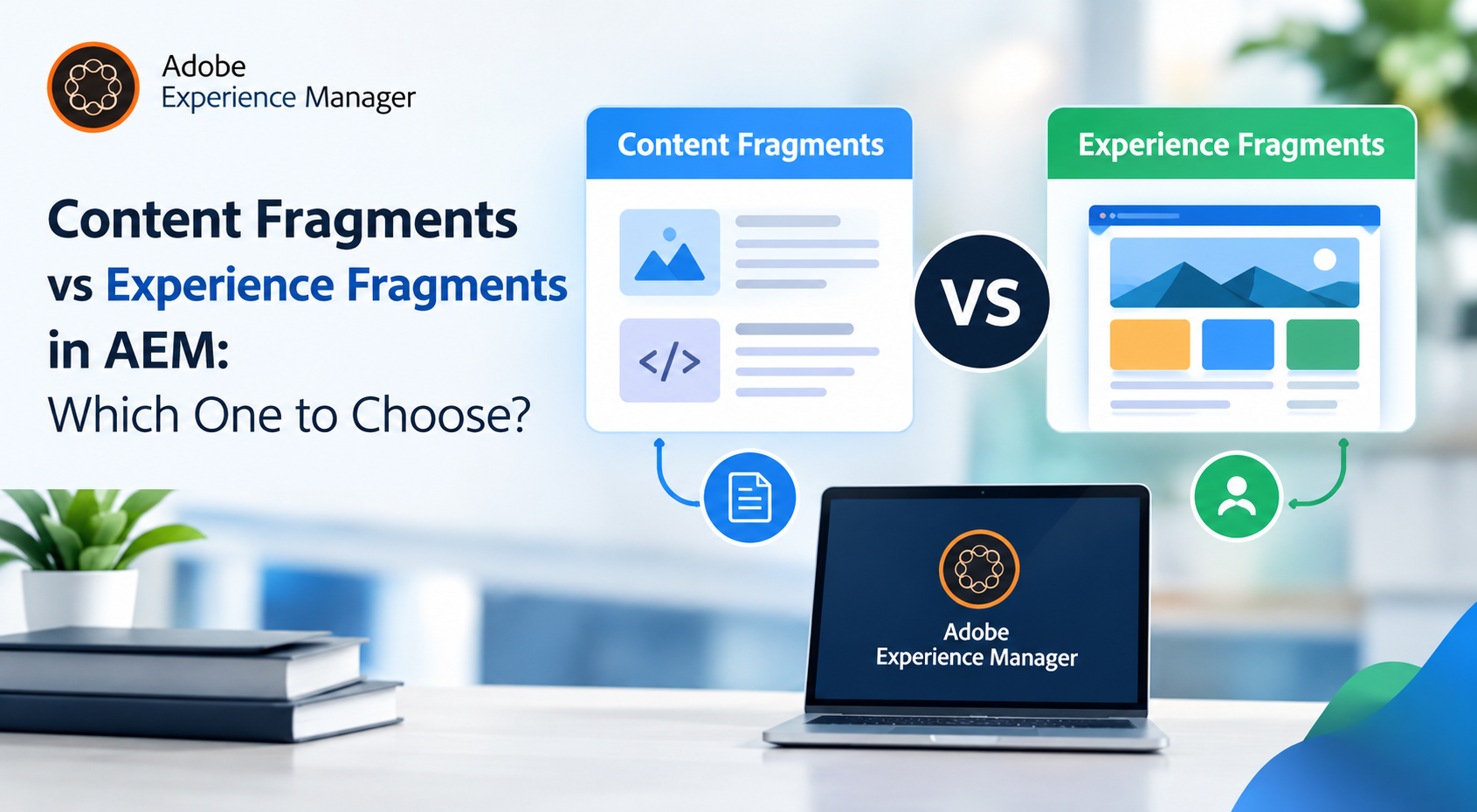
The lack of a unified strategy can slow your workflow and even lead to losing customers to competitors who deliver a unified experience across every platform. It is where AEM content fragments and experience fragments in AEM help simplify content management and distribution. This post will explain the difference between content fragments vs experience fragments in AEM so you can understand which best fits your needs.
What are AEM Content Fragments?
AEM content fragments are free from design or layout constraints. They are structured pieces of content, such as text, images, or videos, that can be shared across different channels. AEM 6.5 content fragments are created and managed in a headless manner to deliver content to various platforms.
AEM 6.5 content fragments let businesses share consistent information in different ways. It makes them useful for organizations that need to share content on many digital platforms. Each platform can display content in a format that suits it. Adobe AEM content fragments are stored in the DAM (Digital Asset Manager) as assets, and you can use them elsewhere on a website.
Key Characteristics Of AEM Content Fragments:
Content fragments and experience fragments are two key components used to build efficient and scalable digital experiences. Here are the key characteristics of AEM content fragments:
1. Content-First Approach: Content Fragments in AEM focus more on content management than design. They help manage text, images, and other media independently.
2. Structured Data: The structured data approach of AEM 6.5 content fragments allows you to create and configure different types of fields, such as text, date, and reference fields, to ensure content is organized and formatted consistently.
3. Channel-Specific Customization: These fragments are not tied to any specific platform or design, which means they can be reused across various platforms based on each platform’s design requirements. A key difference between content and experience fragments in AEM is that content fragments are ideal for omnichannel delivery, while experience allows the reuse of entire components.
4. Reusable Content: Managing content across multiple platforms often leads to inconsistencies and duplication of effort. AEM’s Content Fragments address this challenge and are designed for content reuse across various locations and platforms. You can update the data centrally, which results in the changes automatically reflected wherever they are used.
5. JSON Export for Headless CMS: AEM 6.5 content fragments can be exported as JSON through AEM Content Services, making them perfect for headless CMS and API-driven content delivery. This lets you integrate with other systems and front-end frameworks like React or Angular.
6. Saves Time for Teams: You can speed up the content creation process by allowing teams to focus on content production with Content Fragments in AEM. It is easy to deploy the CF across multiple channels for faster content rollout.
7. Supports Headless CMS and API-Driven Delivery: You can export content as JSON via AEM Content Services and show the content anywhere and anyway you want via API’s. It is good for headless CMSs and allows you to share content across platforms.
8. Efficient localization: Efficient localization is critical for businesses that are looking to reach global audiences. AEM 6.5 Content Fragments makes it easier to manage content in multiple languages with its built-in multilingual support. It makes it easy for businesses to deliver relevant content globally.
9. Improved Workflow and Governance: Ensuring content quality and compliance is critical for organizations. The version control and workflow features of AEM enable content teams to track and approve changes before they are published. This ensures alignment with organizational policies and improves overall workflow efficiency.
10. Flexible Authoring Experience: The highly flexible authoring experience of AEM 6.5 content fragments is very useful for the content creators . They can easily manage complex content structures while maintaining full control by using the Rich Text Editor (RTE) and structured data fields.
11. Support for Personalization and Targeting: Organizations can enhance user engagement by utilizing personalization tools like Adobe Target. This integration helps deliver personalized experiences based on user behavior or preferences. It allows businesses to tailor content to specific customer segments and ensure consistency in their messaging across all platforms.
AEM Content Fragments Use Case:
Content Fragments are useful for websites that create new articles or news pages daily. Instead of creating a new page each time, authors can create and manage the content as fragments. It makes it easier to maintain a consistent structure and update different articles and news sections.
What are Experience Fragments?
Experience fragments in Adobe Experience Manager are reusable pieces of content and layout which can be used on different channels. These fragments may be created on a single occasion and subsequently used in a consistent manner across a variety of channels. It ensures consistent brand experience on different places such as mobile apps, social media, websites and email campaigns.
They are designed to streamline content reuse across various platforms, including AEM site pages and third-party systems. AEM 6.5 experience fragments allow you to create grouped components in one step instead of manually adding the same components to each page. Any changes made are then automatically updated on all pages using the fragment.
This approach improves efficiency for content authoring teams by reducing the need for repetitive content configuration. Furthermore, it mitigates the probability of user errors while guaranteeing uniformity in content across the entire website.
The use of Adobe AEM experience fragments depends on the specific content needs. They can be used alongside Content Fragments. Experience Fragments are the best option when content needs to appear in many areas of a website. Use Content Fragments for simple data-loading tasks if no design is needed.
Key Characteristics of AEM Experience Fragments
1. Content and Design Integration: AEM experience fragments enable seamless integration of both content and layout for consistency and efficiency. It ensures a consistent design across websites, emails and social media.
2. Reusable Across Channels: One of the key features of the Adobe AEM Experience Fragments is that you can reuse it across multiple digital channels. Once you create a fragment, you can use the same fragment effortlessly across platforms like mobile apps, websites, and emails.
3. Editable Templates: Enjoy seamless design flexibility and brand consistency with AEM Experience Fragments. These fragments are created using editable templates and help you maintain control over layouts and components through policies set within the editable templates.
4. Variations for Multi-Channel Delivery: This feature increases efficiency and customization and allows you to create variations for different contexts or channels. You can create designs and content to meet the specific needs of each platform without duplicating effort.
5. Export as HTML or JSON: You can export AEM Experience Fragments as HTML or JSON. This makes them compatible with many platforms and systems, including Adobe Target. You can use them in headless CMSs or traditional web environments.
6. Multi-Device Support: The responsive structure of the AEM 6.5 Experience Fragments optimizes them for different devices. This means you get the same experience on any device or screen size.
7. Efficient Updates: Any amendments made to an AEM Experience Fragment are automatically reflected in all instances of the fragment. This simplified update process improves the workflow and ensures that all instances of the fragment remain consistent.
8. Consistency in Branding: A good user experience across all digital platforms helps build strong customer relationships. AEM Experience Fragments ensures a unified user experience across all touchpoints by integrating content and design. This approach is especially helpful for global campaigns because it makes sure the brand and messaging stay consistent. Keeping everything aligned is very important for success in different regions.
9. Manage Campaign Effectively: Reusing promotional elements with the help of EF such as banners and call-to-actions across channels makes marketing more efficient. This is particularly important to deliver a consistent experience. It allows teams to launch campaigns faster while keeping a unified look and feel. Experience Fragments makes making content management easier across platforms.
AEM Experience Fragments Use Cases:
AEM 6.5 Experience Fragments allow marketers to create one experience that can be reused across different channels. This includes their platforms and third-party sites to ensure the user experience stays the same everywhere. Marketers can also use Experience Fragments to create different versions of the same experience. These versions can be tailored to meet the needs of specific audiences or campaigns.
Experience Fragments lets marketers keep all variations in sync through Live Copy. This feature updates all the versions whenever a change is made to the original experience.
Difference Between Content Fragments vs Experience Fragments in AEM
The difference between content fragments and experience fragments lies in their use cases. Here are some of the common differences:
Feature
Content Fragments (CF)
Experience Fragments (EF)
What They Are
Pieces of structured content (text, images) without a specific design meant to be reused across multiple platforms in Adobe AEM content fragments.
Complete content sections with both design and layout, ready for use as part of web pages or digital experiences.
Focus
Focuses on content flexibility and reuse. It is centered on “what” (the content itself).
AEM 6.5 experience fragments focus on the presentation and how content looks and feels on different platforms. It emphasizes “how” (presentation and design).
How They Are Built
CF is built using structured data models (Content Fragment Models) for consistent and organized content.
EF is built using AEM components that define the layout and presentation of the content experience.
Design & Layout
Design is platform-specific, meaning the appearance is controlled by where the content is used, not by the fragment itself.
AEM 6.5 experience fragments include specific design and layout, ensuring a consistent visual experience across all platforms.
Content Part
Content-centric, including elements like text, images, RTE, date fields, dropdowns, and references.
Presentation-centric, including AEM components such as text, images, and custom components from your project.
Creation Process
Created using Content Fragment Models, treated as an AEM Asset.
Created using Editable Templates, treated as an AEM Page.
Component Control
Content can be configured as different elements in the Content Fragment Model (e.g., text fields, date fields, dropdowns, reference fields).
Components in EF can be controlled through policies set in Editable Templates.
Usage
It can be used in site pages via AEM’s core CF component or exposed as JSON for third-party use.
AEM 6.5 experience fragments can be used in site pages via AEM’s core EF component, exposed as plain HTML, or exported to Adobe Target as HTML/JSON.
Variations
It supports content variations but lacks live copy actions. Synchronization is possible for RTE/multiline text fields.
Variations can be created from a master EF with options like Live Copy and association with different templates.
Content fragments focus on content when comparing content fragments vs experience fragments, whereas experience fragments ensure consistency in both design and layout. Knowing the difference between content and experience fragments helps marketers and developers create better content strategies using the right tools.
When should you use a Content Fragment vs. an Experience Fragment?
You need to think about your business goals and content strategy when choosing between Content Fragments and Experience Fragments.
When comparing content fragments vs experience fragments, remember that content fragments simplify content reuse, while experience fragments streamline the reuse of entire visual and interactive experiences.
Content fragments allow you to reuse text across platforms for consistent messaging and scaling. On the other hand, Experience Fragments lets you reuse entire content experiences for a consistent experience across channels. The choice depends on how complex your content needs are.
Understand the strengths and use cases of both to optimize your content management. If you need help with Content or Experience Fragments or have questions about your information architecture, please contact us.
We at Deftsoft, a professional AEM development company, help businesses magnify their digital presence by realizing the full capabilities of Adobe Experience Manager (AEM). Our team of experienced AEM developers and architects delivers customized solutions to ensure your business stays ahead in the ever-changing digital landscape.
FAQs:
1. What are Content Fragments and Experience Fragments in AEM?
Content Fragments in Adobe Experience Manager are reusable pieces of structured content. They are usually text that can be created once and reused across different platforms without including any design. Experience Fragments are different because they contain both the content and the layout. This lets you use the same design and content across many channels.
2. What is the use case of Experience Fragments in AEM?
Experience Fragments are used when you need to reuse entire content experiences with the same design and layout. This works well when you want to make sure that the user experience is consistent across websites, mobile apps, email campaigns, and other platforms.
3. When should I use Content Fragments over Experience Fragments in AEM?
You should use Content Fragments when you need reusable structured content that can work across different platforms. This is good when your content needs to be updated easily or when you are managing text-heavy content like blogs and product descriptions.
4. Can I use Content Fragments and Experience Fragments together in AEM?
Yes, you can use Content Fragments and Experience Fragments in AEM. Content Fragments can be added inside Experience Fragments so you can use structured content while also making sure the design looks good on all platforms.
5. Which feature is available in Experience Fragments but not in Content Fragments?
Experience Fragments allows you to manage both the layout and the design, along with the content. You cannot do this with Content Fragments. This makes Experience Fragments useful for delivering full visual experiences that can be reused on multiple platforms.
Did you know that global mobile app installs across Google Play and the App Store are expected to reach 230 billion by 2025? Additionally, consumer spending on these platforms is projected to soar to a staggering $270 billion. With experts predicting a major surge in Artificial Intelligence (AI) by 2025, the mobile app landscape is set for a significant transformation. From voice recognition to virtual assistants to predictive analytics, AI-powered apps are projected to redefine the realm of the digital world. Exciting, right? It certainly is. Forget about 2025; mobile apps have already become an essential part of our daily routines, helping us manage everything from finances to staying connected with loved ones and handling tasks more efficiently.
Think about your morning routine: you might kick-start the day with a fitness app guiding your workout, order breakfast through a food delivery app, and book a ride via a transportation app – all before even stepping out the door. Now, as we approach 2025, businesses and individuals have started recognizing the vast opportunities in this space. For aspiring developers, this makes mobile app development one of the most promising career paths for 2025, as demand for cutting-edge mobile apps continues to rise rapidly.
According to Precedence Research, the market size of global mobile app development is predicted to reach $1,383.65 billion by 2033. Moreover, our experts have also predicted that the global app revenue will reach $270 billion by 2025. This means the future of mobile app development is bright. If you’re a beginner looking to enter the mobile app development market, 2025 is the right time.
Since this industry is so dynamic and complicated, it may be difficult for many to navigate it effectively. This is why Deftsoft has created a detailed beginner’s guide for mobile app development to help you navigate this industry effectively in 2025. From discussing the benefits of mobile app development to unraveling essential tools to execute this process seamlessly, our detailed beginner’s guide to mobile app development touches on valuable topics related to this industry. At last, we have dedicated a special section to help you become a professional mobile app developer.
In this crowded market, Deftsoft wants you to become like Sinbad the Sailor, someone who makes every effort to navigate the ever-changing digital seas. Read our beginner’s guide to mobile app development to rise above the competition and chart a course for success.
Before delving into the benefits, let’s understand the concept of mobile app development.
Understanding Mobile App Development: Meaning, History & Evolution
What is Mobile Application Development?
As the name suggests, ‘Mobile app development is the process of creating software applications that run on mobile devices such as smartphones and tablets.’ The process involves designing, building, testing, and deploying apps that deliver specific functionalities or services to users.
History & Evolution of Mobile App Development
How many of you are aware of the history of mobile app development? Hardly, a few of you! Right? This is why, in our detailed beginner’s guide to mobile app development 2025, we’ve included a dedicated section on the history and evolution of mobile app development.
Early Beginnings (From the 1970s to 1990s)
The concept of mobile applications dates back to the late 1970s, with the advent of the first automated cellular network in cars in 1979. A few years later, Motorola launched DynaTAC8000X (the first commercial mobile phone of its time).
In 1989, Psion released EPOC (a mobile OS). With this, the evolution of mobile phones also started—Nokia launched their first GSM phone, and Apple launched their first tablet in 1993.
The incorporation of mobile apps can be found in 1994, when the world’s first smartphone, Simon, was launched. This revolutionary mobile featured simple apps like a calendar, notepad, touchscreen, sketchpad calculator & more. This was a time when the history of mobile applications began.
In 1997, Nokia made an update by including a game app, ‘The Snake’ in their 2110 model.
With the introduction of WAP (Wireless Application Protocol) in 1999, internet accessibility became really easy. All technologies were hitting the market at the right time.
Altogether, this led to the launch of Handango in 1999. Handongo became the world’s first mobile app store. It allowed users to download mobile apps like Palm OS and Windows Mobile. The same year, the web app concept was introduced through Java Technology. Java is a programming language widely used for building cross-platform applications, which would play a significant role in mobile app development in the 2000s.
The Rise of Jave ME & Smartphone Revolution (2000s & 2010s)
During the Y2K era, mobile phone trends and popularity reached their peak. In the early 2000s, Java Micro Edition (Java ME) emerged as a significant development platform. This innovative platform allowed developers to create applications for various mobile devices. However, the real game changer was the launch of the iPhone in 2007 and the subsequent introduction of the App Store in 2008. At that time, Apple’s version 2.0 app store made 500 apps available to its users.
This led to the record-breaking sales of iPhone in 2008. Around 10 million downloads were made on the App Store just three days after the launch.
This period also witnessed the rise of app giants like Facebook, Instagram, and Angry Birds, which became global phenomena. Both Android and iOS app downloads crossed the whopping mark of 10 billion in 2011.
Mobile phone companies like Blackberry and Nokia fell behind because they didn’t keep up with the advancements made by Apple, Samsung, and others. OnePlus has emerged as a new-generation leader in this market.
The Current Landscape (the 2020s)
As of today, 8.93 million apps are available worldwide. Of these, 3.553 million are available on the Google Play Store, 1.642 million on the Apple App Store, and the remaining are on other app stores like Microsoft Store, Amazon App Store & etc. In the 2020s, mobile app development has become a critical component of digital transformation for businesses and organizations. Various mobile app development trends have changed the industry. With the widespread adoption of 5G technology, artificial intelligence (AI), and augmented reality (AR), mobile apps are becoming more interactive and personalized.
Benefits of Securing a Career in Mobile App Development: Why You Should Step Into This Industry?
Mobile application development has become a cornerstone of modern business, providing numerous benefits in today’s fast-paced digital world. If you’re a development enthusiast, delving into the mobile app development industry will open the doors to various opportunities for you. In this section of our beginner’s guide to mobile app development, we’ve listed the top reasons why you should secure a career in the mobile app development industry. Read now!
1. A Secured Career In One of the Fastest Growing Job Sector
As the IT industry is booming, so does the technologies surrounding it. Today, in this industry, various jobs are available in different fields, like: tech support, database analyst, business analyst, and mobile app developer. Speaking of mobile app development, let us inform you that a mobile app developer has been named the ‘Best Job in America’ by CNN Money. Moreover, a prediction has been made that the jobs in the mobile app development sector will witness a growth of 19% in the coming years, with a median salary of more than $97,000.
Furthermore, the BLS (Bureau of Labor Statistics) has also predicted a significant rise in software development jobs, including mobile app development. The data indicates a 25% growth in the job sector in this decade.
As we publish this detailed beginner’s guide to mobile app development, Deftsoft confidently thinks,
“Mobile app development is a promising, lucrative and dynamic career path.”
2. The Rising Influence of Mobile Apps in Business or Brand Building
In today’s digital world, mobile apps have become indispensable for businesses aiming to build their brand and connect with customers. With smartphones becoming an essential part of our daily lives, apps offer businesses and brands a direct, personalized way to engage consumers, strengthen loyalty, and drive growth. According to Statista, the total number of smartphone users worldwide has reached 4,479.66 billion users in 2024 so far. The data also estimates this number to reach a new peak of 6.2 billion in 2029. Moreover, 63% of mobile users prefer to use an app instead of a website, making apps the preferred channel for communication, shopping, and brand interaction. This massive user base demonstrates why mobile apps are now central to brand-building strategies.
Some of the most recognizable brands today have solidified their market position by developing highly functional and engaging mobile apps. For instance, Starbucks has grown its brand through its app, which integrates a loyalty program, mobile payments, and personalized offers, driving 23.4 million active users last year. Similarly, Nike has used its app to offer exclusive content and personalized fitness programs, reinforcing its image as a customer-centric brand.
As mobile apps’ influence on business and brand building continues to rise, the demand for professional mobile app developers is also increasing.
3. Evolution of Mobile App Development As An Easy Process
Mobile app development has undergone a remarkable transformation over the past two decades, evolving from a complex and time-consuming process to a more accessible, streamlined activity. In the early 2000s, developing apps required extensive coding knowledge, specialized skills, and significant time. Only a few developers working in specific environments like Java or Blackberry OS could build simple mobile apps. However, things started changing with the rise of no-code and low-code platforms like Bubble and OutSystems, which allow non-developers to build functional apps using drag-and-drop interfaces.
(Additional Information: No-code and low-code platforms are innovative software development environments that aim to help non-developers build apps seamlessly. These platforms offer various drag-and-drop tools, pre-built templates, and automated processes. This technology started gaining widespread acceptance in the late 2000s.)
Research shows that low-code platforms can cut app development time by as much as 90% compared to traditional coding methods. Gartner Forecasts also predicts that low-code platforms will be responsible for around 65% of app development in 2024.
Moreover, advanced frameworks like React Native and Flutter allow developers to create apps for both iOS and Android with a single codebase, significantly reducing development time and effort. Considering these benefits, around 87% of developers use advanced frameworks for seamless mobile app development.
With the rise of advanced technologies, mobile app development has become faster, more cost-effective, and increasingly accessible to a broader audience.
Mobile App Development Platforms/Frameworks You Need to Know
As a beginner, have you ever considered developing mobile applications? You might know various technologies are used to build well-functional mobile apps. But what are these technologies? How do they help developers in mobile app development? Well, that’s when the mobile app development framework enters the chat.
To answer your questions accurately, we’ve incorporated a detailed section on frameworks in our beginner’s guide to mobile app development.
What are Mobile App Development Frameworks?
A mobile app development framework is a software structure (which acts like a library) that provides developers with the necessary tools, libraries, and interfaces to build mobile applications efficiently. The mobile app development framework acts as a foundation upon which apps are developed, streamlining the coding process by offering pre-built functionalities. The key components of mobile app development frameworks are as follows:
UI Components, such as buttons, menus, and forms.
Development Tools for coding, debugging, and testing.
APIs (Application Programming Interfaces) allow seamless interaction with mobile hardware and software features, such as cameras, GPS, or notifications.
Code Reusability to ensure consistency across the app.
Classification of Mobile App Development Frameworks
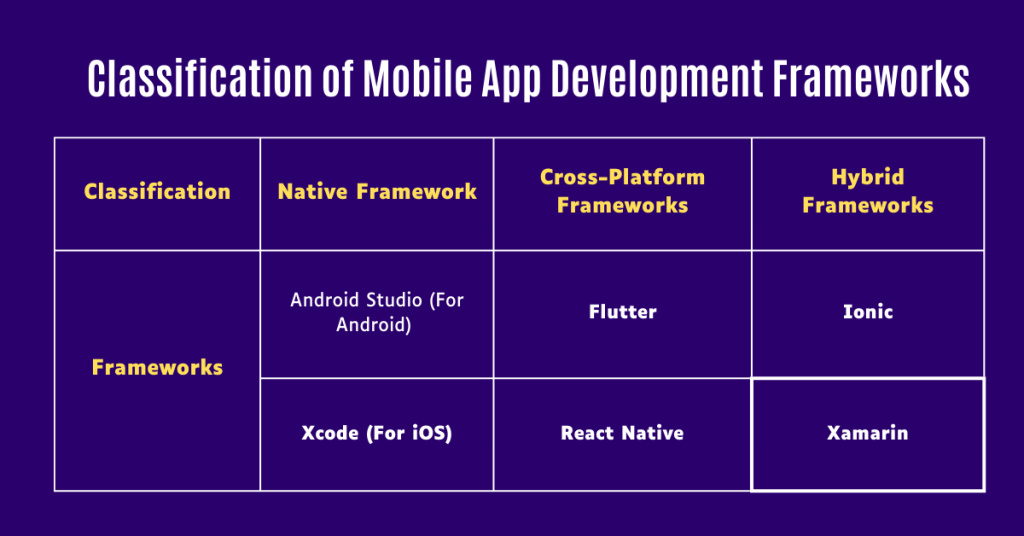
As a beginner, you should know mobile apps are of three types – Native Apps (designed for a particular platform or device such as Android or iOS), Web Apps (designed to look and feel like mobile apps when accessed on a browser), and Hybrid Apps (these are a blend of native and web apps).
Since mobile apps are categorized differently, distinct frameworks are used to develop each type of application. This is why mobile app development frameworks can also be classified into three types: Native, Cross-Platform, and Hybrid Frameworks.
1. Native Framework
These are specific to operating systems like Android or iOS. Native apps are built using the programming languages and tools provided by these platforms.
Android Studio (For Android Apps Only)
Android Studio is regarded as the best Native mobile app development framework. Google launched it in 2013 as the official Integrated Development Environment (IDE) for Android app development. Built on IntelliJ IDEA, Android Studio offers a rich set of features, including a robust code editor, real-time code analysis, and a powerful emulator. Using various programming languages such as Java and Kotlin, Android Studio provides effortless mobile app development.
Xcode (For iOS)
Xcode is Apple’s integrated development environment (IDE) designed to create iOS, macOS, watchOS, and tvOS apps. Launched in 2003, Xcode is one of the reliable native app development frameworks. It comes with a comprehensive suite of tools and resources, including a powerful code editor, a graphical interface builder, and various debugging tools. Unlike Android Studio, Xcode supports Swift and Objective-C programming languages, which are essential for high-performance iOS application developments.
These innovative frameworks allow developers to write code once and deploy it across multiple platforms, such as iOS and Android. By running a single code, developers can effectively build mobile applications, saving time and resources. According to the 2023 Statista Survey, the top cross-platform app frameworks used by software developers are given below.
Flutter
Flutter is one of the leading cross-platform app development frameworks. It was first described and unveiled in 2015 at the Dart Developer Summit. Officially, Flutter was launched on May 12, 2017. The 2023 Statista Survey shows Flutter is the most popular cross-platform mobile framework. 46% of software developers (around 1/3rd of the total professionals) use Flutter.
React Native
React Native is a popular open-source UI software framework released by Facebook on March 26, 2015. The first version of React JavaScript Configuration was launched in 2015 during a technical talk event. Over the years, this innovative framework has become widely popular for cross-platform development. According to the 2023 Statista Survey, React Native is the second most popular cross-platform mobile platform. 35% of the seasoned developers use React Native for their application development requirements.
3. Hybrid Frameworks
These frameworks combine web technologies like HTML, CSS, and JavaScript with native elements, enabling developers to create apps that work across platforms. Like cross-platform frameworks, Hybrid frameworks also allow developers to run single code across multiple platforms. However, what makes Hybrid frameworks different is their flexibility in launching web apps and mobile apps simultaneously. The following are two of the best hybrid mobile app development frameworks.
Ionic
As an open-source framework, Ionic is the ultimate option for developing Hybrid apps. Ionic provides seamless mobile application development using web technologies like HTML, CSS, and JavaScript. Launched in 2013 by Max Lynch, Ben Sperry, and Adam Bradley, Ionic quickly gained prominence due to its ability to create cross-platform apps with a single codebase. This is why Ionic is often counted among the best cross-platform mobile application frameworks. It uses AngularJS and Apache Cordova (formerly PhoneGap) to enable developers to write code once and deploy it on both iOS and Android platforms.
Xamarin
Introduced by Microsoft in 2011, Xamarin is a framework for developing cross-platform mobile applications. It uses C# and the .NET framework to provide hassle-free development. Xamarin allows developers to share up to 90% of their code across Android, iOS, and Windows, streamlining the development process and reducing costs. For top-tier hybrid mobile app development, consider integrating Xamarin with Visual Studio. By doing so, you can unlock a comprehensive development environment, including debugging, testing, and deployment tools.
How to Become a Mobile App Developer?
In our beginner’s guide to mobile app development, we’ve dedicated a comprehensive section to answering your questions about becoming a professional mobile app developer. Consider reading this whole to unlock valuable information from our beginner’s guide to mobile app development.
Who, Exactly, is a Mobile App Developer?
Simply put, a mobile developer is a professional who specializes in creating applications for mobile devices such as smartphones and tablets. Their primary role involves designing, coding, testing, and maintaining apps that run on various mobile operating systems, such as Android and iOS.
To become a successful mobile app developer, you should master diverse skills that span technical knowledge, problem-solving abilities, and soft skills. Below are the essential skills for a mobile app developer.
Proficiency in programming languages like Java, Kotlin, Swift, Objective-C & more.
Understanding of mobile development frameworks (Kotlin, Swift, React Native, Flutter, Xamarin & more)
Deep knowledge of mobile UI/UX designs.
Experience in using Integrated Development Environments (IDEs).
Skilled in using version control systems
Knowledge of different architectural patterns such as Model-View-ViewModel (MVVM) or Model-View-Controller (MVC)
Strong problem-solving skills to identify, analyze, and fix bugs.
Effective communication, teamwork, and project management skills.
How to Become a Mobile App Developer? – Step by Step Process
Many individuals with a keen interest in mobile app development face difficulties in getting an accurate roadmap to becoming industry professionals. In our beginner’s guide to mobile app development, we provide your ultimate roadmap to help you reach the top.
Step #1: Understand the Basics
Start by gaining a strong foundation in computer science or a related field. A degree in Computer Science, Software Engineering, or a similar discipline is highly beneficial. Alongside this, acquire proficiency in programming languages relevant to mobile development. For Android development, learn Java or Kotlin. Learn Swift or Objective-C for iOS mobile app development. If you’re interested in cross-platform development, JavaScript (with frameworks like React Native) or Dart (with Flutter) is crucial.
(Read the section above of this beginner’s guide to mobile app development to learn about these technologies.)
Step #2: Build Your Skills Through Hands-On Projects
Our years of experience as a leading mobile app development company have taught us that “Nothing makes you learn better than working on real-life projects.” Alongside completing your qualification, consider starting your own mobile app (it should be a completely different task from your educational institute curriculum). This could be anything from a simple to-do list app to a more complex application. These projects help you apply what you’ve learned and build a portfolio.
Step #3: Gain Experience
After completing your graduation level education, look for internships or junior developer roles to gain practical experience. Working on live projects with experienced teams provides valuable insights and skills. Moreover, working with like-minded people will give you additional knowledge about the job sector.
Step #4: Develop a Strong Portfolio
While working as a junior mobile app developer, consider creating a portfolio highlighting your best projects. Include descriptions, screenshots, and links to your apps or code repositories. This may help demonstrate your abilities and skills to potential clients or firms. Another thing: “Mobile app development is a rapidly evolving field.” Stay updated with the latest trends, tools, and technologies to survive in this ever-evolving industry. Follow some leading industry blogging websites to read beginner’s guide to mobile app development, attend monthly (if not weekly) webinars, and take online courses (on weekends) to stay ahead of the industry.
Step #5: Focus on Networking
In a crowded market like mobile app development, networking plays a crucial role in becoming successful.
As your trusted beginner’s guide to mobile app development, we recommend that you focus on expanding your networking with industry professionals.
Sometimes, your talent might not even work, but your network with industry people can help you grab a well-paying job. Thus, join developer communities, attend tech meetups, and participate in online forums to connect with other professionals. Networking can unlock a comprehensive suite of job opportunities and collaborations.
Step #6: Prepare for the Job Market
Craft a professional resume and cover letter highlighting your skills, experience, and projects. Tailor them to each job application to align with the position’s requirements. Revise all your knowledge to prepare for technical interviews.
Follow this beginner’s guide to mobile app development and build a successful career in this industry. Understand these steps carefully to build a successful career as a mobile app developer. Embrace learning opportunities, stay curious, and persist in your efforts to grow and succeed.
About Deftsoft, A Premier Mobile App Development Company
After reading this beginner’s guide to mobile app development, you might be thinking about Deftsoft. Well, here’s some information you need to know.
With 19+ years of experience, Deftsoft is a premier mobile app development company. As an industry leader in mobile app development, we specialize in developing custom solutions tailored to meet the unique needs of businesses across various industries. Our team of experienced developers, designers, and project managers work collectively to deliver mobile apps that stand out in both functionality and design. What sets Deftsoft apart from its competitors is its commitment to leveraging cutting-edge technologies and industry best practices. Whether it’s about developing native apps for Android and iOS or cross-platform solutions using frameworks like React Native and Flutter, we aim to fulfill your unique requirements. Deftsoft isn’t only your ultimate beginner’s guide to mobile app development; we’re also the leading service providers in this industry.
Conclusion
Mobile app development has come a long way, from its humble beginnings in the 1970s to the dynamic and versatile industry it is today. With advancements in technologies like 5G, AI, and AR, mobile apps are set to become even more integral to our daily lives. The increasing demand for mobile apps in various sectors (from healthcare to entertainment) opens up vast opportunities for developers.
To all those aspiring mobile app developers,
2025 is the perfect time to enter this industry and conquer it. The mobile app development landscape in 2025 and even in the future looks promising and consistent. Take this as an opportunity to make a career out of this.
Deftsoft’s beginner’s guide to mobile app development is your roadmap to navigating this exciting industry. By leveraging the right tools, platforms, and strategies, you can set sail like Sinbad the Sailor and conquer the digital seas of mobile app development.
Thanks for reading our beginner’s guide to mobile app development! Stay tuned for more informative blog posts. Also, look through the mobile app development services by Deftsoft to know more. You can also recommend our firm to your close ones who are looking for a reliable mobile app development company. With 19+ years of experience, we’re your ultimate application development partner. Contact us now!
Frequently Asked Questions (FAQs)
1. What are the key trends in mobile app development for 2025?
In 2025, mobile app development will focus on advancements such as AI integration, 5G connectivity, enhanced AR/VR experiences, and increased use of cross-platform frameworks. These trends aim to create more intuitive, responsive, and engaging apps.
2. Do I need prior coding experience to start mobile app development?
While coding experience can be beneficial, many tools and platforms that offer drag-and-drop features and simplified coding environments are available for beginners. Starting with these tools can help you build a foundation before diving deeper into coding.
3. What programming languages are most relevant for mobile app development in 2025?
For 2025, languages like Swift for iOS, Kotlin for Android, and Dart for Flutter are highly relevant. Learning these languages will help you develop apps that are both modern and compatible with current technology trends.
4. How do I choose the right app development platform?
Choosing the right platform depends on your target audience and app requirements. Consider whether you need to develop for iOS, Android, or both, and evaluate cross-platform solutions like Flutter or React Native based on your project needs.
5. What are some common challenges faced by beginners in mobile app development?
Beginners often encounter challenges such as understanding complex coding languages, managing app performance, and ensuring compatibility across different devices. Overcoming these challenges requires practice, continuous learning, and leveraging resources such as online tutorials and forums.
6. How can I stay updated with the latest developments in mobile app technology?
Stay informed by following industry blogs, participating in online communities, attending tech conferences, and subscribing to newsletters related to mobile app development. This will help you stay up to date with new tools, frameworks, and best practices.
7. How big is the mobile app market in 2025?
According to our expert analysis, by 2025, global consumer spending on premium apps, in-app purchases, and subscriptions through Apple’s App Store and Google Play is expected to hit $270 billion annually. This figure represents a nearly 2.5-fold increase compared to 2020, a surge driven by the accelerated adoption of mobile technology during the COVID-19 pandemic.