The 10 Best Claude Code Skills to Boost Developer Productivity in 2026
-
By Devraj
-
5th May 2026
Let’s be honest, most developers install Claude Code,type a few prompts, and think they’re getting the most out of it. They’re not.
The developers who are actually pulling ahead in 2026 aren’t just prompting harder. They’re using Claude Code skills, modular, reusable playbooks that tell Claude exactly how to behave for specific tasks. Think of a skill as a senior developer sitting next to you who already knows your project’s conventions, your preferred stack, and your quality standards. You stop repeating yourself. Claude stops guessing.
According to a recent survey from February 2026, 71% of developers who work with AI agents use Claude Code as their primary tool. Yet most of them are leaving serious productivity on the table by ignoring the skill system entirely. For any modern web development service,mastering these “agentic workflows” is no longer optional—it’s the baseline for shipping high-performance, production-ready applications at 10x speed.
This blog covers the 10 best Claude Code skills worth adding to your workflow right now, what they do, why they matter, and how they empower professional web development tools to deliver enterprise-grade results.
QUICK SUMMARY
Claude Code skills are specialized SKILL.md files—structured playbooks that provide Claude with the project-specific logic needed to handle complex engineering tasks. Whether triggered via slash commands or context-aware automation, these skills bridge the gap between a “chat assistant” and a production-ready engineering collaborator. At Deftsoft, we use these agentic workflows within our web development services to standardize code quality, automate security audits, and accelerate delivery timelines. Here are the 10 best Claude Code skills dominating the 2026 landscape.
Quick Navigation
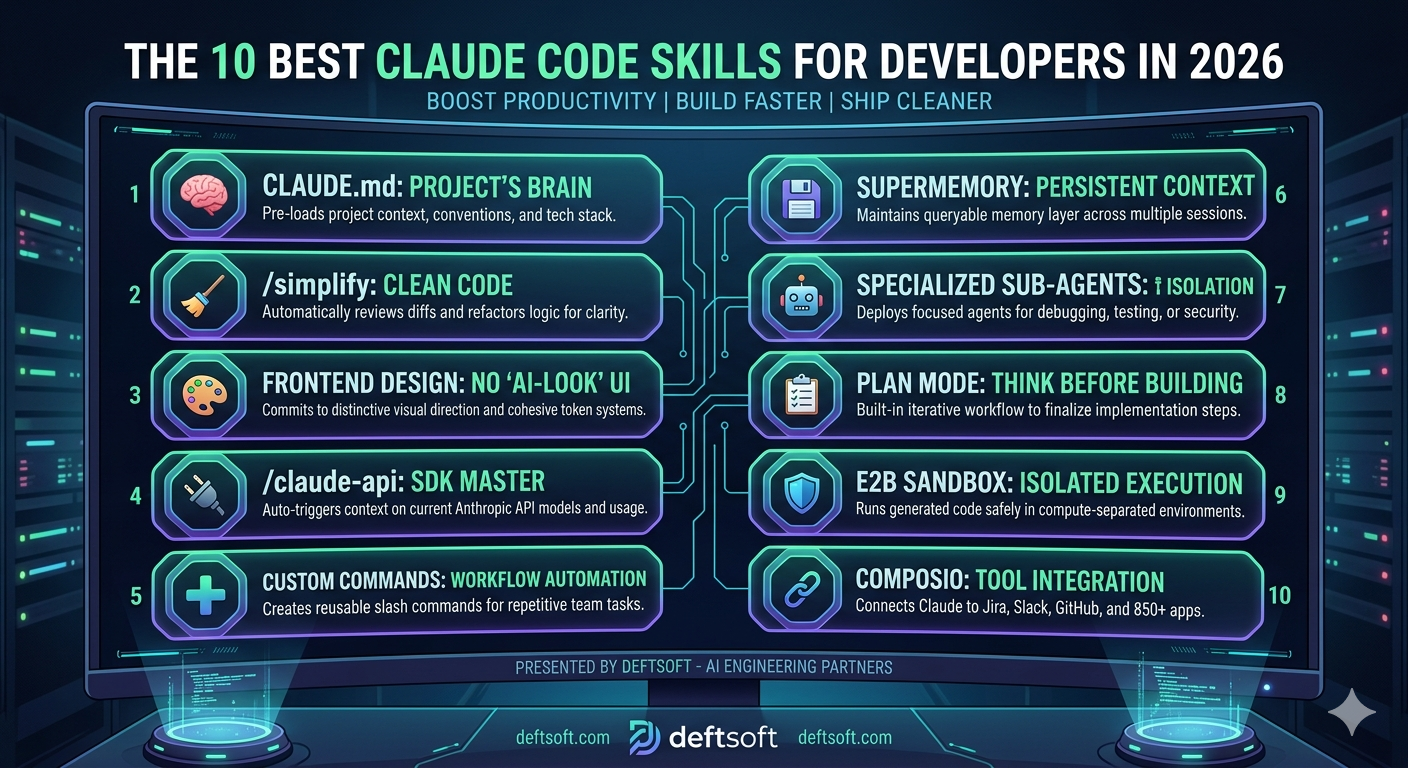
1. CLAUDE.md Your Project’s Brain
2. /simplify Clean Up After You Ship Fast
3. Frontend Design Skill Stop Shipping “AI-Looking” UIs
4. /claude-api Build on Anthropic’s API Without Reading the Docs
5. Custom Slash Commands Turn Repetitive Prompts Into One-Line Workflows
6. Supermemory Persistent Memory Across Sessions
7. Specialized Sub-Agents Stop Mixing Contexts
8. Plan Mode Think Before You Build
9. E2B Sandbox Skill Run Code Without Touching Production
1. CLAUDE.md Your Project’s Brain
Before any skill, this is the foundation. CLAUDE.md is a markdown file you place in your project root. It tells Claude your architecture, your code standards, your key file paths, and your CLI commands all upfront, every session.
Without it, Claude starts from zero every time. With it, Claude already knows you use React 18 with TypeScript, prefer named exports and run tests with `npm run test`. One developer described it as “the onboarding doc I wish I had written for my own team.” Run `/init` in any repo and Claude auto-generates a draft by reading your codebase. Spend 30 minutes refining it once. Save hours every week.
? PRO TIP
Scope your CLAUDE.md rules using YAML front matter so they activate only in specific directories. Your API conventions won’t distract Claude when it’s working on a React component and vice versa.
Create the file manually or run /init to auto-generate:
bash
# Auto-generate from your codebase
/init
Or create it manually at your project root:
markdown
# CLAUDE.md

## Architecture
- Frontend: React 18 + TypeScript + Vite
- Backend: Node.js + Express + PostgreSQL

## Code Standards
- Functional components with hooks only
- Named exports over default exports
- Tailwind utility classes only

## Key Files
- Utils: /src/utils/
- API endpoints: /src/api/endpoints/
- Types: /src/types/

## Commands
- Dev: npm run dev
- Tests: npm run test
- Build: npm run build
With YAML frontmatter for path scoping:
markdown
---
path: src/api/**
---

## API Conventions
- Always validate request body with Zod
- Return { data, error } shape on every endpoint
- Use 400 for validation errors, 500 for server errors
2. /simplify Clean Up After You Ship Fast
You wrote the feature. It works. But you both know the code is a mess. That’s exactly when `/simplify` earns its keep. It reviews only what changed, spots redundant logic, flags duplications of existing utilities, and proposes targeted fixes without touching parts that don’t need them.
Teams that run `/simplify` right after a fast build catch the “I’ll clean this up later” debt before it becomes load-bearing. One rule: run it once the code is correct, not while logic is still changing.
No installation needed — it’s a built-in skill. Just invoke it after your feature is working:
After your feature works, run:
bash
/simplify
Or target a specific file:
bash
/simplify src/utils/payment.ts
What it does under the hood — it reviews only the diff, not the entire codebase:
bash
# It essentially does this internally:
git diff HEAD -- src/utils/payment.ts

# Then asks: is there duplication, redundancy, or reuse opportunities?
3. Frontend Design Skill Stop Shipping “AI-Looking” UIs
Here’s a problem nobody talks about enough: users can now spot AI-generated interfaces. The generic layouts, the safe color palettes, the predictable component hierarchy, it all reads as “machine-made.”
The frontend design skill fixes this by pushing Claude to commit to a bold visual direction before it writes a single line of code, whether that’s brutally minimal, editorial, retro-futuristic, or something else entirely. It enforces distinctive typography pairings, cohesive CSS variable systems, meaningful motion, and spatial compositions that break from the defaults. With over 277,000 installs as of early 2026, it’s the most-used design skill in the ecosystem. The output genuinely looks like a senior designer reviewed it.
⚡ DID YOU KNOW?
Without the frontend design skill, Claude defaults to “safe” design choices, the kind that look fine but are forgettable. With it, the output is opinionated, distinctive, and production-ready.
Install via the plugin system:
bash
/plugin install frontend-design@anthropic-skills
Then invoke it before describing what you want to build:
bash
/frontend-design
bash
# Example prompt after invoking:
"Build a SaaS dashboard landing page.
Bold, editorial direction. Dark background,
sharp typography, animated hero section."
Without the skill, Claude generates generic CSS. With it you get explicit design tokens upfront:
css
/* What Claude generates WITH the skill */
:root {
--color-primary: #E8FF3A;
--color-bg: #0A0A0A;
--color-surface: #141414;
--font-display: 'Clash Display', sans-serif;
--font-body: 'Inter', sans-serif;
--spacing-section: clamp(80px, 12vw, 160px);
}
4. /claude-api Build on Anthropic’s API Without Reading the Docs
If your code imports `anthropic` or `@anthropic-ai/sdk`, this skill triggers automatically. It switches Claude Code into API-aware mode, it knows the current model IDs, understands the tool-use protocol, generates correct SDK usage patterns, and recommends the right model for your specific task without you needing to cross-reference documentation mid-build. For developers building products on top of Claude AI, this skill alone removes a significant source of friction.
No installation needed — triggers automatically when your code imports the SDK:
// The moment you write this, the skill activates:
import Anthropic from '@anthropic-ai/sdk';

Claude then generates correct, current SDK usage without hallucinating outdated patterns:
// What Claude produces with the skill active:
const client = new Anthropic();
const response = await client.messages.create({
  model: 'claude-sonnet-4-20250514',
  max_tokens: 1024,
  messages: [
    {
      role: 'user',
      content: 'Explain how recursion works.'
    }
  ]
});

console.log(response.content[0].text);

For tool use, Claude auto-generates the correct schema:
const response = await client.messages.create({
  model: 'claude-sonnet-4-20250514',
  max_tokens: 1024,
  tools: [
    {
      name: 'get_weather',
      description: 'Get current weather for a location',
      input_schema: {
        type: 'object',
        properties: {
          location: { type: 'string', description: 'City name' }
        },
        required: ['location']
      }
    }
  ],
  messages: [{ role: 'user', content: 'What is the weather in Mumbai?' }]
});
5. Custom Slash Commands Turn Repetitive Prompts Into One-Line Workflows
Every developer has the same 10–15 tasks they repeat: component scaffolding, code reviews, feature specs, and refactor plans. Without custom commands, you’re retyping the same context-heavy prompt every single time.
Any markdown file you drop into `.claude/commands/` becomes a slash command. A file called `new-component.md` creates `/new-component`. The real power: commands can run shell commands and embed output directly into the prompt before Claude sees it. A review command can pull your current git diff automatically. A bug-fix command can fetch a GitHub issue and hand Claude full context without any copy-pasting. Commit them to your project folder so the whole team can share them.
? PRO TIP
Keep personal commands in ~/.claude/commands/ so they’re available across every project. Keep team commands in .claude/commands/ so they’re shared and version-controlled.
Create the commands folder and add a markdown file:
# For project-wide (shared with team):
mkdir -p .claude/commands

# For personal use across all projects:
mkdir -p ~/.claude/commands
# For personal use across all projects:
 mkdir -p ~/.claude/commands

Example: a new React component command:
Create a new React component called “$ARGUMENTS”.
Requirements:
- TypeScript with proper prop types
- Named export only
- Tailwind for styling
- Include a loading and error state
- Add a basic Jest test file alongside it

File structure:
- src/components/$ARGUMENTS/$ARGUMENTS.tsx
- src/components/$ARGUMENTS/$ARGUMENTS.test.tsx
- src/components/$ARGUMENTS/index.ts

Use it like this:
/new-component UserAvatar
/new-component PaymentForm

Example: a code review command that auto-pulls the git diff:

Review the following code changes:
$(git diff HEAD)
Check for:
1. Security vulnerabilities (XSS, SQL injection, auth flaws)
2. Performance bottlenecks
3. Error handling gaps
4. Edge cases missed
5. Code smells
Rate each issue: Critical / Warning / Suggestion
6. Supermemory Persistent Memory Across Sessions
Claude has no memory between sessions by default. Every conversation starts fresh. For long-running projects, this is genuinely painful; you re-explain your architecture, your decisions, your constraints, session after session.
Supermemory solves this by giving Claude a persistent, queryable memory layer that survives across conversations. It integrates as a drop-in wrapper for major agent frameworks and has earned over 16,700 GitHub stars, with benchmarks demonstrating state-of-the-art recall. For developers building complex, multi-week projects with Claude AI for developers, this skill changes the relationship from “tool I have to re-onboard every day” to “collaborator who actually remembers.”
Install via npm:
npm install supermemory-mcp

Add it to your Claude Code MCP config (~/.claude/mcp_config.json):
{
  "mcpServers": {
    "supermemory": {
      "command": "npx",
      "args": ["supermemory-mcp"],
      "env": {
        "SUPERMEMORY_API_KEY": "your_api_key_here"
      }
    }
  }
}

Once connected, Claude can save and recall context across sessions:
# Save a decision to memory mid-session:
"Remember that we chose Zustand over Redux for this project
because we want minimal boilerplate and the team is small."

# In a future session, Claude recalls it automatically:
"Based on our previous decision to use Zustand,
here's how I'd structure the auth store..."
7. Specialized Sub-Agents Stop Mixing Contexts
One Claude session for everything is a trap. Debugging conversations bleed into architecture decisions. Context gets polluted. Quality degrades.
The better pattern is to deploy specialized sub-agents with single, well-defined purposes. A Debugger Agent that only identifies and fixes bugs. A Security Agent that exclusively scans for vulnerabilities, SQL injection, XSS, auth flaws, insecure dependencies and rates severity. Security isn’t an afterthought; we integrate these automated audits into our mobile app development and API workflows to catch leaks before they hit production.
A Test Agent that generates comprehensive test suites. Each sub-agent gets a focused system prompt and a bounded scope. The result, per documented workflows, is 70% fewer production bugs, 50% faster debugging, and test coverage jumping from 40% to 90%. These aren’t marketing numbers; they come from teams that made the switch and measured it.
⚡ DID YOU KNOW?
CLAUDE.md instructions get followed about 70% of the time. For style preferences, that’s fine. For rules like “don’t push to main,” that 30% gap is a production incident waiting to happen. Sub-agents with hard-scoped roles are the fix.
Create separate agent prompt files in your .claude/commands/ folder:
Create separate agent prompt files in your .claude/commands/ folder:

You are the Debugger Agent. Your only job is to find and fix bugs.
Rules:
- Do NOT refactor or improve code style
- Do NOT suggest new features
- ONLY identify what is broken and why, then fix it
- Always explain the root cause before applying the fix
Context: $(cat $ARGUMENTS)


You are the Security Agent. Review code exclusively for vulnerabilities.
Scan for:
- SQL injection
- XSS vulnerabilities
- Auth and session flaws
- Sensitive data exposure
- Insecure dependencies
Rate each finding: Critical / High / Medium / Low
Provide a fix for every Critical and High finding.
Code to review: $(cat $ARGUMENTS)


You are the Test Agent. Generate a comprehensive test suite.
Include:
- Happy path scenarios
- Edge cases (empty, null, undefined, boundary values)
- Security scenarios (injection attempts)
- Error scenarios (network failure, invalid tokens)
Use Jest syntax. Match this project's existing test structure:
$(cat src/__tests__/example.test.ts)
Function to test: $(cat $ARGUMENTS)

Invoke each one independently:
/debug-agent src/utils/payment.ts
/security-agent src/api/auth.ts
/test-agent src/utils/formatDate.ts
8. Plan Mode Think Before You Build
This one isn’t a plugin; it’s a built-in workflow that most developers skip entirely, and they pay for it later.
Press Shift+Tab twice to enter plan mode. Claude drafts a plan. No implementation yet. You annotate the plan in your editor wherever Claude got something wrong. Send it back with: “address all notes, don’t implement yet.” Iterate until every decision is resolved. Then ask Claude to implement.
One developer spent two hours on a 12-step spec for a complex feature and recovered an estimated 6–10 hours of implementation time. The upfront investment compounds heavily on larger features. “Don’t implement yet” is the exact phrase that matters; without it, Claude skips revision and starts writing code.
No installation — built into Claude Code. Two keyboard shortcuts:
No installation — built into Claude Code. Two keyboard shortcuts:

bash
# Enter plan mode (draft only, no implementation):
Shift + Tab + Tab

# Switch to implementation mode when plan is approved:
Shift + Tab

The workflow in practice:

bash
# Step 1 — Enter plan mode and describe the feature:
"Build a user authentication system with JWT,
refresh tokens, and role-based access control."

# Step 2 — Claude drafts a plan. You annotate it in your editor:
# [Wrong] Step 4: Store tokens in localStorage
# Fix: Use httpOnly cookies instead — security requirement

# Step 3 — Send back with this exact phrase:
"Address all notes. Don't implement yet."

# Step 4 — Repeat until every decision is resolved.
# Step 5 — Then say:
"Implement the plan."

The guard phrase matters — without "don't implement yet" Claude skips straight to code.
9. E2B Sandbox Skill Run Code Without Touching Production
Every time Claude generates and runs code in your local environment, you’re one bad output away from a problem. The E2B sandbox skill gives Claude a fully isolated execution environment with its own compute, fully separated from your local files and production systems.
You can run as many parallel sandboxes as needed. Scaffold, build, and test full-stack apps end-to-end with no risk to real systems. It works out of the box with Claude Code, and for teams that are serious about using Claude for coding in any kind of regulated or sensitive environment, isolation isn’t optional; it’s the baseline.
Install via pip:
bash
pip install e2b-code-interpreter

Add the sandbox skill to Claude Code:
bash
/plugin install agent-sandbox@e2b-skills

Set your API key:
bash
export E2B_API_KEY=your_api_key_here

Claude now runs all generated code inside an isolated sandbox:

python
# Claude generates and executes this safely inside the sandbox —
# completely isolated from your local files and production systems:

from e2b_code_interpreter import Sandbox

sandbox = Sandbox()

result = sandbox.run_code("""
import pandas as pd

df = pd.DataFrame({
    'revenue': [12000, 15000, 9000, 18000],
    'month': ['Jan', 'Feb', 'Mar', 'Apr']
})

print(df.describe())
print(f"Total revenue: {df['revenue'].sum()}")
""")

print(result.logs.stdout)
sandbox.kill()

For parallel sandboxes (running multiple tasks simultaneously):

python
sandboxes = [Sandbox() for _ in range(3)]

# Each runs independently — no shared state, no interference
for i, sb in enumerate(sandboxes):
    sb.run_code(f"print('Sandbox {i} running independently')")

for sb in sandboxes:
    sb.kill()
10. Composio: Connect Claude to 850+ Real Tools
Most workflows eventually require Claude to interact with external systems: create a Jira ticket, update a Notion doc, send a Slack message or push to GitHub. Without a proper integration layer, you’re either writing custom API code for every connection or doing it manually.
Composio serves as the integration backbone, supporting over 850 SaaS apps, built-in OAuth lifecycle management, scoped credentials, and standardized action schemas. It’s the skill that turns Claude from a code assistant into an actual workflow agent… This level of automation is exactly how Deftsoft optimizes web development trends for our clients, connecting their codebases directly to Jira, Slack, and GitHub to create a self-documenting ecosystem.
? PRO TIP
Think of your skills folder like a dotfiles repo: small, opinionated, version-controlled, and always shrinking back toward the things that actually earn their keep. Audit it monthly. Delete what you’re not using. Write the ones that are missing.
Install:
npm install @composio-core/composio

Authenticate and connect your apps:
composio login
composio add github
composio add slack
composio add jira

Use inside Claude Code to trigger real actions:
import { Composio } from '@composio-core/composio';
import Anthropic from '@anthropic-ai/sdk';

const composio = new Composio({ apiKey: process.env.COMPOSIO_API_KEY });
const anthropic = new Anthropic();

// Get tools for the apps you've connected
const tools = await composio.getTools({ apps: ['github', 'slack', 'jira'] });

const response = await anthropic.messages.create({
model: 'claude-sonnet-4-20250514',
max_tokens: 1024,
tools: tools,
messages: [{
role: 'user',
content: `Create a GitHub issue titled "Fix payment bug on checkout"
in repo deftsoft/app, assign it to @john,
then post a Slack message in #dev-team saying it's been logged.`
}]
});

Claude handles the full workflow, creating the GitHub issue and posting to Slack, without you writing any integration code. The slash command version inside Claude Code:

# Once Composio is connected, just describe the task:
"Create a Jira ticket for the auth bug I just fixed,
link it to the PR, and notify the QA team on Slack."
FINAL THOUGHT
The honest truth is this: Claude Code is already powerful. But without skills, you’re using maybe 30% of what it’s actually capable of. The developers winning in 2026 aren’t the ones prompting the hardest; they’re the ones who’ve built the right infrastructure around the model.
Start with CLAUDE.md. Add one or two skills that match your immediate workflow. Build from there. The compounding effect on developer productivity is real, and it starts showing up faster than you’d expect.
FAQs
Q: What exactly are Claude Code skills?
Claude Code skills are SKILL.md files structured markdown playbooks that give Claude specialized knowledge and behavior for specific tasks. They can be triggered automatically by context or invoked manually with a slash command. They essentially teach Claude how to behave on your project, so you don’t have to re-explain it every session.
Q: Do I need to be an advanced developer to use Claude Code skills?
Not at all. Most skills install with a single command, and the built-in ones like CLAUDE.md and Plan Mode require no installation at all. If you can write a Markdown file, you can create your own custom skill. The learning curve is low, the productivity gain is high.
Q: Are Claude Code skills the same as Claude AI prompts?
They’re related but different. A prompt is something you type once for a single output. A skill is a reusable, persistent playbook that shapes how Claude behaves across many tasks and sessions. Skills beat prompts for anything you do repeatedly.
Q: How many Claude Code skills should I install?
Less is more. Eight to twelve well-chosen skills cover most of a senior developer’s day. Installing too many creates context bloat. Claude Code limits skill descriptions to roughly 2% of the context window, so exceeding that causes skills to be silently ignored. Pick the ones that match your actual workflow and cut the rest.
Q: Can teams share Claude Code skills?
Yes, and this is one of the most underused benefits. Any command or skill you commit to your project’s .claude/commands/ folder is automatically shared with every developer on the team. It’s a way to encode your team’s standards and workflows so that every developer, regardless of experience level, gets the same quality baseline.
Q: Is Claude AI for developers suitable for production-grade projects?
Yes, with the right setup. Claude Code handles large codebases, multi-step reasoning, and complex architectural decisions well. The key is to use skills, sub-agents, and Plan Mode to structure Claude’s engagement with your codebase, rather than treating it as a raw autocomplete tool. Human validation remains critical for edge cases, security, and performance.
Q: How is Claude Code different from GitHub Copilot or other AI coding tools?
Claude Code is built around deeper contextual reasoning and longer-form task completion, rather than line-by-line autocomplete. It’s more suited to whole-feature development, refactoring large codebases, and multi-step engineering workflows. The skill system is also unique, it lets you customize Claude’s behavior at a level that most autocomplete tools don’t support.
Q: Can Deftsoft help us integrate Claude Code into our development workflow?
Yes. Deftsoft specializes in helping development teams set up, configure, and get maximum value from AI coding tools, including Claude Code. Whether you’re starting from scratch or optimizing an existing setup, our team can help you build the right skill stack, define sub-agent workflows, and measure productivity gains that actually show up in your delivery timelines.
Recent Articles





Devraj
 5th May 2026