Google Launches Generative AI Performance Reports: What It Means for Your SEO Strategy
-
By Devraj
-
3rd June 2026
For over a year, the digital marketing world has asked the exact same question: “How much traffic am I actually getting from Google’s AI Overviews?”
Up until now, tracking your visibility inside Google’s AI-driven search experiences felt like guesswork. Marketers were forced to rely on third-party scrapers, volatile multi-touch attribution tools, or muddy data pools in Google Analytics. That data blackout just ended. Google has officially rolled out its highly anticipated Search Generative AI Performance Reports inside Google Search Console (GSC).
Quick Summary
- Track AI Separately: A brand-new dashboard lets you see your AI search data completely separate from your normal organic traffic numbers.
- See Clicks and Impressions: You can now see exactly which keywords, blog posts, and pages Google’s AI is pulling information from.
- Control Your Content: Google added easy toggles so you can decide if AI models are allowed to read and display your content.
- The Rise of GEO: This update provides the exact data you need to shift your strategy from classic SEO to Generative Engine Optimization (GEO).
Not sure if your website is ready for AI search?
Get a tailored, comprehensive AI SEO audit from Deftsoft and find the underlying gaps affecting your modern search visibility.
Quick Navigation
Inside the Update: What’s New in Search Console?
A Dedicated Generative AI Performance Tab
Native Content Control Toggles
Why This Shifts the Needle: From SEO to GEO
How to Optimize Your Website for Google’s Generative AI
Focus on Semantic Depth and Topic Clusters
Write for Conversational Search Intent
Structure Data for Machine Extraction
Inside the Update: What’s New in Search Console?
Google is actively separating traditional organic search results from its generative AI ecosystem. Instead of burying AI metrics inside standard web search data, Search Console is introducing an entirely new dashboard built for conversational search analytics.
A Dedicated Generative AI Performance Tab
Look at the left-hand menu in your Google Search Console profile under Performance. You will see a brand-new tab labeled Generative AI. This dedicated interface separates your AI impressions and clicks from standard “blue link” organic results, giving you an honest look at your true AI traffic.
Deep Granular Tracking
The new reports show you exactly when and where your content is being used to answer user questions. You can filter this data by:
- Pages: See the exact blog posts or product pages Google’s AI trusts as authoritative sources.
- Geography & Devices: Track your AI performance across different countries and see if users find you on mobile or desktop.
- Timelines: Look at traffic trends over time to see when your visibility spikes.
Native Content Control Toggles
Along with the performance report, Google has added simple privacy switches for publishers. This allows website owners to choose whether their content can be crawled and displayed in generative answers such as AI Mode and AI Overviews, without harming their traditional organic rankings.
Why This Shifts the Needle: From SEO to GEO
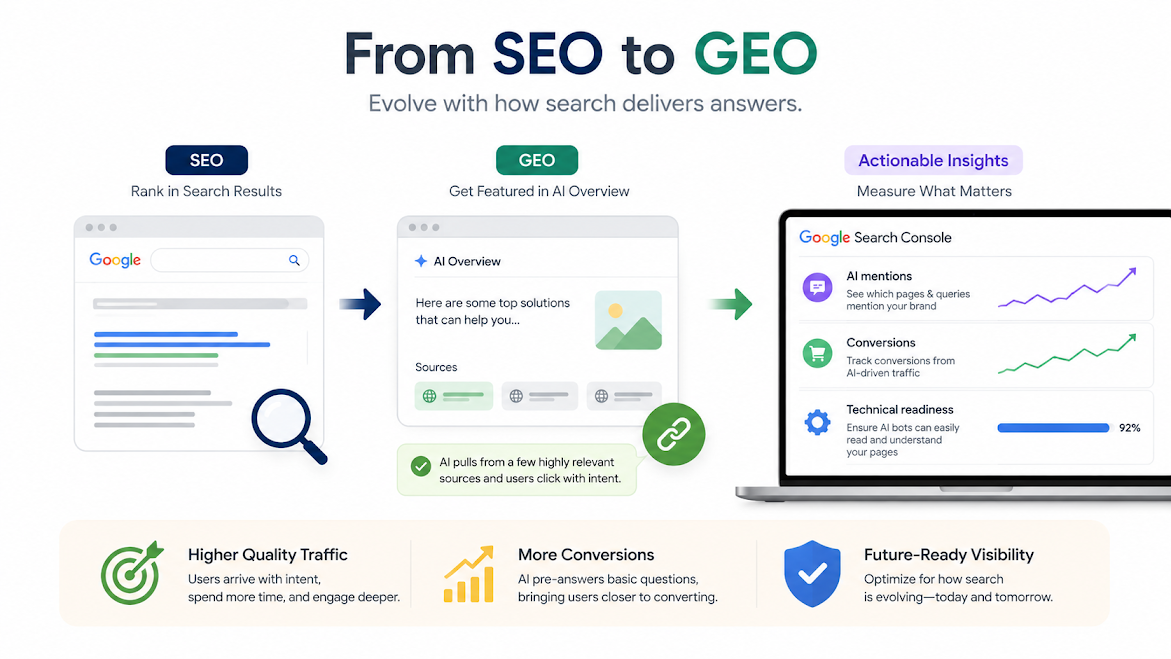
This update marks a permanent transition from classic Search Engine Optimization (SEO) to Generative Engine Optimization (GEO).
When Google summarizes an answer using AI, it pulls quotes and links from a few highly relevant websites. Early data shows that when users click a link inside an AI Overview, the traffic is significantly higher quality. These users are usually looking for specific solutions, spend more time on your pages, and convert faster because the AI has already answered their basic questions.
With native reporting inside Google Search Console, you can finally answer critical business questions:
- Which specific blog post is Google’s AI mentioning our brand?
- Are our conversions going up even if traditional click-through rates look different?
- What technical updates do we need to make so AI bots can easily read our pages?
How to Optimize Your Website for Google’s Generative AI
Now that Google provides data to measure AI search performance, your content strategy needs to adapt. Here is how to make sure your website shows up in these new reports:
Focus on Deep, Expert Content
Google’s AI rarely relies on a single website; it combines data from multiple trusted sources. Instead of writing short, superficial articles, build comprehensive “topic clusters”—groups of deeply detailed articles that cover a subject from every angle to prove you are an expert.
Write for Conversational Search Intent
People talk to AI assistants differently from how they type into traditional search bars. AI searches are often long, conversational questions. Structure your content to answer multi-layered, complex problems clearly and directly.
Structure Data for Easy Reading
Clear headings, bulleted lists, and structured schema markup (like FAQ or Product schema) make it incredibly easy for AI models to scan, extract, and cite your content. Clear formatting helps the AI bot understand your site faster.
Prioritize High-Intent, Authoritative Copy
Back up your claims with real data, original research, and clear author bios. Google’s AI filters for highly trustworthy information to avoid making mistakes, meaning your site needs to clearly showcase real-world experience.
Want to turn your AI search data into revenue?
Deftsoft can help you analyze your new Search Console metrics and design a data-driven strategy to scale your digital footprint.
FAQs
Where can I find the new Generative AI report in Search Console?
The report is located on the left-hand navigation sidebar inside Google Search Console. Look under the primary Performance dropdown menu, where a dedicated tab labeled Generative AI will appear once the feature rolls out to your region.
Does turning off AI crawling affect my normal organic rankings?
No. Google’s new publisher visibility toggles allow you to opt out of generative AI summaries and conversational answers without penalizing your traditional, standard blue-link rankings on the main search engine results page.
What metrics are available in the Generative AI report?
The report tracks the same core performance indicators as standard search reporting. This includes Total Clicks, Total Impressions, Average Click-Through Rate (CTR), and Average Position, all of which are filterable by page URL, country, and device type.
Why did Google create a separate tab for Generative AI performance?
Generative search interfaces change how users interact with websites. By isolating this data from standard search, Google allows webmasters to accurately track user behavioral differences, citation value, and traffic patterns unique to AI experiences.
How can I get my website cited in Google’s generative answers?
To increase your visibility, prioritize high-quality schema markup, natural language processing formatting, direct answers to long-tail queries, and deep topical authority backed by clear expert credentials.
Is traffic from AI Overviews better than traditional search traffic?
Early data suggest that users who click links within AI-generated summaries often have higher purchase intent. Because the AI has already answered their foundational questions, visitors landing on your site are typically further along in the buying journey.






Devraj
 3rd June 2026